
Approvals for your team and your clients
In Maeve you can set rules for what needs approving and who approves it. Content then works its way through your team and out to your client, and nothing publishes until everyone has said yes.
Set the rules once
A workflow says what needs approving and who approves it. Match on the channel, the label, the post type, whoever made it, or the campaign it belongs to.
Mark it required and nothing it matches can go out without the review. Mark it suggested and it is filled in for whoever sends the post, who can still change it.

Settings, approvals
Workflows
- 01The InternRequiredTeam, Jared.Runs for creator authors.Edit
- 02Summer CampaignRequiredTeam, Jared, then client, Lily.Runs for label Summer Campaign.Edit
- —Everything elseAny content the workflows above do not pick up ends up here. Right now it needs no approval, so anyone who can schedule it can publish it.Require approval
Everyone sees what is theirs to do
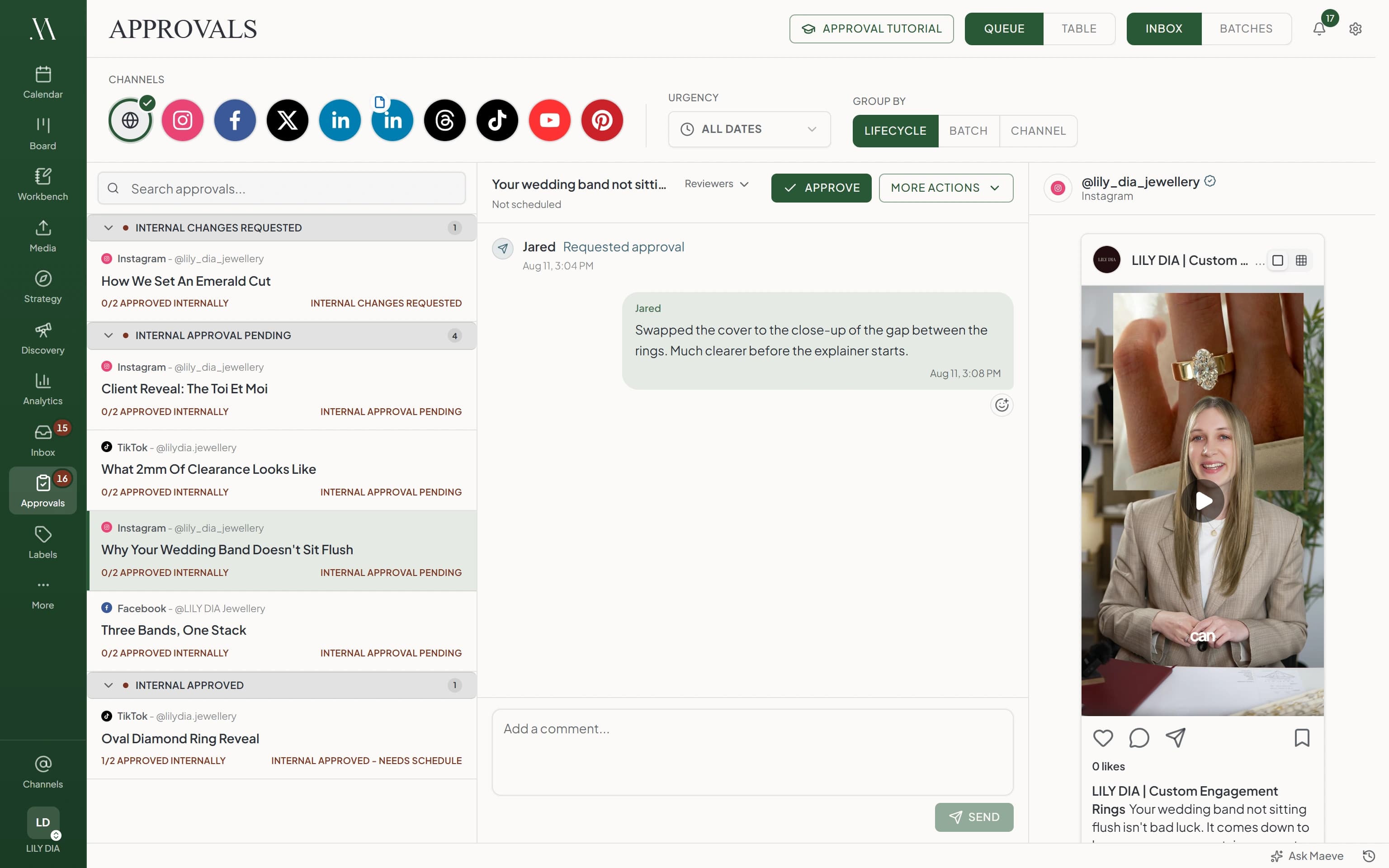
The approvals list splits into what is waiting on you, what is with someone else, and what is done.
Each row says which stage it is on and who it is waiting for, so nobody has to ask where a post got stuck.

Approvals
InboxReviewsWhy your wedding band doesn't sit flush
What 2mm of clearance looks like
Client reveal: the Toi et Moi
Three bands, one stack
How we set an emerald cut
Approve it, or say what needs changing
Two buttons. Approve moves it to the next stage. Request changes sends it back to whoever made it with your note attached.
Everything that happens is written down underneath: who approved, who asked for what, and when. A manager can override a stuck review, and the reason is there for everyone to see.

Why your wedding band doesn't sit flush
Samapproved version 321 Sept, 9:12 am
Jaredshared version 321 Sept, 8:40 am
Samrequested changes20 Sept, 4:05 pm
“Swap the cover to the close-up of the gap between the rings.”
See exactly what changed
When a new version comes back, you do not have to reread the whole thing. Maeve shows you what moved, word by word.
Moving only the publish time keeps the approvals you already have, so a reschedule does not send everyone round again.
What changed
Version 3, 21 Sept, 8:40 amCaption
Your wedding band not sitting flush isn't bad luck. It comes down to the setting. It comes down to the profile of the engagement ring beside it. Here is what to ask your jeweller before you buy.
Media
Media edits
Cover changed, Crop changed
Post type
FeedReel
Schedule
Moved from 22 Sept, 9:00 am to 24 Sept, 9:00 am. Approvals stay valid when only the time moves.
Your client just clicks a link
Add a client stage and they get an email with a link. No account, no password, nothing to set up at their end.
They see the posts waiting on them, approve or ask for a change, and your team gets told. They never see anything you said to each other.
maevesocial.com/reviews
September content review
“The two ring reveals are the priority, the rest can wait.”
Needs your review
- @lily_dia_jewellery#1Needs your review
Client reveal: the Toi et Moi
26 Sept, 9:00 am
- @lilydia.jewellery#2Needs your review
What 2mm of clearance looks like
27 Sept, 5:00 pm
Everything else
- @lily_dia_jewellery#3Approved
How we set an emerald cut
22 Sept, 9:00 am
Jessrequested changes24 Sept, 11:02 am
“Can we try the cover on the knit sleeve?”
Renshared version 224 Sept, 4:10 pm
Ren
Swapped the cover and moved the price onto the second line.
24 Sept, 4:11 pm
Jess
Much better. Happy with this one.
25 Sept, 8:40 am
Message everyone in the review…
Questions
What are approvals in Maeve?
A way to make sure content is checked before it goes out. Content goes through a review made of stages, each one either your team or your client, and it cannot publish until every stage has said yes.
Do I have to set this up on every post?
No. Build a workflow once and Maeve picks it up for you. Workflows are checked from the top and the first one that matches runs, so you can say client content always gets two stages while stories only need one.
Can I make a review compulsory?
Yes. A required workflow cannot be changed on the post, so nothing it matches can be scheduled or published until the review is done. A suggested workflow fills itself in and can be changed by whoever is sending it.
Does one person approve, or everyone?
Both work, per stage. Any one approves, everyone approves, or everyone approves in order when the sequence matters.
What happens if someone is not happy with it?
They request changes and write what needs changing. The content goes back to whoever made it, publishing pauses, and the review starts again from the first stage when a new version is shared. There is no reject button.
How do reviewers see what changed?
Every new version drops a what changed card into the thread. The caption is diffed word by word, and media, post type and schedule changes are listed. Moving only the time keeps the approvals valid.
What does my client have to do?
Open the link in their email. No account, no password. They see the posts shared with them, approve or request changes, and can leave a note. They never see your internal messages.
Can someone push a post through in a hurry?
A manager can override an item, which approves it and skips every remaining stage. The reason is required and everyone in the review can see it.
Do people get chased automatically?
Each stage can send a reminder after a set number of days, and you can send one by hand at any point. A review can also have a closing time, after which it closes on its own.
Where is the record of who approved what?
On the content itself. The thread holds every approval, every request for changes, every version shared and every override, with the reasons and the times.
Who can do what?
Managers and editors can send a review to a client and decide on one. Creators can ask their team for a review and decide. Only managers can override. Viewers can read.
How is this different from client reviews?
It is the same thing. A client stage is how your client gets involved, as part of the same review your team is working through.
Which plans include approvals?
Standard and Premium. Team and client review workflows are on the Standard plan and above, and the pricing page has the comparison.