
Social media scheduler for Instagram
Schedule Instagram posts, Reels, Stories and carousels from one screen. Pick the media, write the caption, set the Reel cover, decide whether the hashtags go in a first comment, and see how the grid will look once the new post sits next to the last nine. A video that is too long for a Reel gets caught while you are still in the editor rather than failing at 7am.
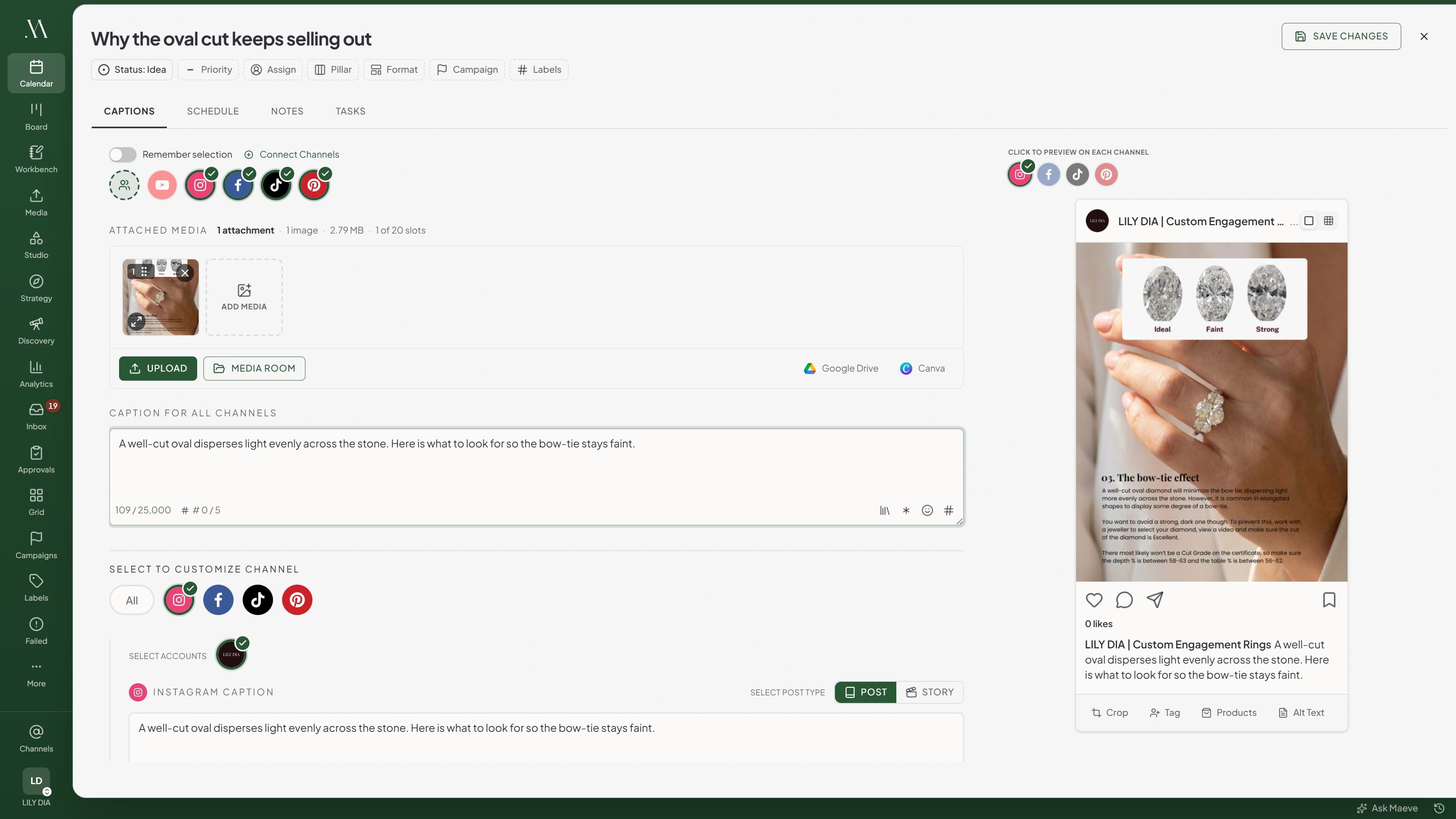
The formats, without the workarounds
Feed posts carry images or video with alt text and tags. Attach more than one item, up to ten, and it becomes a carousel in the order you set, and you can mix images and video in the same one. Stories publish as Stories, and the composer disables the caption box because Instagram never uses it there.
Stories are where most schedulers make you build six separate posts for six frames. Here they go on one Story post and Maeve splits them into separate Stories a second apart, each one queued once the last has published so the order holds. That Reels-and-Stories focus is why it works as a scheduler built for creators rather than only brand pages.

Post type: Story
Media for Instagram
3 of 10 selected- 1Shopfront
- 2Back room
- 3Closing up
- Story 1 of 3Shopfront9:00:00
- Story 2 of 3Back room9:00:01
- Story 3 of 3Closing up9:00:02
Reel settings the app would give you
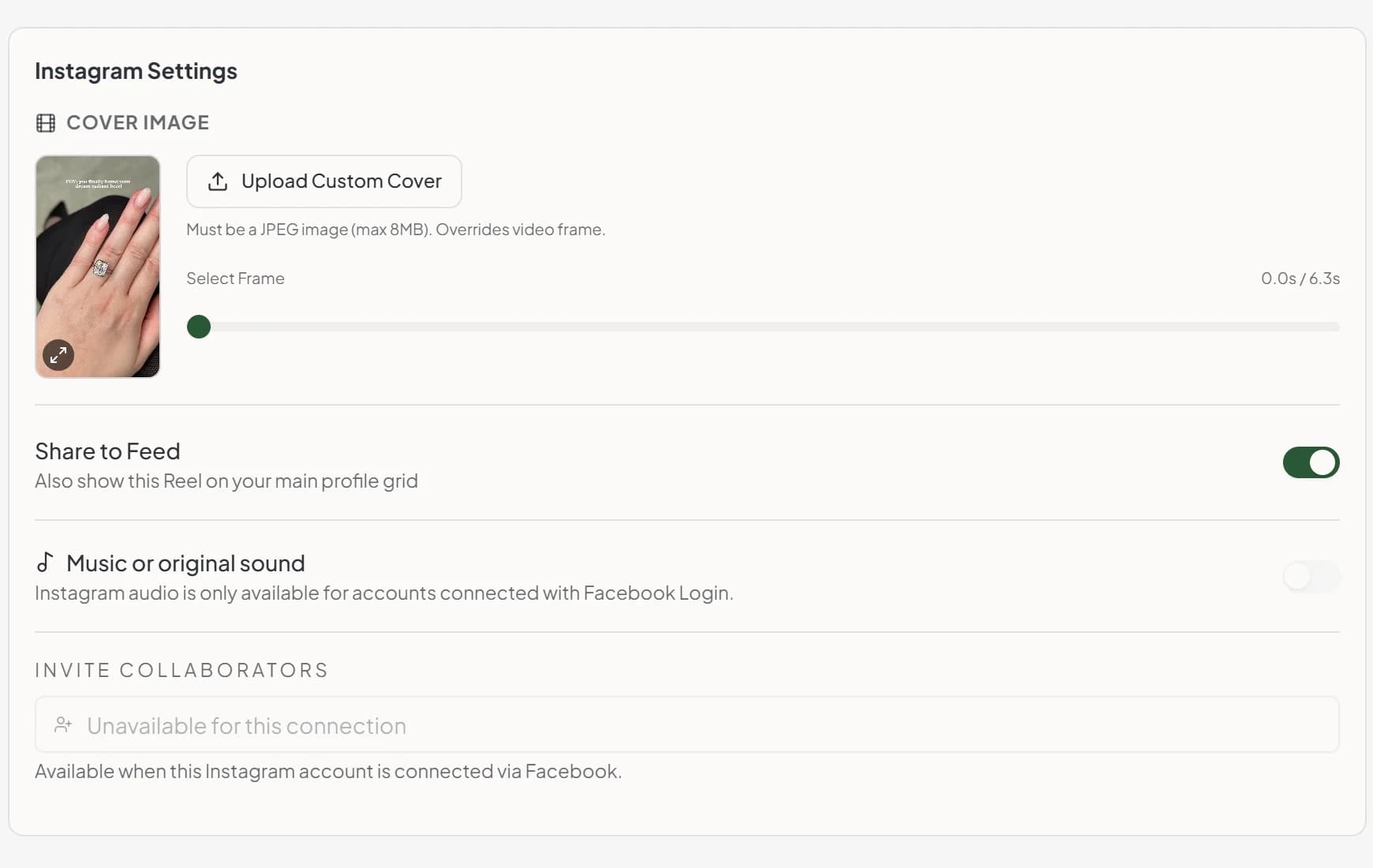
Attach a video and the Instagram settings open up. Upload your own cover or drag the slider to pick a frame from the video itself, choose whether the Reel also shows on your profile grid, add a track from Instagram's library or an original sound and balance it against the video's own audio, and add collaborators so it lands on both accounts.
Trial reels are here too, for testing something on non-followers first. Turning one on hides the share-to-feed switch, because Instagram doesn't use it there.
The panel is honest about what your connection supports. Music and collaborators need Facebook Login, and on a direct Instagram connection the composer shows the control and tells you why it's off rather than failing at publish time.
See the feed before you post to it
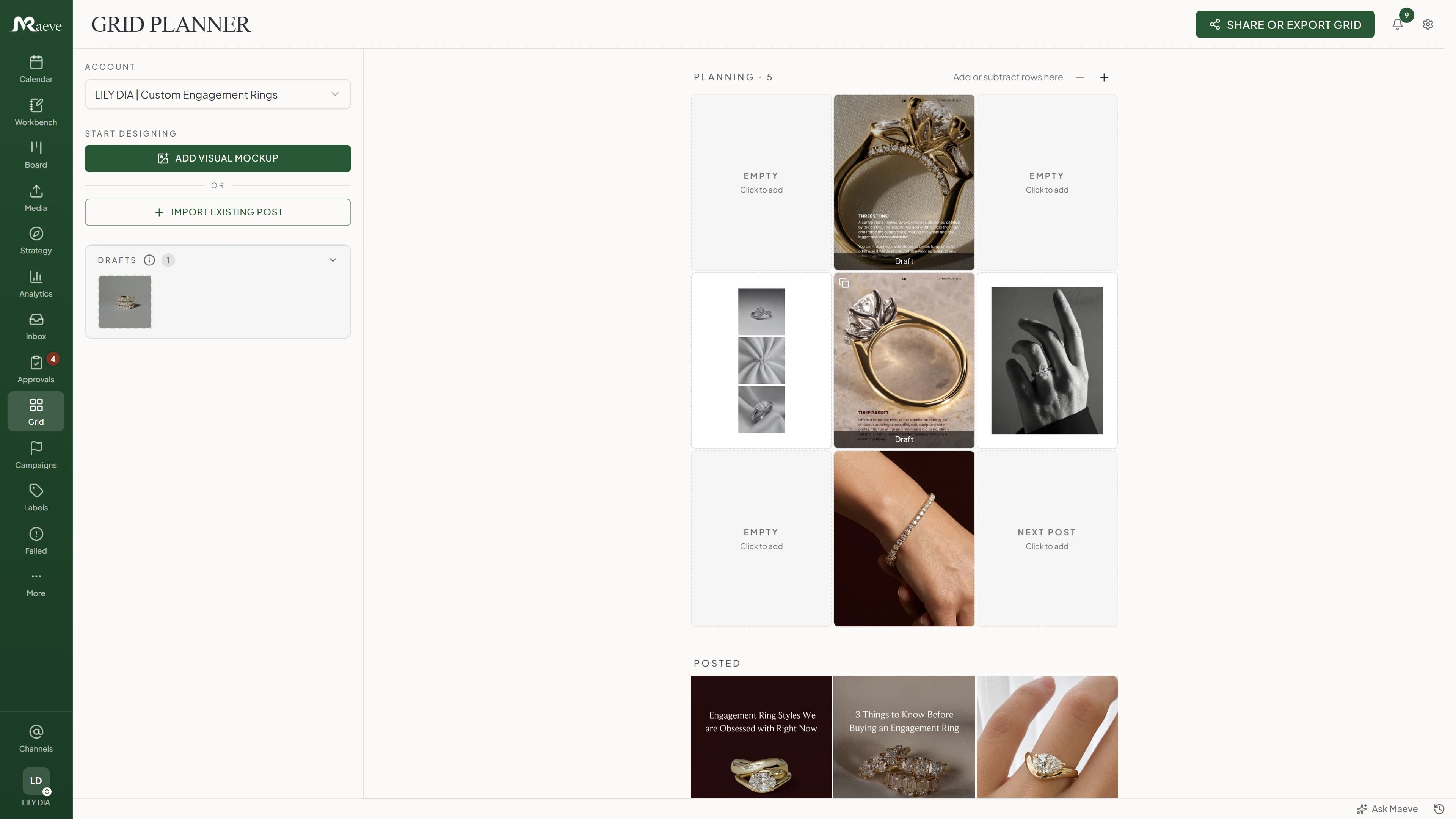
When the look of the profile matters as much as the posts in it, the grid planner lays it out three wide. Every tile is a real post or a mockup you are still shaping, so you can drag them into the order you want and promote a mockup straight into a scheduled post.
Your last 27 published posts sit directly underneath, so you are judging the new row against the real feed rather than against nothing.
Two ways to connect, and what each one gives you
Instagram has to be a Business or Creator account either way. Connect through Facebook if it sits on a Facebook Page, and connect Instagram directly if it does not.
Both publish posts, Reels, Stories and carousels, and both get analytics, comments and DMs. What Facebook Login adds is collaborator tags, product tags, Reel music, deleting a published post from Instagram, mentions in the inbox and liking a comment from it. The composer tells you which of those you have rather than letting you find out at publish time.
Worth knowing before you count your plan's connections: an Instagram account and its Facebook Page are two separate channels, so they use two.

Instagram Settings
- Cover ImageMust be a JPEG image (max 8MB). Overrides video frame.Upload Custom Cover
- Share to FeedAlso show this Reel on your main profile grid
- Trial reelYou must have 1000 followers
- Music or original soundAdd a track to your Reel.
See what actually reached people
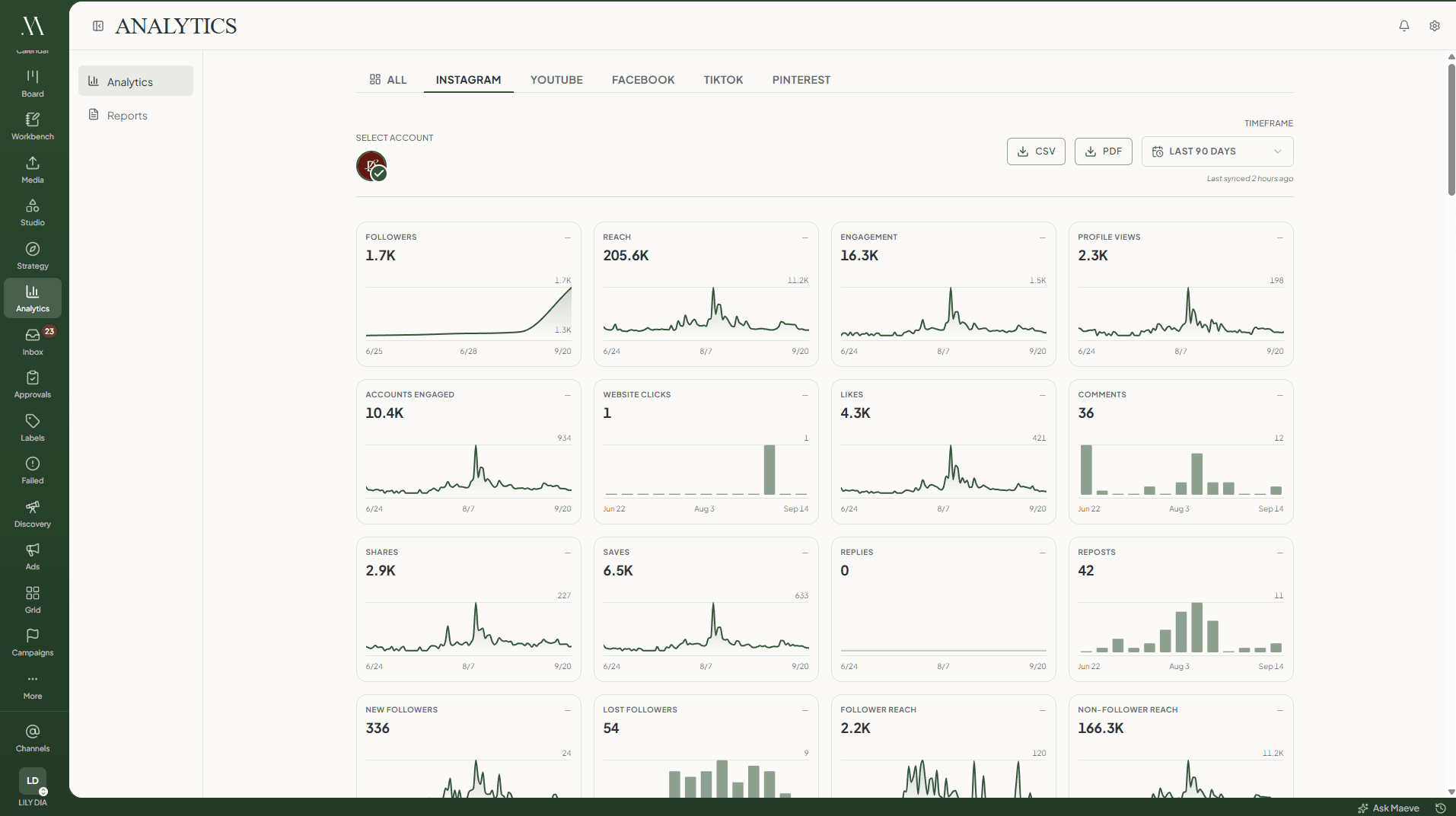
Reach, profile views, engagement, saves, follower movement and a sortable table of every post's numbers. Reach splits into followers and people who do not follow you, follows and unfollows are counted separately rather than netted off, and Reels bring their own numbers: average watch time, total view time and skip rate.
Audience demographics come straight from Instagram by age, gender, city and country, for your followers and for the people who engaged recently. There is a heatmap of when your posts actually landed, and the month exports as a branded PDF when a client wants it on paper.
Analytics work on both connection types. A handful of ads-inclusive totals are the exception, because Instagram's direct API does not serve them.
The replies come back to the post
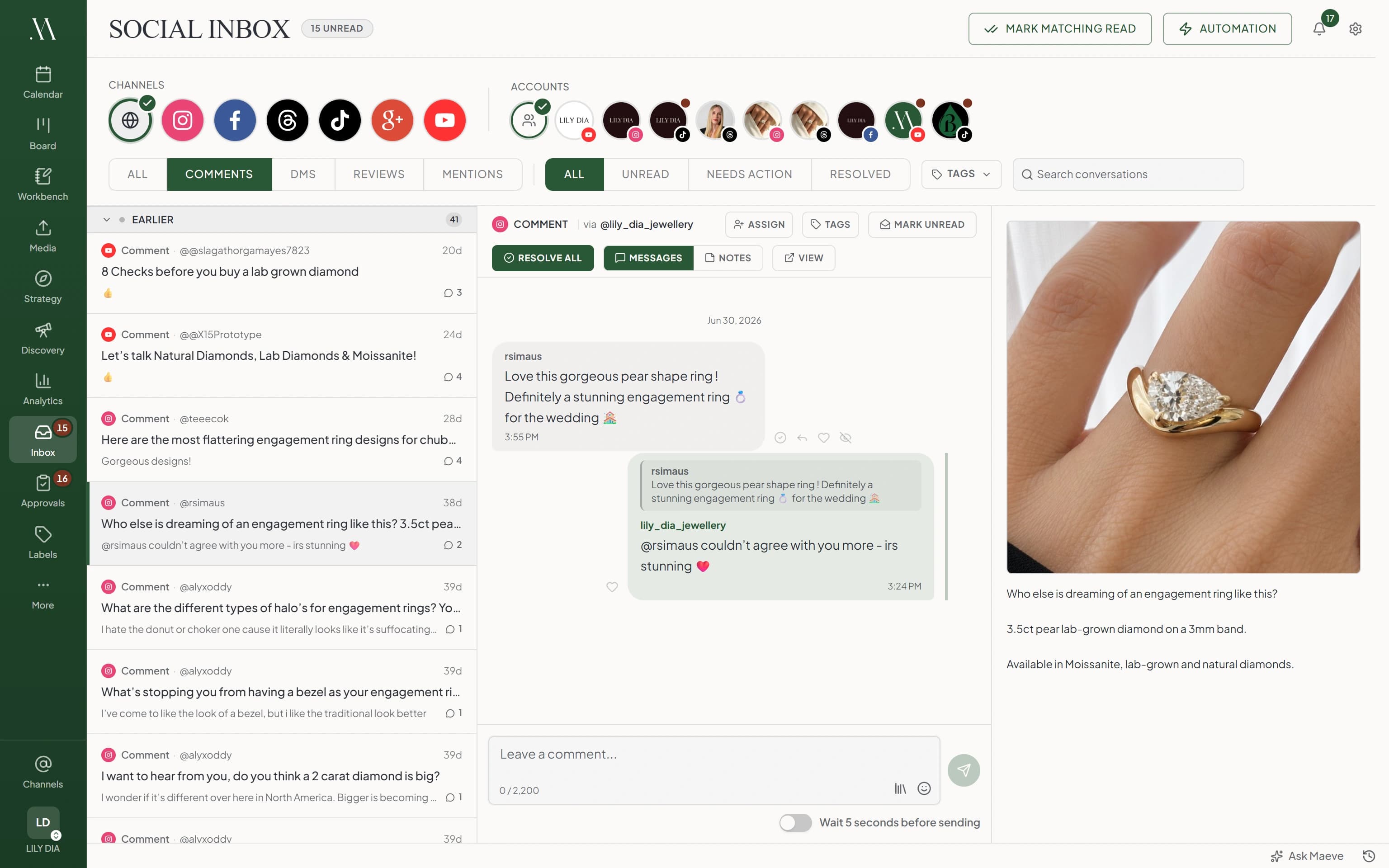
Publishing is not the end of the Instagram workflow. Comments and DMs flow into the Social Inbox with the original post beside the thread, so the reply has its context without a trip back through the calendar. Assign the conversation, tag it, leave an internal note, and resolve it when the work is actually done.
What the Instagram scheduler does
From the media-first composer through publish, recovery, and the reply, each piece built around how Instagram actually behaves.
One clip rarely stays one post
The Reel goes out, then the TikTok, then the LinkedIn update. Each platform keeps its own caption and settings under one campaign, so nothing gets redone from scratch.
The limits, before you hit them
Instagram's own rules, checked in the editor rather than at publish time. An API or CLI submission skips the editor, so those land at Meta instead.
Questions
What can Maeve schedule on Instagram?
Maeve schedules Instagram feed posts, carousels, Reels, and Stories. Instagram requires media, so each scheduled Instagram item needs at least one image or video. Feed posts, carousels, Reels, and Stories publish through the Instagram provider when the connected account and Meta API permissions allow it.
Is this a scheduler or a planner?
Both, but the scheduler is the core. You can schedule Instagram posts, Reels, Stories, and carousels, then use the grid preview, calendar, media library, per-platform caption editor, first comment, tags, and recovery tools around that publishing workflow.
Can I schedule Reels?
Yes. Attach a video and the Reel settings open up: upload your own cover or drag a slider to pick a frame from the video, and choose whether it also shows on your profile grid. Reels run 3 seconds to 15 minutes, up to 300MB, as MP4 or MOV. Trial reels are supported too, and turning one on hides the share-to-feed option because Instagram does not use it there.
Can I add music to a scheduled Reel?
Yes, on accounts connected through Facebook Login, for a Reel with a single video. Search Instagram's music library or original sounds, attach the track, and balance it against the video's own audio with two sliders. On a direct Instagram connection the composer shows the option and tells you why it is unavailable rather than hiding it.
Can I schedule Stories?
Yes. Attach several media items to one Story and Maeve splits them into separate Stories a second apart, each one queued only once the last has published, so the order holds. Captions and first comments are not used on Stories, so the composer disables the caption box. Story video runs 3 to 60 seconds and has to be 9:16 or taller.
Can I schedule carousels?
Yes. A carousel is just a feed post with more than one item attached, up to ten, and you can mix images and video in the same one. Maeve keeps the order you set and previews it as a carousel before it goes. To cut one wide photo into slides that line up as people swipe, use the free Instagram carousel splitter first.
Can I schedule the first comment?
Yes, on feed posts and Reels, up to 2,196 characters. It is posted straight after the post goes live. If Instagram takes the post but refuses the comment, the post still counts as published and the comment failure is logged rather than holding the whole thing up.
Can I save the hashtags I always use?
Yes. Drop a saved group into the main caption, the Instagram caption or the first comment. Worth knowing: the composer holds Instagram captions to five hashtags and tells you how many over you are, so a long evergreen set is one for the first comment.
Can I post from my media library?
Yes. You can choose Instagram media from Media Room, organize assets with folders and labels, reuse saved media, and keep platform-specific media handling attached to the post. Google Drive import is also available in the media picker where it is configured.
Do I need a Business or Creator account?
Yes, Business or Creator. A personal account has to be switched over first. Facebook Login is for accounts linked to a Facebook Page and Instagram Login is for accounts that are not. Publishing, analytics, comments and DMs work on both. Facebook Login is what adds collaborator tags, product tags, Reel music, deleting a published post from Instagram, inbox mentions and comment likes.
Does the grid planner publish posts?
The grid planner helps you see how scheduled and upcoming Instagram content will look before it goes live. Publishing still happens through the scheduler. For feed layout work, use the grid view and Instagram grid planner together with the normal calendar.
Can I tag people, products and collaborators?
On feed posts you can tag people in an image and tag products, and you can add collaborators to a feed post or a Reel. Tags work on a single image and on each image in a carousel, but not on Reels or Stories. Location tagging is not available on either connection type today. Product tags need Facebook Login plus catalog permissions from Meta.
Can I set up a collaborative post?
Yes, up to five, on feed posts and Reels but not Stories. You type the exact username rather than searching, and it goes out as a co-authored post when Instagram accepts it. Collaborators need Facebook Login.
Can I see it before it publishes?
Yes. Maeve shows an Instagram preview of the post, carousel, or Reel cover the way it will read in the feed, plus the grid planner so you can see how the new post sits next to the ones already up, before anything goes live.
Can I manage more than one Instagram account?
Yes. Connect several Instagram accounts, see them all in one calendar, schedule each one with its own caption and media, and reply to comments and DMs across them from one Social Inbox. How many social connections you get depends on the plan.
Do Instagram comments and DMs come into Maeve?
Yes, on both connection types. Instagram comments and DMs land in the Social Inbox next to Facebook comments, DMs, reviews and mentions, Threads and YouTube and TikTok comments, and Google Business Profile reviews. Mentions and liking a comment need Facebook Login.
Can I schedule Instagram alongside my other accounts?
Yes. Maeve is built for multi-platform publishing across Instagram, TikTok, YouTube, LinkedIn, Threads, Facebook, Pinterest, and X. Instagram can still keep its own caption, media choices, first comment, and publishing options.
What happens if a post does not go out?
Failed Post Recovery applies to Instagram. Maeve auto-retries temporary publish failures, classifies common failures in plain English, blocks retry when the account needs reauth, and gives you a one-tap Retry action when the post can be replayed.