Social Media Management
For Marketing Agencies

Five Clients, Eight Platforms, One Login That Keeps Them Apart.

The bakery is launching on Thursday, the fitness studio wants Reels by Wednesday, the skincare brand keeps emailing about Threads, and somewhere in all of that you nearly posted one client's content to another client's account. In Maeve every client is its own workspace with its own calendar, drafts, connected accounts, labels, and analytics, and you move between them from one sidebar. Click into the wrong client and the calendar is empty, because none of it is shared. The rest of the management platform is in there too, scoped to whichever client you are standing in.

3 days free. Cancel anytime.

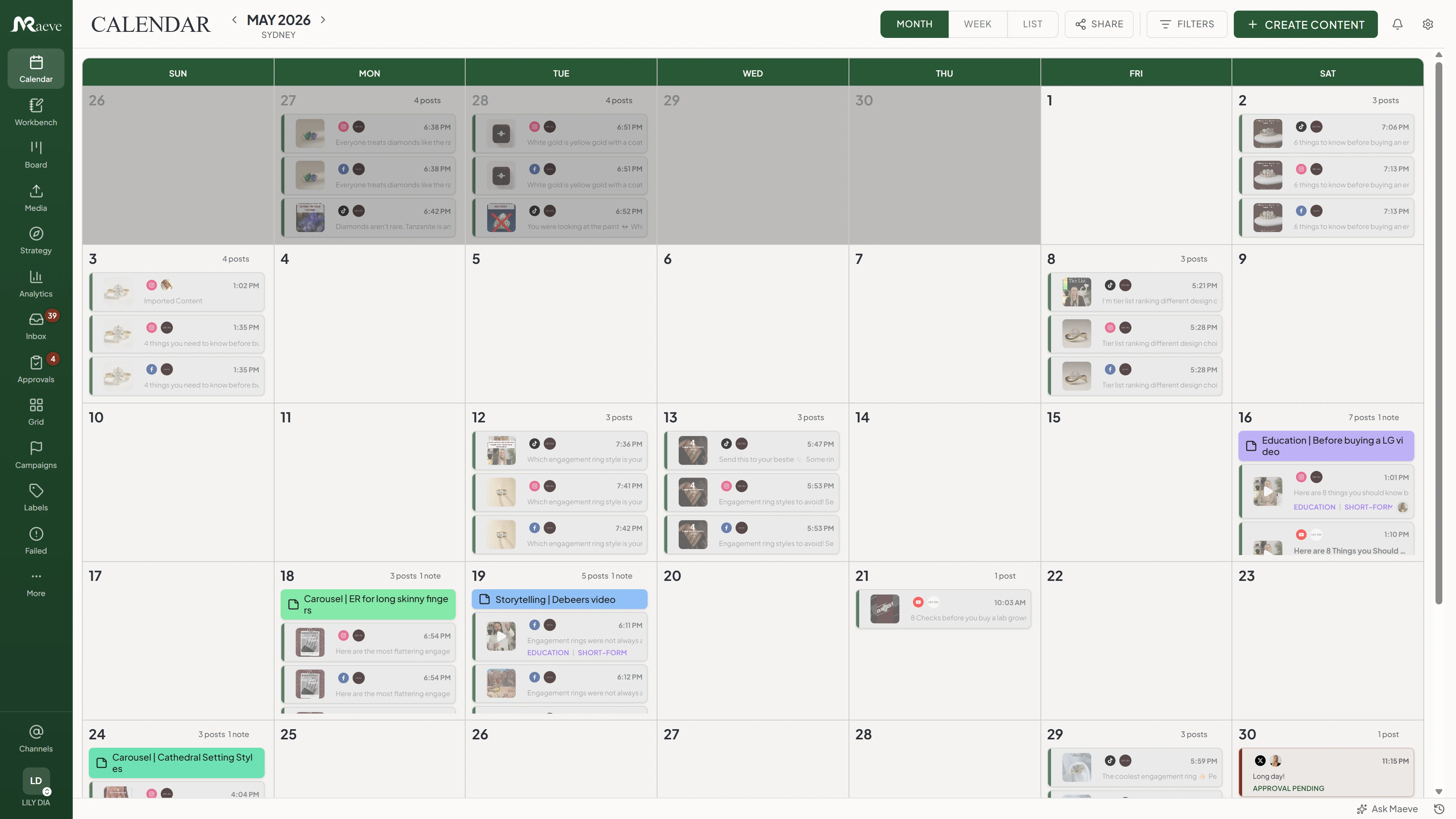
One client's calendar in Maeve, in month view, with each day stacked with scheduled posts color-coded by status and platform

One Workspace Per Client, And Nothing Crosses Over

Every workspace looks the same from the sidebar, so switching clients takes a second and you stop thinking about it. Underneath, each one is separate: the bakery's Instagram, the skincare brand's Reels, and the studio's TikToks never share a calendar, a draft, a media library, a label, or a row of analytics.

Roles are set inside each workspace rather than across your whole account, so the same freelancer can be a manager on one client, an editor on another, and view-only on a third. The four roles are manager, editor, creator, and viewer, and the labels, pillars, formats, and hashtag groups belong to one client as well, so renaming the bakery's launch label leaves everyone else's alone.

Your Team Signs Off Before The Client Ever Sees It

When you request review on a post you choose the path it takes: internal only, straight to the client, or internal first and then the client. You also choose how the sign-off works, whether any one approver is enough, everyone has to approve, or people approve in a set order, which is the difference between a strategist glancing at a caption and a regulated client that needs three names on it.

A post waiting on review is locked, and if someone edits an approved post the approval resets, so the version the client signed off on is the version that publishes.

Maeve approvals view with an internal approval thread beside the post preview

Pick The Path Before You Send It

The Request Review dialog is where the routing is decided: which path the post takes, who the approvers are, what the policy is, and which client batch it joins. Set it once for a client and the rest of the month follows the same route.

Maeve Request Review dialog with Internal, Client, and Internal plus Client paths, an approval policy of any-one, all-must, or approve-in-order, an approver list, batch selection, and client policy

Getting a client to approve a week of posts usually means a PDF, a spreadsheet, or a thread of screenshots, and the feedback comes back as "the second one, the blue image, can we change the wording". Instead you send the batch as one link. They open it on their phone, scroll the posts as they will actually look, and approve, ask for changes, or comment on the post itself.

There is no login, no seat to buy, and nothing else in your workspace is reachable from that link. You set how long it lives, you can resend it, and you can cancel the batch.

The Maeve client review link as the client sees it, with the batch name, four posts waiting on them, an approve all pending button, the caption, and approve and request changes buttons beside the Instagram preview

Know Who Has Actually Looked At It

The batches list is the honest answer to "has the client come back to us yet". Each batch shows what is approved, what needs changes, what is still pending, when the client last touched it, and when the link expires, and you can resend the link or cancel the batch from the same row rather than chasing it over email.

Maeve approvals batches list showing two active client reviews with approved, changes, and pending counts, last client activity, an expiry date, and resend link and cancel batch buttons

Connect Their Accounts Without Asking For A Password

Onboarding a client normally involves a password over email, a screen share, or a two-factor code read out over the phone. Instead you generate a connection link inside their workspace, choose which platforms it should offer, and send it. They tap through the platform login screens themselves, and the accounts appear in your sidebar ready to publish against.

The link expires on its own, you can revoke it early, and the panel logs each attempt, so if a client says they connected Instagram and it is not there, you can see whether the authorization failed or was never finished.

A Report The Client Can Read In Two Minutes

Every connected account is tracked from the day it is connected, so the month is already sitting there when the client asks for it. Pick a date range, export, and the PDF comes out with your agency name on the cover, followed by engagement, reach, follower growth, and the posts that actually worked, and you can total several accounts of the same platform into one number.

Analytics covers the six platforms that report data back, which are Instagram, YouTube, Facebook, TikTok, Pinterest, and Threads. Audience demographics come through on Instagram, Facebook, and YouTube, because those are the ones that hand the data over.

Maeve analytics with the Export PDF Report panel open, showing a branded cover and a report preview

The Replies Come Back To The Post That Caused Them

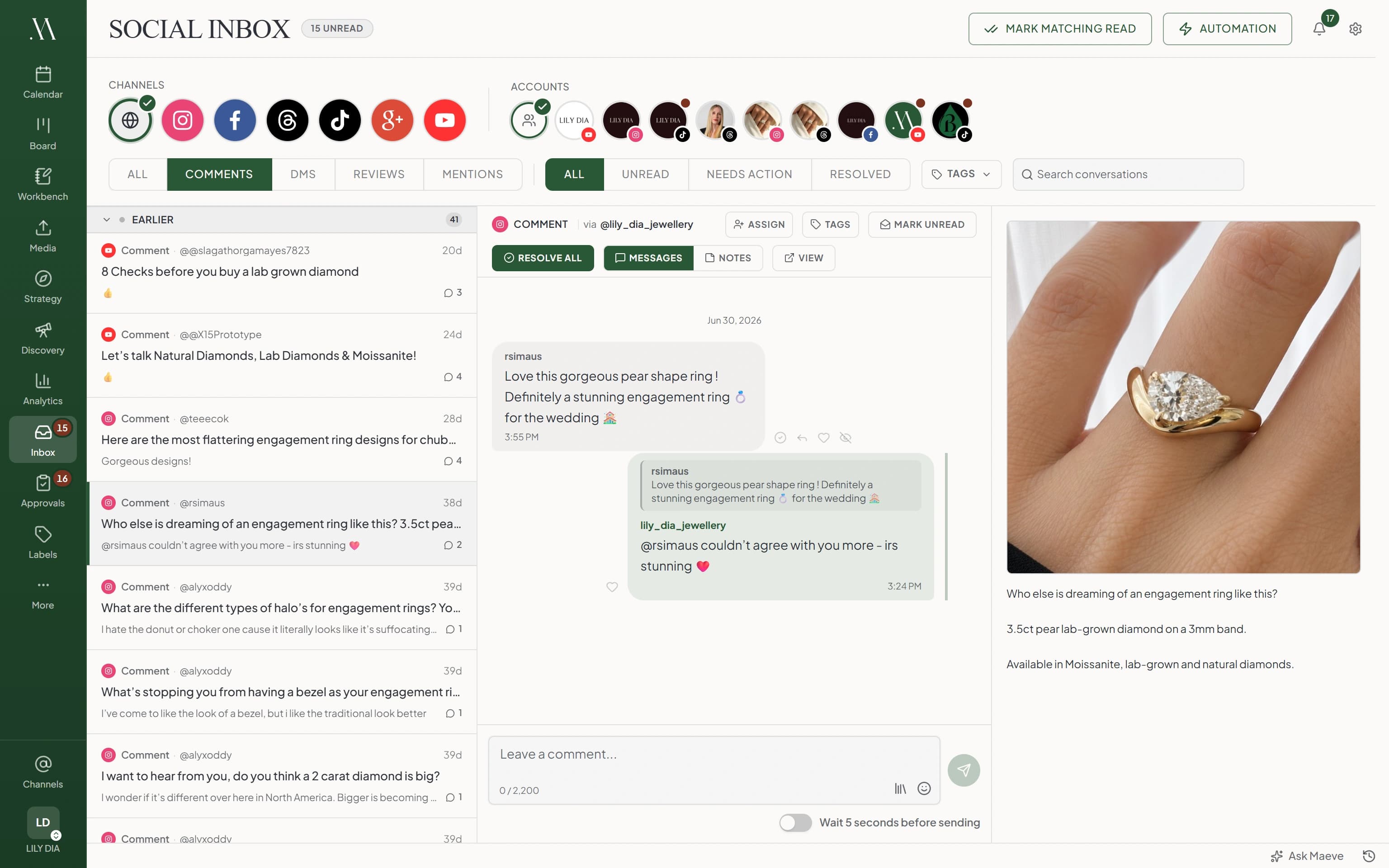
Comments and direct messages from Instagram, Facebook, and Threads land in one queue with the post beside the conversation, so whoever is on inbox duty can see what the customer is reacting to without going back through the calendar. Assign a conversation to a teammate, leave an internal note the customer cannot see, and resolve it when the client's question is actually answered.

An Instagram comment open in Maeve Social Inbox with the threaded brand reply, assignment and resolve controls, a reply composer, and the original post beside the conversation

When A Platform Says No On A Client Account

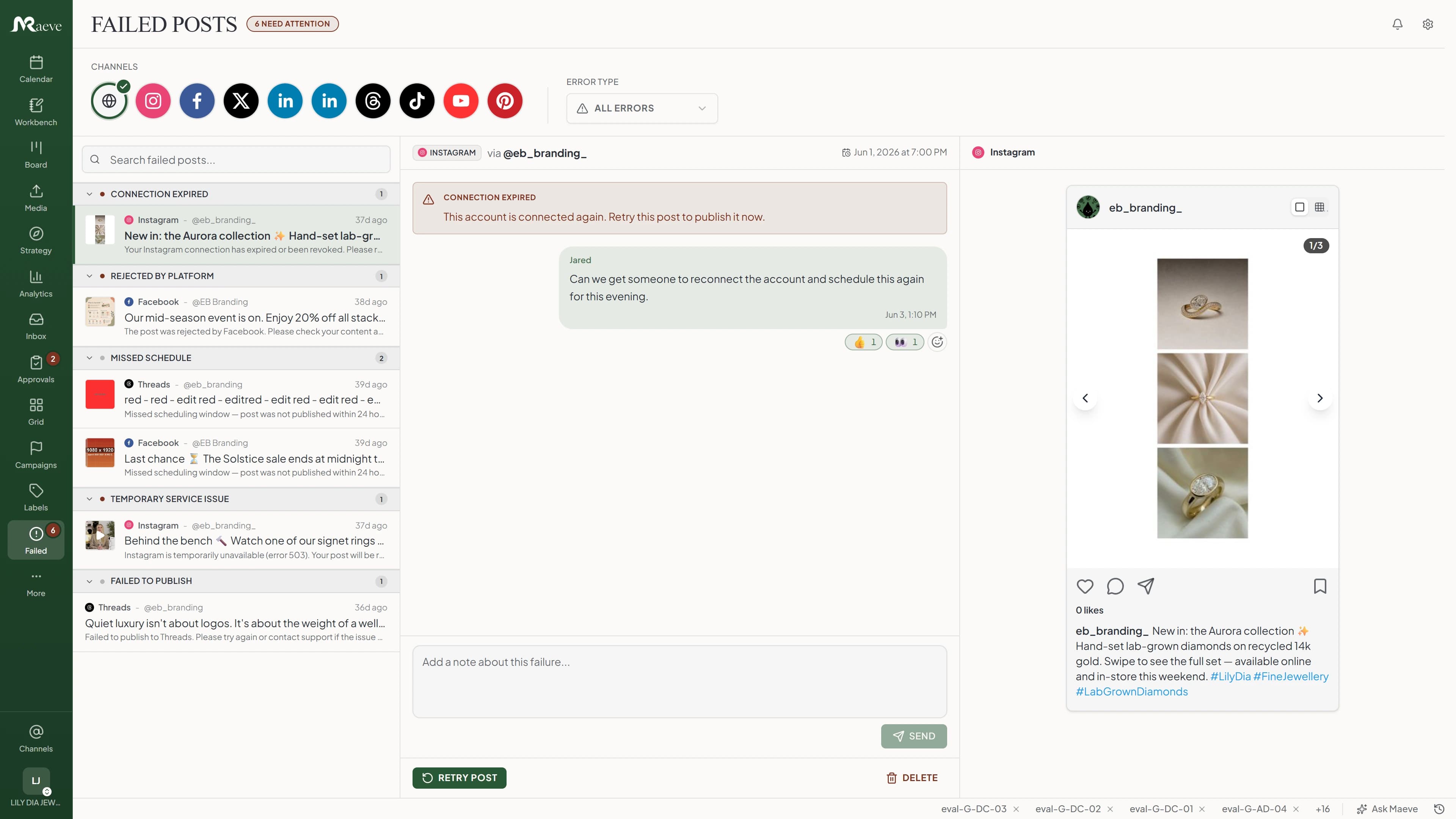
A post fails at 7am on the client's Instagram and you would rather hear it from Maeve than from the client. Temporary failures retry on their own, and anything that still will not publish is flagged in the sidebar straight away, with the platform's reason in plain words and the post ready to fix and requeue. If the account needs reconnecting, Maeve says so instead of retrying into the same wall.

Maeve failed-posts view with posts grouped by error type, an Instagram connection error with reconnect guidance, and the post preview

Point An AI Agent At One Client, Not All Of Them

If your team runs Claude, Codex, or Cursor, Maeve's MCP server lets an agent read the calendar, draft posts, schedule them, and pick up failures. The connection is granted the workspaces you choose, so an agent helping the bakery cannot read the skincare brand, writing needs an editor or admin role, and anything that publishes or deletes has to send an explicit confirmation before it runs. Every tool call is logged with who ran it and what it touched.

Everything In The Agency Workspace

The whole product, with the multi-client layer over the top of it.

A Workspace Per ClientEach client is its own workspace with its own calendar, drafts, connected accounts, media, labels, and analytics, and you switch between them from the sidebar on one login.
Roles Set Per WorkspaceManager, editor, creator, and viewer, assigned inside each client, so the same person can have a different level of access on every account you run.
Client Connection LinksSend a link, pick which platforms it offers, and the client authorizes their own accounts. The link expires, you can revoke it, and every attempt is logged.
Review PathsSend a post to internal review, client review, or internal and then client, with a policy of any one approver, all approvers, or approval in a set order.
Public Client Review LinksA week of drafts goes out as one link the client opens on their phone without an account, previewing each post the way it will publish.
Comments On The Post ItselfA reaction or a sentence comes back attached to the post it is about, so feedback is not spread across an email thread and a WhatsApp message.
Per-Platform ComposerWrite the caption once, then change it per platform, along with the media, crops, titles, threads, and first comments each network needs.
Media Room Per ClientImages, videos, and thumbnails in folders with labels, alt text, and a usage history showing which posts an asset is already in.
Labels, Pillars, And CampaignsEach workspace has its own labels, content pillars, formats, campaigns, and hashtag groups, and any of them can filter the calendar and the board.
Calendar, Board, And ListThe same posts as a month calendar, a kanban board, or a flat list, so building next week is drag-and-drop rather than a spreadsheet.
Eight-Platform PublishingInstagram, Facebook, LinkedIn, TikTok, YouTube, X, Pinterest, and Threads, with carousels, Reels, Stories, video Pins, Shorts, and threads where each one supports them.
Social InboxComments and direct messages from Instagram, Facebook, and Threads in one queue, with the post someone is reacting to beside the conversation and internal notes the customer cannot see.
PDF Client ReportsPick a date range, export, and the PDF carries a cover with your agency name, engagement, reach, follower growth, top posts, and demographics on Instagram, Facebook, and YouTube.
A View Across Every AccountAn All tab totals the numbers across the accounts in the workspace, so you can read the month without opening each platform one at a time.
Failed Post RecoveryA post that fails is flagged the moment it happens, with the platform's reason, the preview, and a retry once the cause is fixed. It will not retry into a wall when the account needs reconnecting.
AI Agents, ScopedAn MCP connection is granted the workspaces you pick, so an agent working on one client cannot read another, and anything that publishes or deletes needs an explicit confirmation.

The Platforms Your Clients Are On

All eight sit on the same calendar, and each one keeps its own caption, media, and posting options inside the post.

Connects To The Rest Of Maeve

The agency workspace is the same product the rest of Maeve runs on. A post moves from a brief to a draft to client review to the calendar to a report without ever leaving the workspace it belongs to.

Agency FAQ

Can I Run Several Clients Without Their Content Mixing?

Yes. Each client gets its own workspace, and the calendar, drafts, connected accounts, labels, and analytics all live inside it, and you switch between them from the sidebar on a single login. If you click into the wrong client the calendar is empty, because there is nothing of anyone else's in there.

Do Clients Need Accounts Or Paid Seats To Approve Content?

No. You send a batch of drafts as one link. The client opens it on their phone, scrolls through the posts the way they will look once published, and approves, requests changes, comments, or reacts. There is no login screen for them or for their team.

Can My Team Review Before The Client Sees It?

Yes. Set the post to internal and then client, and your team approves it first before the same draft moves into the client review batch, so the client only sees the version your account manager has already checked.

How Do I Connect A Client's Accounts Without Their Password?

You generate a connection link inside their workspace and send it over, choosing which platforms the link offers. They tap through the platform login screens on their own phone, and the connection lands in your sidebar ready to publish against. The link expires, you can revoke it, and no password ever changes hands.

Can A Team Member Be An Editor On One Client And View-Only On Another?

Yes. Roles are set per workspace, so the same person can be a manager on one client, an editor on the next, and a viewer on a third. The four roles are manager, editor, creator, and viewer.

Do Labels And Content Pillars Carry Across Clients?

No, and that is on purpose. Each workspace has its own labels, pillars, formats, and hashtag groups, so renaming one client's launch label leaves the others alone, and adding a pillar for one client does not show up in the rest.

Do I Get A PDF Report I Can Send To Clients?

Yes. Pick the date range and export a PDF with your agency name on the cover, engagement, reach, follower growth, and top posts, and audience demographics on Instagram, Facebook, and YouTube, which are the platforms that hand that data over. You can also total across several accounts of the same platform.

Which Platforms Can I Schedule To?

Eight: Instagram, Facebook, LinkedIn, TikTok, YouTube, X, Pinterest, and Threads, with carousels, Reels, Stories, video Pins, Shorts, and threads where the platform supports them.

Can I Point An AI Agent At One Specific Client?

Yes. An MCP connection is granted access to the workspaces you choose, so an agent working in one client's workspace cannot read another. Reading is open once you grant it, writing needs an editor or admin role, and anything that publishes or deletes has to send an explicit confirmation before it runs.

What Happens When A Post Fails On A Client Account?

It lands in the failed posts queue and is flagged in the sidebar as soon as it happens. You see what the platform said, fix the post or reconnect the account, pick a new time, and put it back in the queue, without raising a support ticket or losing the slot.

How Big Does The Agency Need To Be To Use This?

A freelancer with a couple of clients can run on Basic. The agency-shaped features, which are team roles, internal approvals, and client review workflows, sit on Standard, and Premium removes the workspace and connection caps. The pricing page has the current numbers.

Does The Inbox Cover The Same Platforms As Scheduling?

Not yet. Comments and direct messages come in from Instagram, Facebook, and Threads today, with the post they are reacting to beside the conversation. The other five platforms publish through Maeve, and their replies still live in their own apps.

Free Tools For The Work Before The Calendar Fills Up

These are free and you do not need an account to use them.

Built by two founders who run their own brands on it

Done by five