
Social media scheduler for LinkedIn
Schedule LinkedIn posts with a caption written for LinkedIn rather than pasted in from somewhere else. Add an image, up to ten of them, a video, or just the link, and give it a time. Posting once or twice a week works. Doing it live every Tuesday morning is what falls over. If someone needs to sign off first, it goes through review before the publish time locks in.
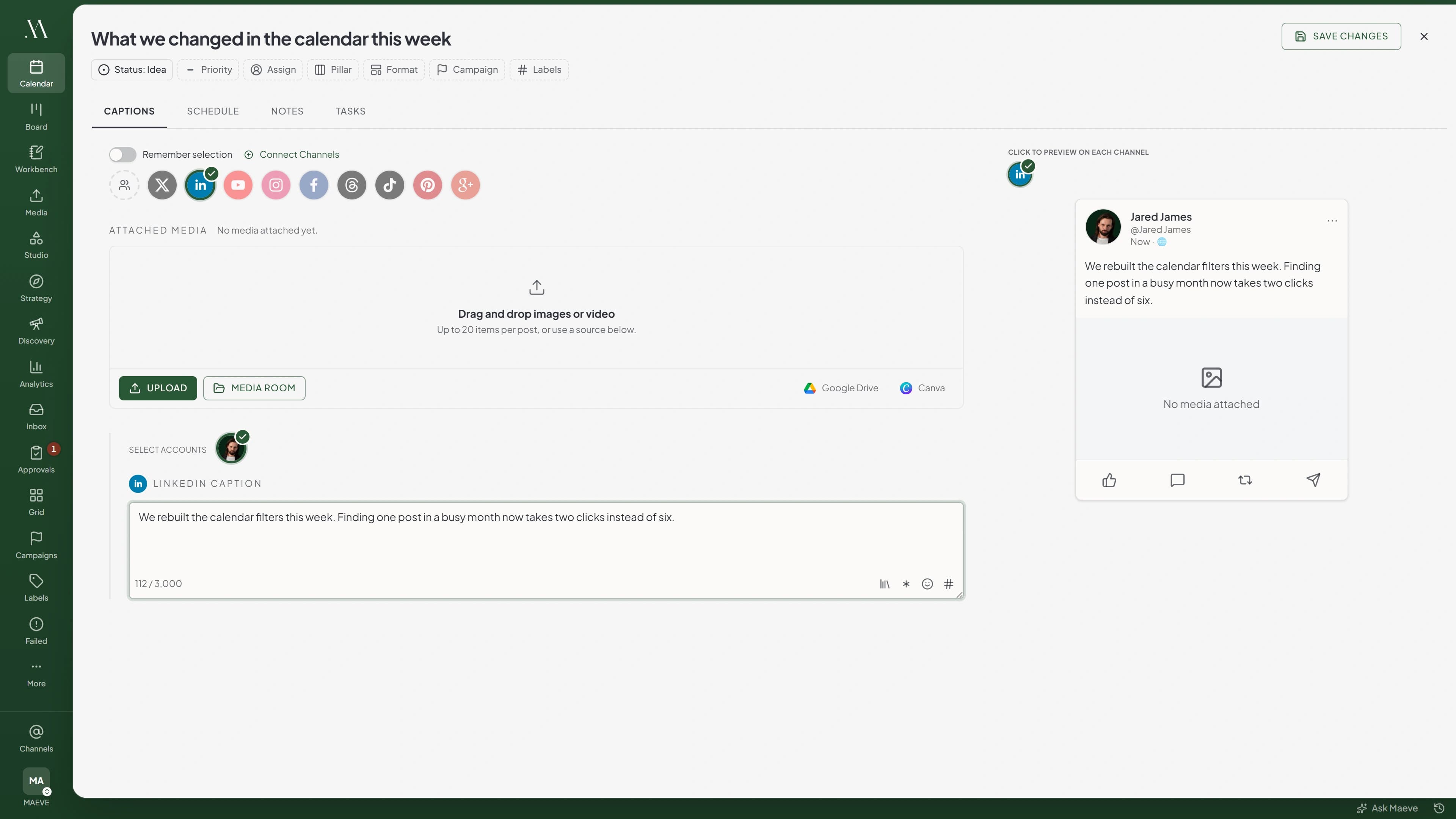
The formats LinkedIn actually posts
Text on its own, where the writing carries the whole thing. LinkedIn is one of the few networks that will take a post with no media at all. Drop a URL into a caption with no media and it goes out as a link share instead, with the preview attached.
Or up to ten images in the order you set, each with its own alt text and cropped for the LinkedIn frame. Or one video. Not both, because LinkedIn will not mix images and video in the same post.
The LinkedIn caption is its own field, because the same announcement almost never sounds right pasted across platforms, and saved hashtag groups drop straight into it. There is no hashtag cap on LinkedIn.
It still goes through the same sign-off
A LinkedIn post is a post like any other here. It sits on the same calendar, carries the same labels, and where your workspace uses review it moves through internal approval or a client review against the real caption, media and publish time before any of it is locked in.
If it fails at publish, it lands in Failed Posts with LinkedIn's own reason and the action that clears it, rather than disappearing.
Rolling out: Pages, analytics and first comments
Three things are built and working, but they run on a newer LinkedIn app that we are still turning on one workspace at a time. Company Page publishing, LinkedIn analytics, and scheduling the first comment alongside the post.
A company Page connects separately from a profile and counts as its own channel. Analytics covers followers, impressions, engagement, reactions, comments and reposts, and a Page adds unique impressions and page views. Page analytics needs you to be an admin on the Page in LinkedIn, not just able to post to it.
Ask us to switch it on for your workspace and we will. Until then LinkedIn is profile publishing, and the Page option shows as coming soon in the connect screen rather than pretending otherwise.
What the LinkedIn scheduler does
A steady weekly presence without the babysitting. The caption, the media, the alt text, the approval and the publish time all live on one post.
The limits, before you hit them
LinkedIn's own rules, checked in the editor rather than at publish time.
Questions
What can Maeve schedule on LinkedIn?
Posts to your personal profile: text on its own, a link share, up to ten images, or one video. Text-only is fine, which is unusual, most networks insist on media. You get a LinkedIn-specific caption up to 3,000 characters, alt text on every image, and the post sits on the same calendar as everything else.
Can I post to a company Page?
It is built and we are turning it on workspace by workspace. A Page connects separately from a profile and counts as its own channel. Until it is enabled for you, the Page option shows as coming soon on the connect screen. Ask us and we will switch it on.
Do I get LinkedIn analytics?
It is part of the same rollout as Pages. When it is on you get followers, impressions, engagement, reactions, comments and reposts, and a Page adds unique impressions and page views. Page analytics needs you to be an admin on the Page in LinkedIn, not just someone who can post to it.
Can I schedule a first comment?
Also part of the rollout, because it needs the same newer LinkedIn permissions. When it is on, the first comment goes out straight after the post, up to 1,248 characters, which is where a long hashtag set belongs.
Can I write a LinkedIn-specific caption?
Yes. Start with the shared idea, then write the LinkedIn version on its own. The same announcement can be more considered on LinkedIn, shorter on Threads and more visual on Instagram without turning into three planning jobs.
Can I save the hashtags I always use?
Yes. Saved hashtag groups drop into the LinkedIn caption from the editor. LinkedIn has no cap on how many hashtags a post can carry, unlike Instagram.
How many images can one post carry?
Ten, in the order you set, each with its own alt text. JPG, PNG, WebP or AVIF up to 50MB each. GIFs are not supported on LinkedIn.
Can I schedule video?
Yes, one video per post, MP4 or MOV up to 512MB. You cannot mix video and images in the same LinkedIn post, and alt text is not published on video.
How do link posts work?
Put the URL in the caption and leave the post free of media, and LinkedIn turns it into a link share with a preview. Attach an image or a video and it becomes an image or video post instead, with the URL just sitting in the text.
Can I add alt text to LinkedIn images?
Yes, up to 500 characters per image, saved on the file in the Media Room so it comes with the photo next time you use it. It is published on single and multi-image posts, though not on video.
Are LinkedIn comments and DMs in the Social Inbox?
No. The inbox covers Instagram, Facebook, Threads, TikTok, YouTube and Google Business Profile. LinkedIn conversations stay on LinkedIn, so read and reply to those there.
Does LinkedIn connect to the calendar and approvals?
Yes. A LinkedIn post drafts, schedules, moves through internal approval or client review where your workspace uses them, and publishes without anyone remembering to do it by hand.
What happens if a post does not go out?
It lands in Failed Posts with the caption, media and schedule intact, the reason LinkedIn gave, and the action that clears it. Reconnect or fix the post and retry, rather than rebuilding it.