
It fails at 7am and it's sorted before you're up
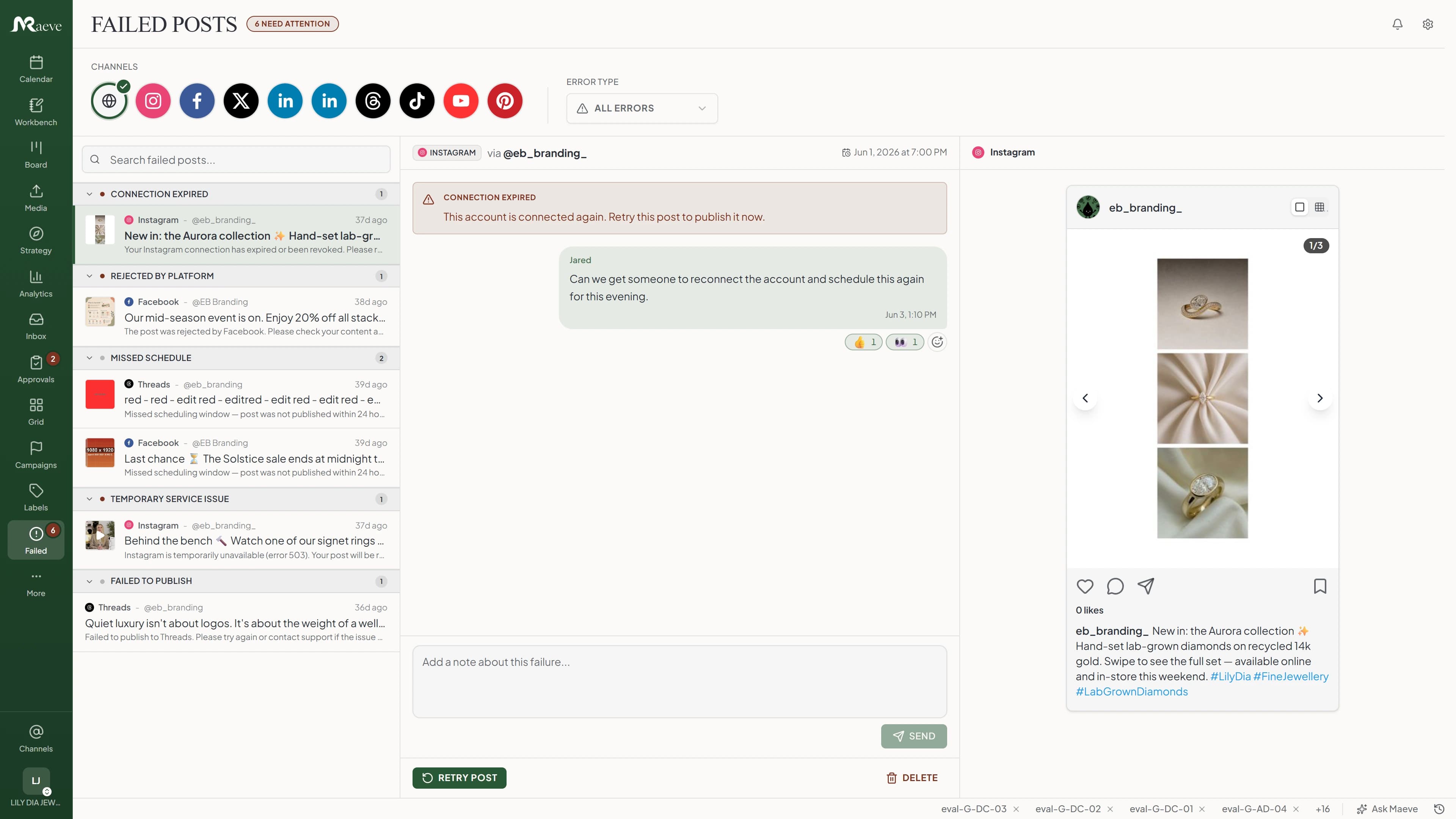
Sometimes a post doesn't go out. Maeve keeps trying while the problem looks temporary, and most of the time that's the end of it. If it isn't, the post lands in Failed Posts with the reason in plain words and the button that fixes it, and you'll have heard about it by then.
Most of them fix themselves
The first few minutes are covered without you. If the network is having a wobble or throttling the account, Maeve keeps trying in the background and the post usually goes out before you've opened the app.
After that a check sweeps every five minutes for anything that should have gone out and didn't, and tries it again. A day past its time it stops for good, so yesterday's launch never sneaks out tomorrow morning.
When it needs you, it tells you why
Anything that can't recover on its own lands in Failed Posts under one of eight reasons: connection expired, account action required, credits depleted, rejected by platform, missed schedule, temporary service issue, publishing outcome unknown, or failed to publish.
Each row carries the exact message the network sent back, so you fix the real thing instead of guessing, and each reason points at the button that clears it. A dead connection won't even let Retry fire until you reconnect the account, the same reauth the Instagram scheduler walks you through, so you never burn an attempt on a wall.
The full recovery list
Three layers of retry with one Retry button on top: the automatic pass, the background sweep, and the Failed Posts tab where you take over.
Questions
Why didn't my Instagram scheduled post go out?
Usually the connection expired, Instagram had a bad few minutes, the account got rate-limited, or the post broke one of Instagram's own rules. The post lands in Failed Posts under one of eight reasons, with the actual error from Instagram underneath, so you can tell straight away whether to retry it, edit it, or reconnect the account.
Will Maeve retry automatically when a post fails?
Yes. If the platform's just having a bad moment, Maeve keeps trying for the first few minutes without you doing a thing. A brief outage or a rate limit usually recovers on its own. If the platform says your connection's expired, your post was rejected, or you've hit a daily limit, we stop retrying and put the post in Failed Posts so you can act.
How long does the system keep trying?
The first few minutes are covered automatically. After that a background check runs every five minutes looking for posts that should've gone out but didn't, and tries them again. Twenty-four hours past the scheduled time it stops and marks the post 'Missed scheduling window'. Yesterday's launch doesn't go out tomorrow morning.
What if my Instagram or Facebook account disconnects?
Retry stops the moment the platform says the connection has expired. No point hitting a wall over and over. The post moves to Failed with a 'Connection expired' reason, and the Retry button refuses to fire until you reconnect the account. Reconnect, hit Retry, and it goes immediately.
Can I retry a failed post without opening the app?
Yes. Hit the same retry from the public REST API, the CLI, or an AI agent through MCP. They all run the same code path: reset the post to scheduled, clear the error, fire the publish job with no delay, and write one entry to the workspace audit log.
Do carousels and Instagram story chains retry as a unit?
Yes. Retry the parent post and every child resets with it. Carousel slides, story chains, multi-platform groups. You won't end up with slide 1 published and slides 2 to 5 stuck in failed.
How do I find failed posts in the first place?
There's a Failed Posts tab in your workspace. Filter by platform or reason. Each row shows the original post, the time it should've gone out, the reason it didn't, and the actual error from the platform. The tab updates the moment a post fails, so new ones show up without refreshing.
Will I get notified when a post fails?
Yes, in the app, by email and as a push notification on your phone, titled with the network it failed on. The Failed Posts tab and the calendar also update in real time, so a teammate looking at either sees it without refreshing. A post that missed its window or one Maeve can't confirm gets its own notification rather than being lumped in with the rest.
What happens if a scheduled post is more than 24 hours overdue?
We stop retrying it and mark it 'Missed scheduling window: post was not published within 24 hours of scheduled time.' From the Failed Posts tab you can edit and reschedule, retry as-is, or delete. Whichever you pick gets logged.
Is every retry tracked in the audit log?
Every one. Whether the retry came from the app, the REST API, the CLI, or an AI agent. The log captures who did it, which post, when, and what happened. If an AI agent retries a post on your behalf, the log names the agent.