
Social media scheduler for X (Twitter)
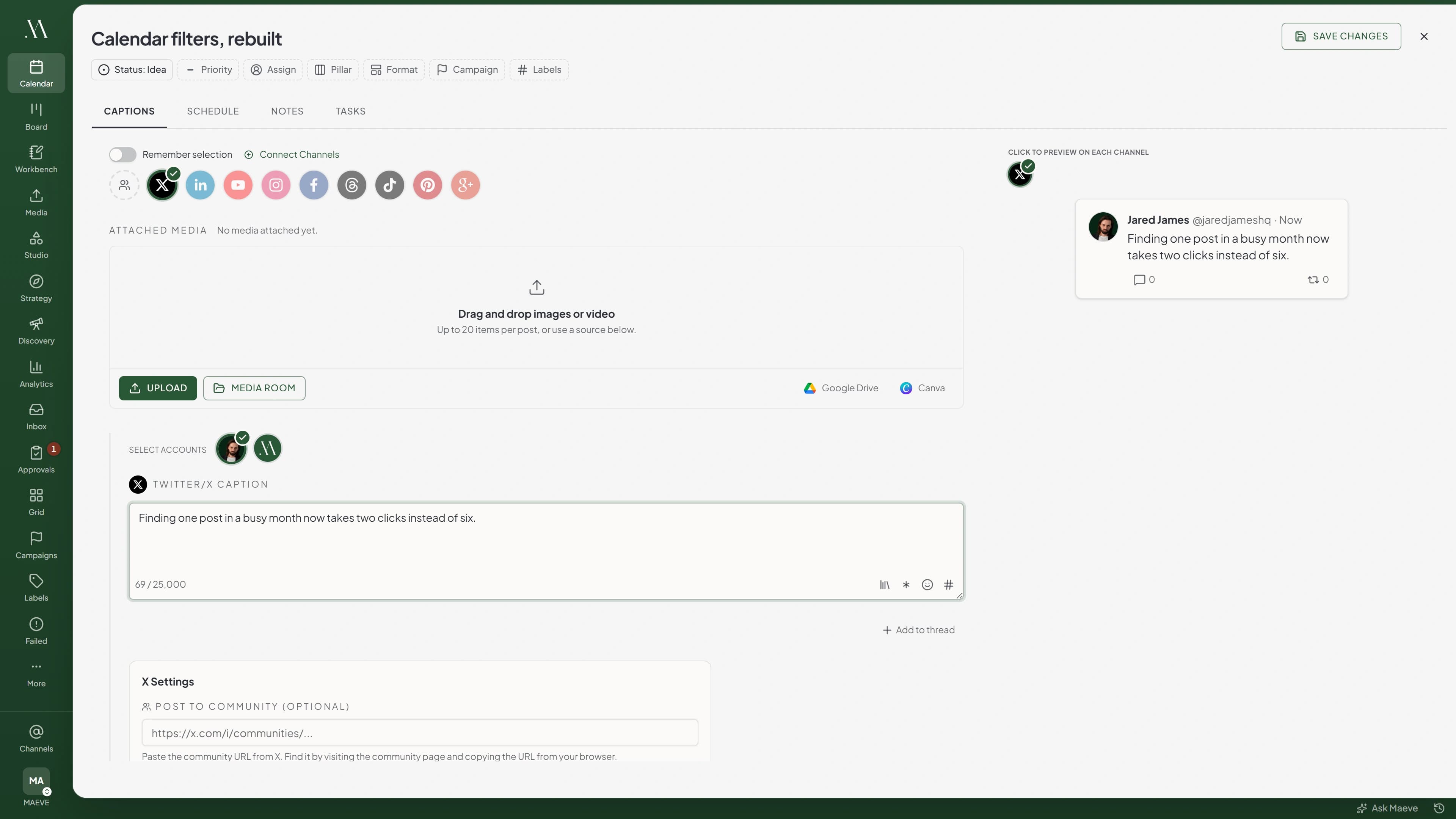
Schedule X posts and threads without opening the app, which is the part that costs you twenty minutes of scrolling before you remember why you came. The X copy gets its own field, a thread takes a main post and up to twenty replies that publish in order, and images, GIFs and video ride along with a crop sized for X. Set the time and it goes out while you are doing something else.
Short posts, long posts, and threads that stay threads
The counter flags the moment a post crosses 280 characters, which is where X stops for an account without Premium. With Premium you have up to 25,000. Maeve reads which of those you have from the connected account rather than asking, so it holds you to the limit you actually have instead of letting you find out on the day.
A thread is a main post and up to twenty replies, twenty-one posts in all, with up to four media items on each. They publish in order rather than you posting reply after reply watching the clock. Images, GIFs and video all work, with an X-sized crop and alt text pulled from the file in the Media Room.
One thing to know: no links in X posts
X charges a higher rate to publish a post containing a link, so Maeve does not send them. URLs are blocked in the main post and in every reply, and it is caught while you are writing rather than at publish time. That covers full addresses, bare domains like example.com, and anything starting with www.
Worth saying plainly rather than letting you discover it. The Community field is separate and takes a URL as normal, and every other channel in the same draft keeps its links, so a campaign can still carry them on LinkedIn, Facebook and the rest while the X version stays clean.
Post into a Community, on purpose
Paste an X Community URL into the X settings and the main post targets that Community, with the rest of the thread following it. If the URL has no Community ID in it, Maeve flags that under the field, and publishing anyway sends the post to your normal timeline rather than failing.
The schedule watches X's publishing limits too. A connected account can publish 100 times in a rolling 24 hours and 100 times a calendar month, and each post in a thread counts as one, so a main post with three replies uses four.

A thread that stops halfway picks up where it stopped
The worst way for a thread to fail is halfway, because the obvious fix posts the whole thing again. Maeve records the main post and every reply as they go out. On a retry it checks the main post is still on X, matches the copy against what it already published, and carries on from the last reply that landed.
If you changed the text after the failure, it stops rather than stitching a different thread onto a live one. And you can delete a published post from the workspace, which deletes it on X too.
What the X scheduler does
The sharp version stays sharp, the thread stays a thread, and the limits are counted for you rather than discovered.
The limits, before you hit them
X's rules and ours, in one place.
Questions
What can Maeve schedule on X?
Posts and threads. A post takes text with up to four images, or a GIF, or a video. A thread is a main post plus up to twenty replies, which is twenty-one posts, each with its own media. There are no polls, quote posts or retweets.
Can I put a link in an X post?
No. Maeve does not publish X posts containing URLs, because X charges a higher rate for link posts. That covers full addresses, bare domains like example.com, and anything starting with www, in the main post and in every reply. It is caught in the composer rather than at publish time. The Community field is separate and takes a URL as normal, and every other channel keeps its links.
Can I schedule X threads?
Yes. Write the main post, add up to twenty replies underneath, attach media to each, and the whole thing publishes in order. If it stops partway, retrying resumes from the last reply that went out rather than posting the thread again.
Can I schedule long posts on X?
Only from an account with an active X Premium subscription. The composer takes up to 25,000 characters and flags the moment you cross 280, so you can see where you are. Without Premium the 280 limit is hard and Maeve will not publish past it. X also counts characters by weight, so emoji and some non-Latin scripts count as more than one.
Can I schedule images, GIFs and videos on X?
Yes, up to four media items on the main post and four on each reply, counted per message rather than shared across the thread. X takes four images, or one GIF, or one video on a post, and will not accept a mix of types in the same one. Image cropping is supported at 16:9 and 1:1.
What are the video limits?
140 seconds on a standard account and up to 10 minutes on a blue-verified one. Maeve reads the verification status from the connected account itself rather than asking you to tell it. Every video uploaded to Maeve is capped at 512MB whichever account it is, so a very long video has to fit inside that.
Can I post to an X Community?
Yes. Paste the Community URL into the X settings and the main post targets that Community, with replies following it. If the URL has no Community ID in it, Maeve flags it in the composer, and publishing anyway sends the post to your normal timeline instead.
Does Maeve report X analytics?
No. Analytics and reports cover Instagram, Facebook, YouTube, TikTok, Pinterest, Threads, LinkedIn and Google Business Profile. X is a publishing channel here rather than a reporting one, so there is no X tab in analytics and X does not appear in reports. Use X's own analytics for performance.
Do X replies and DMs come into the Social Inbox?
No. X is not one of the networks the Social Inbox covers, so replies, mentions and direct messages on X are not brought into Maeve. The inbox covers Instagram, Facebook, Threads, YouTube, TikTok and Google Business Profile.
Are there X publish limits?
Yes, three worth knowing. A connected account can publish up to 100 times in a rolling 24 hours and up to 100 times per calendar month. Each post in a thread counts as one, so a twenty-one post thread uses twenty-one. On a free trial there is a separate allowance of 15 X posts for the whole organisation, which is used up the moment you schedule rather than when the post goes out.
Can I delete a published X post from Maeve?
Yes, and it deletes on X too. For a thread, that removes the main post, so replies come down separately. Editing a published post is not supported, because X does not offer it to scheduling tools.
Can the X copy be different from LinkedIn, Threads or Instagram?
Yes. Write the X version separately and keep its thread replies with it while the other channels keep their own copy. This matters more on X than anywhere else, because the X version cannot carry a link and the others can.
What happens if a scheduled X post fails?
It lands in Failed Posts with the copy, media, account, timing and X's own reason kept together, and a half-published thread resumes rather than reposting. The one exception is a trial organisation that has used all 15 of its trial X posts, which cannot be retried until the organisation upgrades.
Can X posts go through approvals and client review?
Yes, where your workspace uses them. A post or a whole thread can move through internal approval or client sign-off against the real copy and media before it is scheduled.