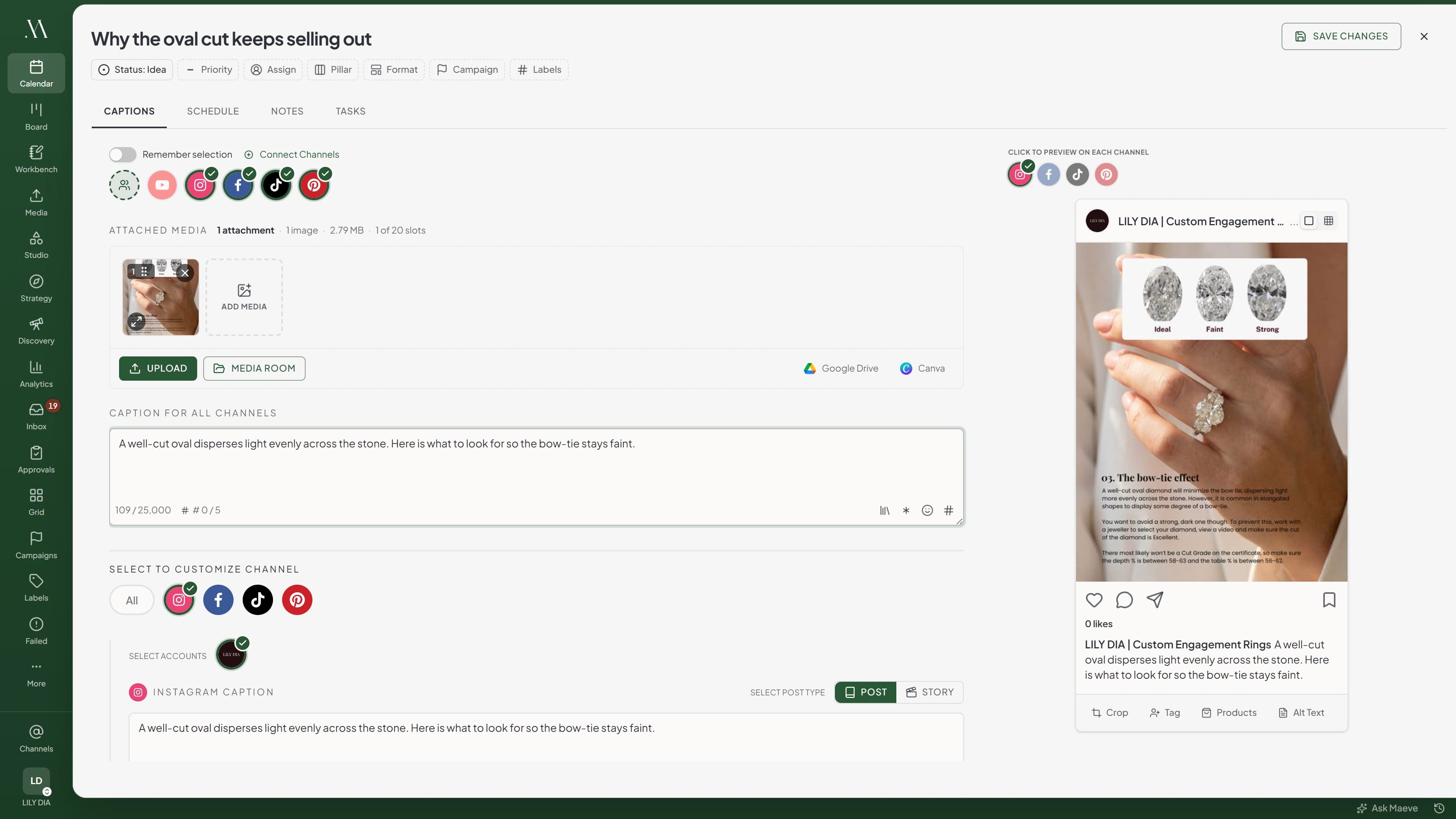
You write the post once, pick which accounts it's going to, and adjust whatever a platform needs its own way. Any channel can get its own caption, media, or crop, and the preview beside it shows the post exactly as that platform will render it while you type.
An hour wasted pasting the caption into each platform.
The image cropped again for the feed, the Reel and the Pin, and uploaded three times.
The TikTok disclosures and the YouTube settings finished off in the native app.
The first comment posted by you, once the post is already live.
A post that fails when it tries to publish, while you're busy.
Content scheduled in Maeve
One caption that ships everywhere, overridden only on the channel that needs different wording.
One upload, cropped per network, so the same file goes out square on one and portrait on another.
Each network's own settings sitting beside the caption.
A first comment that posts itself on Instagram, Facebook and LinkedIn.
Errors upfront while you're drafting, so you know what to change before you submit.
So how does it work?
01
Pick the channels
Select a network and Maeve brings in the account you used last. Turn one off and its caption, media and settings stay in the draft, ready for when you turn it back on.
02
Write the caption once
Every channel you have not touched publishes that text. A counter beside each one tells you where you are against that network's limit before you get near it.
03
Change the one that needs it
Open a channel to shorten its caption, swap its media, or set its own crop. The rest carry on following the shared caption.
We support the native platform settings
There's nothing more frustrating than having to open the native app and change a setting because it wasn't available when you scheduled a post. Maeve puts these settings right next to the channel.
TikTok
Set who can see it, whether comments, duets and stitches are allowed, and the disclosures TikTok asks for. Pick the frame you want as the cover, or send the post to your TikTok drafts to finish in the app.
TikTok
TikTok Caption
Title
Photo: Max 90 chars
Autumn booking window
October bookings are open. Two Saturdays left.
46 / 4,000
Media for TikTok
1 of 35 selectedSelect allClear
TikTok Settings
Visibility
Select visibility...
Allow comments
Let other TikTok users comment on this post.
Content disclosure
Indicate that this post promotes goods or services in exchange for something of value.
AI-generated content
Adds TikTok's Creator labeled as AI-generated disclosure.
Post to drafts
Send to TikTok drafts instead of publishing directly.
YouTube
A title, the category and the licence, who it goes out to, and whether subscribers get told. A long-form video needs a thumbnail before it will publish, and Maeve works out a Short from the video itself.
YouTube
YouTube Caption
Title
Max 100 chars
Autumn booking window
October bookings are open. Two Saturdays left.
46 / 5,000
Media for YouTube
1 of 1 selectedSelect allClear
YouTube Settings
Visibility
Select visibility
Category
Select category
License
Select license
Tags
technology, coding, tutorial (comma separated)
Custom thumbnail
Notify subscribers
Allow embedding
Made for kids
Facebook
Choose a Post, a Story or a Reel, give Facebook its own caption, queue a first comment, attach a link and add a call-to-action button.
Facebook
FB Caption
Select Post Type
PostStoryReel
October bookings are open. Two Saturdays left.
46 / 5,000
Media for Facebook
2 of 10 selectedSelect allClear
Facebook Settings
Add link
https://example.com
Add button
The rest work the same way
Instagram
LinkedIn
X
Threads
Pinterest
Instagram, Threads, Pinterest, LinkedIn and X each get the fields that network actually uses. The scheduler pages at the foot of this page cover what each one needs.
We won't let you schedule a post that can't go out
If something would stop the post going out, we tell you in the composer before you schedule it. A missing YouTube or Pinterest title, an image at the wrong shape, a video that runs too long, a file over the network's size limit. You fix it right there instead of finding out the next morning.
If a platform is briefly unavailable, Maeve keeps trying on its own. When it is something only you can fix, like an account that needs reconnecting, the post goes to Failed Posts with the reason the platform gave, and you can send it again from there.
CaptionsScheduleNotesTasks
Post NowPublishes to the selected channels as soon as you confirm.
SchedulePick a date and time, and see the week around it.
Publish Time
Posting Friday, October 3rd at 9:00 AM
Confirm Schedule
Confirming a schedule runs the post against every channel on it. A rule broken on one network holds all of them, and each message names the network and what it wants.
Everything about the post stays on the post
Normally the post sits in your scheduler and everything about it sits somewhere else. A Trello card, a spreadsheet, a chat thread. Who is writing it, where it is up to, what the client asked for.
Here it is all in the one place. Say who it is assigned to and what stage it is at. Give it a pillar and a format so it turns up in your reporting later, a campaign to group it with, and labels so you can find it on the board and the calendar. Notes hold the brief, only your team sees them, and two of you can type in them at once. Start a task inside the post and it lands on the task board still linked back here. When someone needs to sign it off, it goes into review as it is. You do not rebuild it anywhere.
Only Idea and Draft can be picked. Everything past that is worked out from the channels on the post rather than set by hand.
The planning row above the tabs. Empty fields are dashed and grey, filled ones go solid, and Campaign and Phase only appear once there is a campaign to put the post in.
Questions
How do per-platform captions work?
Write a main caption first. When a network needs different wording, override it for that platform. The override applies on that network and the main caption applies everywhere else. The Reels caption can be short, the LinkedIn caption can be long, the X caption can be a thread, all from the same draft.
Do I have to re-upload images for each platform's aspect ratio?
Upload the image once and set a crop for each network. Maeve saves the crop against that image on that post and applies it when the post goes out, so a square crop for Facebook and a portrait one for Instagram both come from the one file. That covers Instagram, Facebook, LinkedIn, X, Threads and TikTok photo posts. Cropping is for photos, so a video keeps the shape of the file you upload. You can also pick different images for different networks in the same post.
What happens if a post fails to publish?
Most problems get caught in the composer before you schedule. If a platform still says no at publish time, Maeve retries the temporary ones itself, like a timeout or the network being busy. When it is something only you can fix, like an account that needs reconnecting, the post goes to Failed Posts with the reason the platform gave, and you send it again from there once it is sorted.
Where does approval fit in?
Routing happens at draft time: direct, internal, client, or internal-then-client. The same draft moves into review without rebuilding the post in a separate tool. Internal reviewers see it inside the workspace; clients see it through a token link via client reviews, no account required.
Does the editor support X threads?
Stack thread messages with their own text and per-message media. Add a Community URL when the post should publish into an X Community instead of the main feed. The same draft can be a single post or a thread, depending on whether you've added thread messages.
What's available for TikTok?
Set who can see the post from the options TikTok gives that account, and turn comments, duets and stitches on or off. If TikTok has one of those disabled for the account, the composer shows it locked rather than letting you set something that will not stick. Add the paid partnership, promotional and AI-generated disclosures TikTok asks for. Pick the frame you want as the video cover, or which image covers a photo post. For a single video going out directly you can choose a track from TikTok's commercial music library and set how it sits against your original audio, and photo posts can let TikTok add music automatically. You can also send the post to your TikTok drafts to finish in the app. Two things worth knowing: a video published straight from Maeve always goes out public, because that is all TikTok's publishing API allows, and the music library is TikTok's licensed catalogue, so a particular viral sound may not be in there.
What about YouTube Shorts?
Long-form videos and Shorts both publish from the same draft, and Maeve works out which one you have from the video's shape and length, so there is nothing to switch. You get privacy, category, license, Made for Kids, notify subscribers, embeddable and tags. A long-form video needs a custom thumbnail before it will publish, a JPEG or PNG up to 2MB. Shorts do not take one, so YouTube picks the frame.
Can I save captions or post templates to reuse?
Captions yes, whole posts no. The Caption Library sits in the caption toolbar. Save what you are writing, then search your saved text and drop it into the main caption or any one channel's caption. You can favourite and tag them, and they belong to the workspace so your team shares them. Hashtag groups are separate and go into the main caption, a channel caption, a first comment or a thread message. What does not exist is a post template, meaning a reusable draft with the channels and settings already filled in.
Can I @-mention people inside the caption?
Not as autocomplete. A mention you type in the caption is plain text and publishes exactly as you wrote it, so use the handle the way that network reads it, like @username on X. LinkedIn is the exception: an @handle there publishes as text and does not turn into a link. Instagram has a separate collaborators field where you add up to five accounts by exact username, and that part is structured.
The editor behind every channel
The editor drafts the post. These pages cover what each network needs from there. Same post, eight different shapes.