
Social media scheduler for Pinterest
Schedule image Pins and video Pins with the board, the title and the destination link all set on the post. Pinterest works more like a search engine than a feed, so a Pin you publish today can still be sending people to your site in six months, and the board it sits on matters more than the hour it goes up. Build a month of them in one sitting, and a Pin missing its title, board or media gets held rather than failing at publish time.
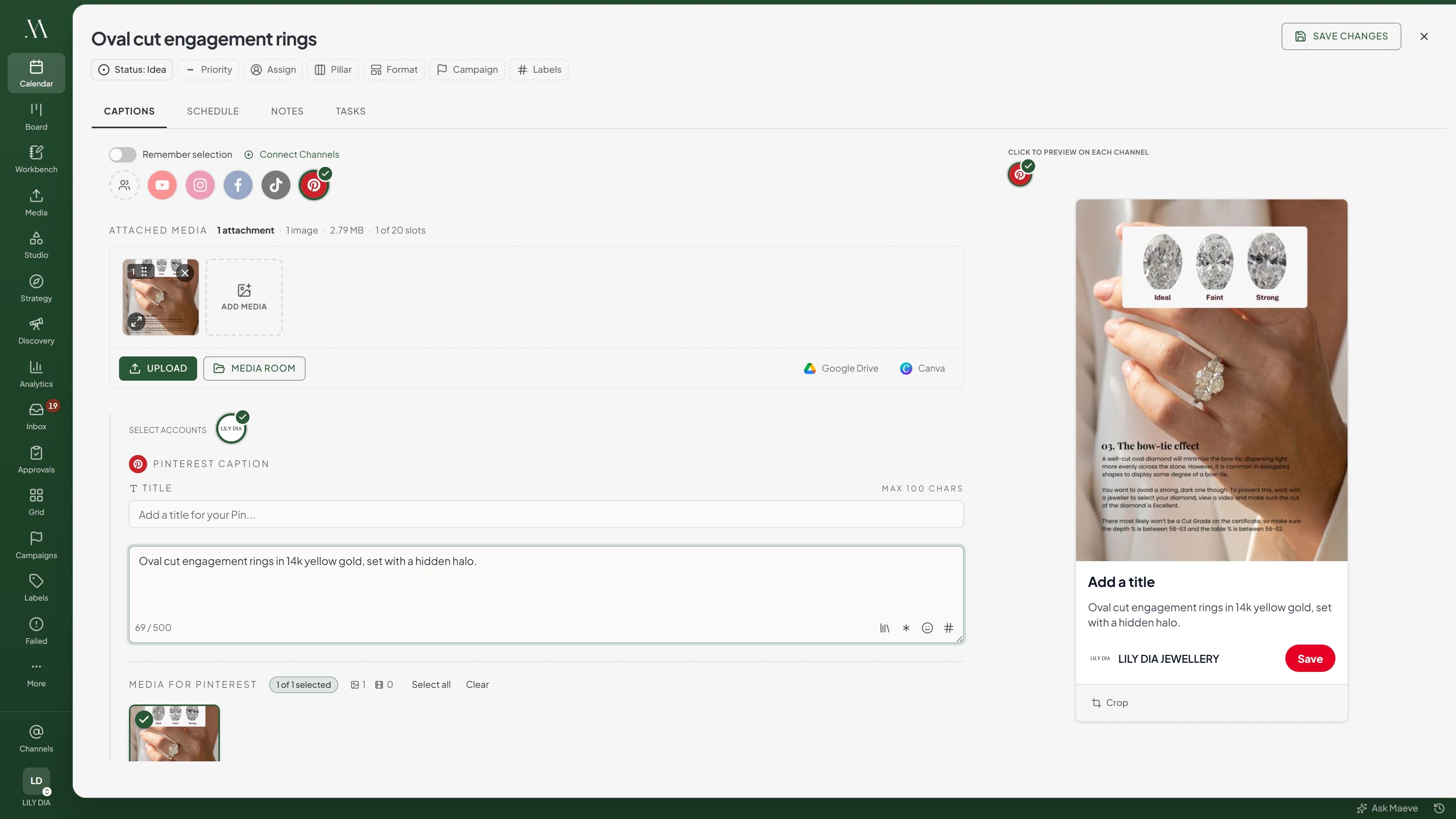
Image Pins and video Pins, kept whole
Each Pin carries one image or one video with a Pinterest title of up to 100 characters, a description of up to 500 written for search, and the outbound link. The title is the one field Pinterest genuinely needs, so Maeve treats it as required rather than optional.
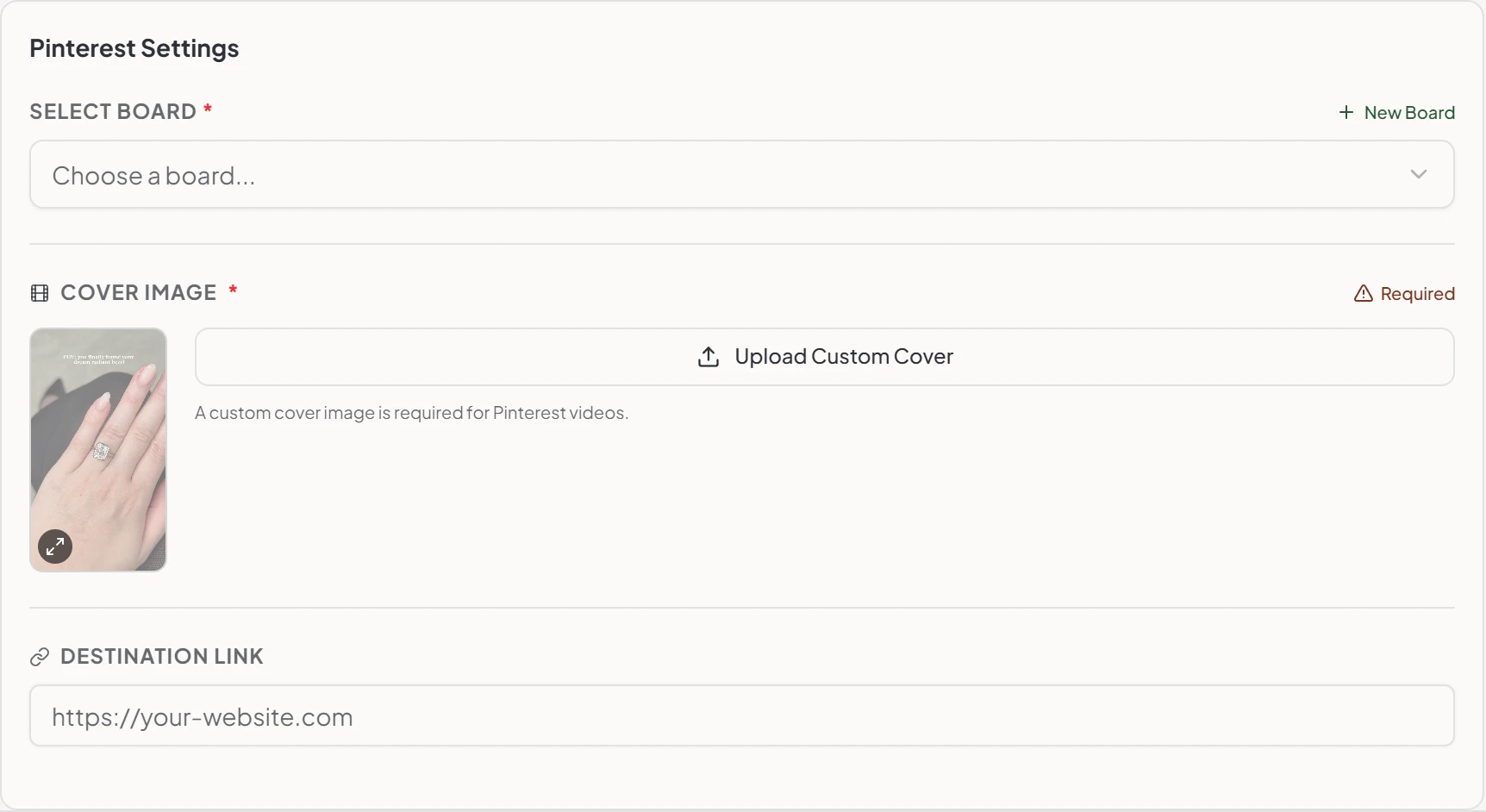
A video Pin needs a cover image, and the composer will not let you schedule one without it. That single check is the difference between a video Pin going out looking deliberate and going out with whatever frame happened to land first.
A Pin needs a title, a board and media before it can publish, and the queue is held until those pieces are actually there.
The board and the link travel with the Pin
Boards load live from the connected Pinterest account, secret ones included, and you pick where the Pin belongs right on the post. When the campaign needs a board that does not exist yet, create a public or secret one without leaving the composer.
The destination link sits in the same panel, so the visual, the words and the page it sends people to never get separated. Alt text comes from whatever is saved against the image or video in the Media Room, and the Pin title is used if there is none.
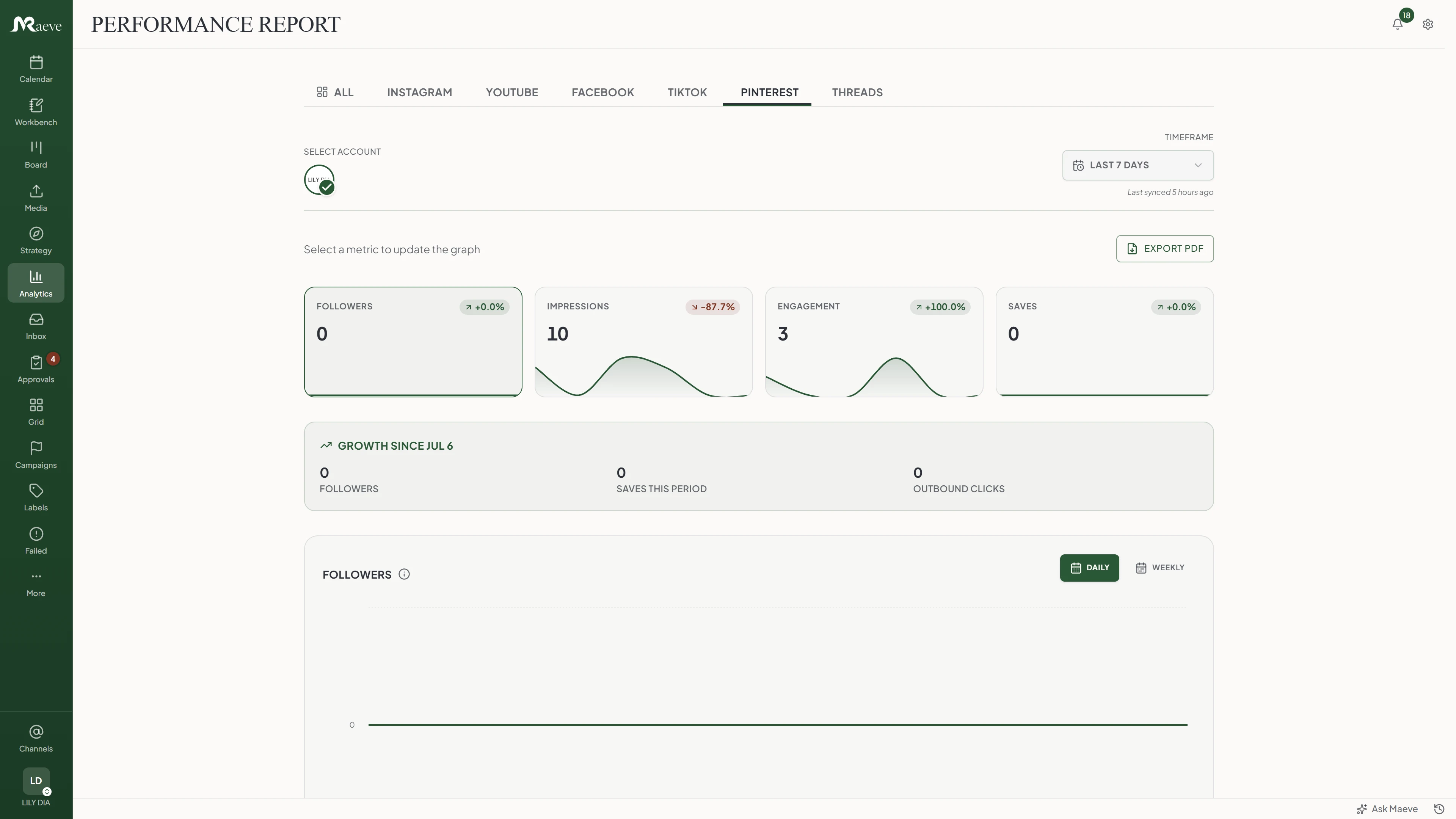
See which Pins are pulling clicks
Followers, impressions, engagement, saves and outbound clicks across the range you pick, with your current Pin and board totals beside them and a heatmap of when your Pins do best. Top Pins come from the last thirty days, which is the window Pinterest reports them over whatever range you have chosen.
Worth being straight about what Pinterest does not give out. There is no audience or demographic breakdown at all, no reach separate from impressions, and no likes, comments or shares per Pin. Saves and outbound clicks are the two numbers that tell you anything here, which is why they are the ones on the report.
On Standard and above the month exports as a branded PDF with the account overview, Pin performance and your top three Pins by impressions, saves, clicks and engagement rate.
A Pin that half-published is found, not repeated
Pinterest publishing gets more care than most. Maeve writes a checkpoint before it calls Pinterest and again after, so if something falls over mid-publish it knows a Pin might exist. On the retry it re-reads the board looking for that Pin rather than assuming, which is how you avoid the same Pin appearing twice on a board.
There is one Pinterest quirk worth knowing. Pinterest does not mark Sandbox boards as different in its own board list, so one can be picked by accident. When a Pin is refused for that reason, Maeve says exactly that instead of showing a provider error code.
What the Pinterest scheduler does
Built for a search-shaped platform: the board, the title, the description and the link stay together, and a half-finished Pin never reaches the queue.
The limits, before you hit them
Pinterest's rules and ours, in one place.
Questions
What can Maeve schedule on Pinterest?
Image Pins and video Pins, one piece of media each. Every Pin needs a title and a board. The description, the destination link and the alt text are optional, and a video Pin needs a cover image before the composer will let it through.
Can I choose the Pinterest board for each Pin?
Yes. Boards load live from the connected account, including secret ones, and you pick where the Pin belongs on the post itself. You can also create a new board, public or secret, without leaving the composer, as long as your role lets you manage connections.
Can I write a Pinterest title and description?
Yes, and the title is required. It runs to 100 characters and is its own line, separate from every other channel's caption. The Pinterest caption becomes the Pin description and runs to 500 characters, which is where the keywords people search for belong.
Can I add a destination link to a scheduled Pin?
Yes. The outbound URL sits in the Pinterest settings and travels with the Pin, so the visual and the page it sends people to stay together. It has to be a full http or https address, which Maeve checks before the Pin queues.
Does Maeve support Pinterest alt text?
Yes, though it comes from the media rather than a field on the Pin. Whatever alt text is saved against the image or video in the Media Room is what publishes, and if there is none the Pin title is used instead.
Can I schedule Pinterest video Pins?
Yes. One video with a cover image, which Maeve requires in the composer and will not let you schedule without. You can upload the cover, take it from the Media Room or pull it from Google Drive.
Can I delete a Pin after it has published?
Yes. Deleting a published Pin in Maeve deletes it on Pinterest too. Editing a live Pin is not supported, so a change means taking it down and posting a new one.
What Pinterest analytics do I get?
Followers, impressions, engagement, saves and outbound clicks over the range you pick, plus your current Pin and board totals and a best-times-to-post heatmap, all in analytics and reports. Top Pins come from the last thirty days, because that is the window Pinterest reports them over.
Does Pinterest report reach or audience data?
No, and Maeve does not invent either. Pinterest gives no audience breakdown at all, so there is no age, gender or location panel the way there is for Instagram. It also reports no reach separate from impressions, and no likes, comments or shares per Pin, so saves and outbound clicks are the numbers that matter here.
Do Pinterest comments come into the Social Inbox?
No. Pinterest is not one of the networks the Social Inbox covers, so comments on your Pins are not brought in and there is no Pinterest messaging in Maeve. The inbox covers Instagram, Facebook, Threads, YouTube, TikTok and Google Business Profile.
What permissions does connecting ask for?
Reading and creating Pins, reading and creating boards including secret ones, and reading your account. All of it is required together, so declining part of it refuses the connection rather than setting it up half working.
What happens if a scheduled Pin fails?
It lands in Failed Posts with the title, description, media, board and Pinterest's own reason kept together. Pinterest gets extra care here: Maeve records a checkpoint either side of the publish and re-reads the board afterwards, so a Pin that went up during a crash is found rather than posted twice.
Can Pins go through approvals and the calendar?
Yes. Pins use the same workflow as everything else, moving through draft, review, approval, scheduled and published while the calendar keeps the publish time visible.