
Automatic replies and a social inbox
In Maeve you can set up automatic replies, and handle the DMs, comments, mentions and reviews from six networks in one social inbox. You can assign a conversation, tag it and leave notes for your team.
Answer the same question automatically
Maeve can answer DMs and comments for you, which is great for sending out a lead magnet.
Set up as many rules as you like and play around until you find what works for you. Automatic replies are on Standard and Premium.

New automation rule
Rule name
Account
When
Match
Keywords (comma separated, up to 20)
Public comment reply
Saved RepliesJust sent it to your DMs!
Private DM to the commenter
Saved RepliesHere's the link: maevesocial.com/guide
Instagram sends one private reply per comment, within 7 days of the comment.
Apply tags
What we support
Six networks come into the inbox. Not all of them send the same things, so here is what you get from each one.
You can filter the queue down to one of them at any time.

Social Inbox
| Network | Comments | DMs | Reviews | Mentions |
|---|---|---|---|---|
| Yes | Yes | No | No | |
| Yes | Yes | Yes | Yes | |
| Threads | Yes | No | No | Yes |
| TikTok | Yes | No | No | Yes |
| YouTube | Yes | No | No | No |
| Google Business | No | No | Yes | No |
Instagram story mentions arrive as DMs. LinkedIn, X and Pinterest do not feed the inbox.
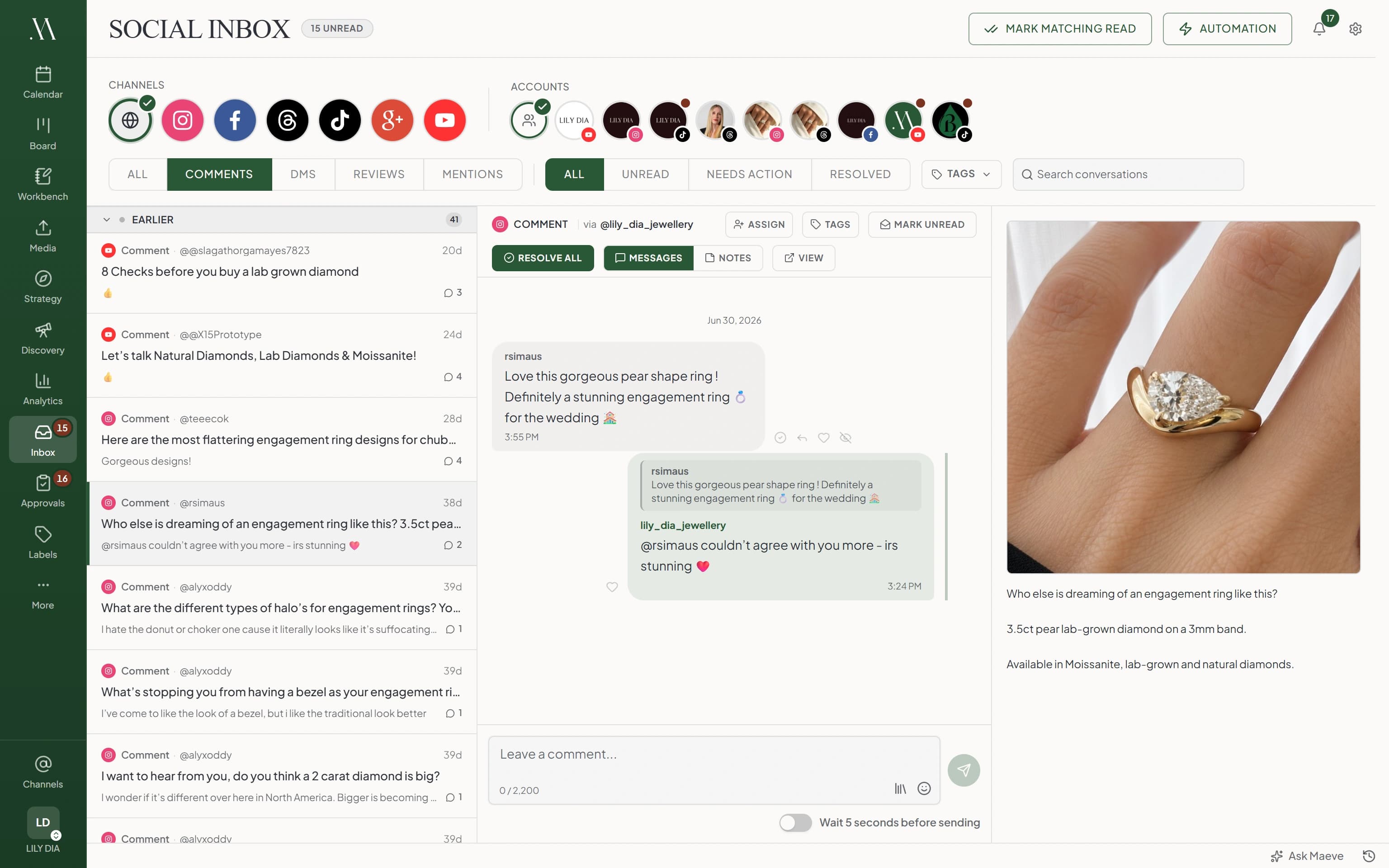
See the post next to the comment
Open a comment and you see the post it was left on, right beside it.
Every comment on that post is in the one place, so you can work through them in a single go.

Messages
rsimaus
Love this pear shape. Is it available in a 3mm band?
3:55 pm
lily_dia_jewellery
@rsimaus it is, 3mm is our most popular band.
4:24 pm
The post it came from

Who else is dreaming of an engagement ring like this? 3.5ct pear lab-grown diamond on a 3mm band.
View on Instagram
Write the reply here
Type your reply and send it. You can pull in a reply you have saved, or send a photo or video in a DM.
Turn on the five second delay and you get a moment to take it back.
Reply
@rsimaus it is, 3mm is our most popular band.
Share the work with your team
Give a conversation to someone on your team, and see who else has it open so you are not both replying.
Leave a note for each other on any conversation. Only your team can see them.
Conversation
Internal notes
She ordered in July, so the 3mm is already on file. Priya is sending the ring sizer.
Notes stay in your workspace. The customer never sees them.
Mark a conversation done
Mark a conversation done when you have dealt with it, and it leaves your list. Replying marks it done for you.
If the person writes back it comes straight back, with everything said so far still there.
Status
@rsimaus
Needs actionIs it available in a 3mm band?
@rsimaus
ResolvedResolved by Sam when the reply sent.
A new message from the same person brings it back into Needs action, with everything said so far still there.
Questions
What is the Social Inbox?
One queue for everything that comes back after you post: comments, direct messages, mentions and reviews from your connected accounts. Open a conversation, read it in order with the post beside it, and reply from your laptop.
Which networks feed the inbox?
Instagram, Facebook, Threads, TikTok, YouTube and Google Business Profile. What each one sends differs: comments come from five of them, direct messages from Instagram and Facebook, reviews from Google Business Profile and Facebook. LinkedIn, X and Pinterest do not feed the inbox.
Are comments and DMs in the same place?
Yes. One queue, with filters for comments, DMs, reviews and mentions, and status filters for all, unread, needs action and resolved. Comments on the same post are grouped into one conversation, so a post with forty comments is one row in the list.
Where do Instagram story mentions show up?
Under DMs, with the story attached.
How long is a reply allowed to be?
The counter under the box shows the limit for that network and conversation type, from 500 bytes on a Threads reply to 10,000 characters on YouTube. Instagram DMs, Threads replies and Google review replies are measured in bytes, so emoji and accented letters count for more than one.
Can I take a reply back?
Turn on the five second delay under the reply box and you get an Undo button during the countdown. Once the countdown ends the reply has gone and nothing can recall it.
Why does it say the reply window has expired?
Instagram and Facebook only allow a DM reply for 24 hours after the person's last message, extended to seven days where the account is eligible. The conversation stays readable, and a new message from them opens a new window.
Can I attach an image to a reply?
In an Instagram or Facebook DM, yes, up to 25MB. Comment, review and mention replies are text only. On Instagram, send the text and the media as two messages.
Can I hide or delete a comment?
Where the network allows it and your connection has the permission. Hide and unhide work on comments, deletion is not offered for Instagram, Threads or YouTube, and liking a comment is Instagram only. Reviews cannot be hidden or deleted.
Do posts I scheduled in Maeve show up in the conversation?
When Maeve can match a comment to its post, that post sits beside the messages with its media and caption. It is the same content you planned in the calendar and wrote in the composer.
Who on my team can reply?
Managers and editors can reply, assign, tag, resolve and moderate. Creators and viewers can read the inbox without those controls.
Can the customer see internal notes?
No. Notes stay inside your workspace and are never sent to the person or the network.
What is the difference between read and resolved?
Read is a notification and it is shared with the whole workspace, so opening a conversation clears it for everyone. Resolved is a decision about the work. A conversation leaves Needs action when its incoming messages are resolved, and a new message brings it back.
Can Maeve reply for me?
On Standard and Premium you can build auto reply rules for an Instagram account or a Facebook Page. A rule matches a comment or a DM by keyword, then replies, tags the conversation or assigns it to someone.