Social Media Management
Software

Most Of The Work Happens Before The Post, And After It.

There is the idea sitting in the workbench, the draft you are shaping in the composer, the photo you are sure you saved somewhere in the media room, the client who still has to sign off, the reply that came in overnight, the report due Friday, and the morning a platform says no and you have to work out why. A scheduler covers one slice of that. Maeve holds the rest of it too, so the work stays in one place from the first rough note to the report at the end of the month. If what you actually need is only the publishing queue, the social media scheduler page goes deeper on that on its own.

3 days free. Cancel anytime.

Maeve content board with posts in idea, draft, review, approved, scheduled, and published columns, each card showing its platforms and labels

Where The Idea Lives Before It Is A Post

The half-formed stuff has to go somewhere, and in most teams it goes into a doc nobody opens again. The Content Workbench keeps it beside the scheduler instead. A row in the planning table can be linked to a real draft, so the plan and the post are the same thing rather than two records that drift apart.

Research notes hold the links and reference images behind an idea, a series keeps a launch run in the order it ships, and notepads take the rough thinking that is not ready for the composer.

Maeve Content Workbench planning table with topic rows, status pills, content pillars, assignees, and scheduled dates beside the folder tree

Write It Once, Then Shape It Per Platform

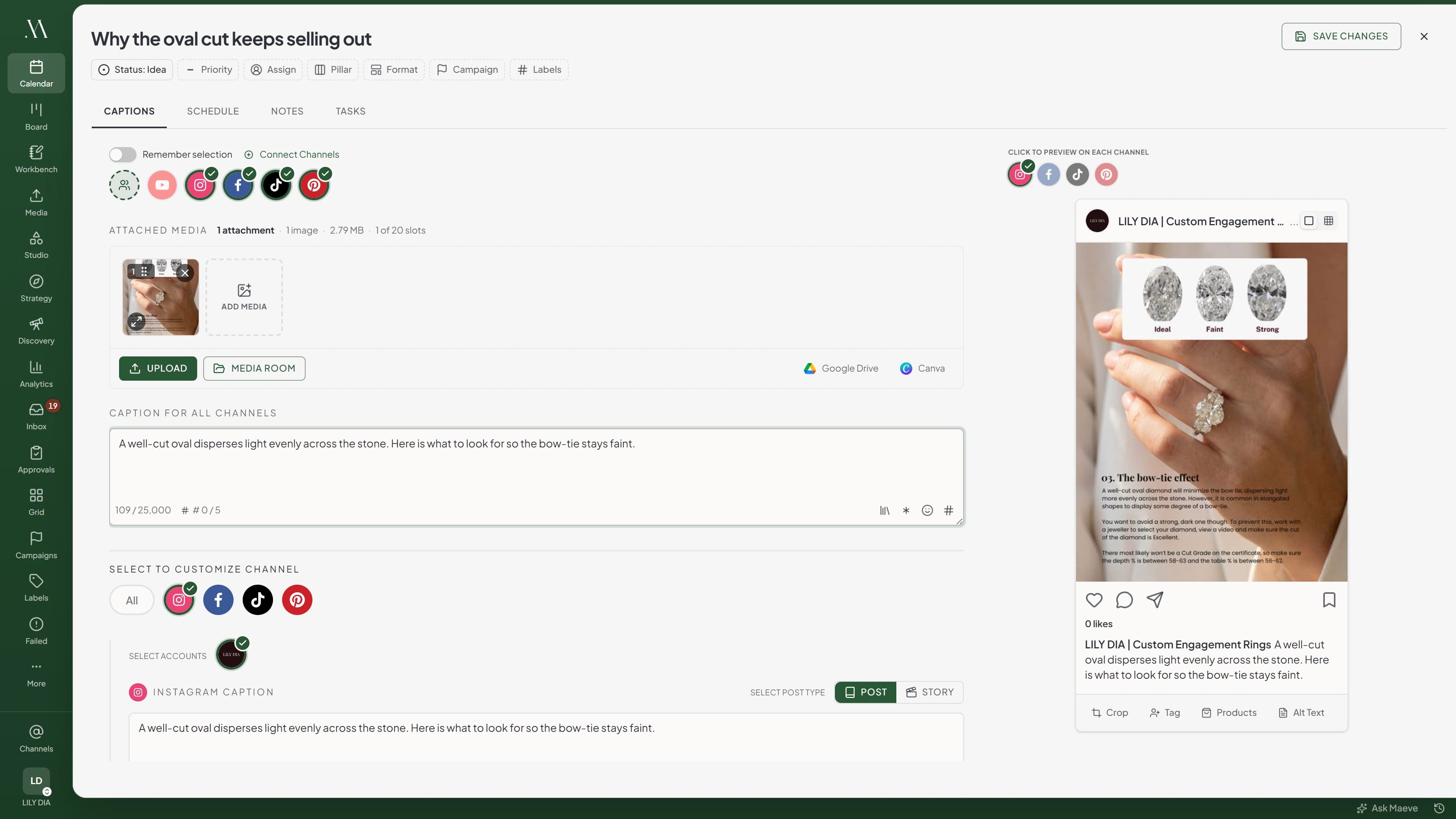
Start from one caption, pick the channels, and change only what each network needs. YouTube keeps its own title, description, and tags, X and Threads can run as a thread, Instagram can hold the hashtags back in a first comment, and any channel can take different media or a different crop.

A live preview shows the post the way each platform will render it, so the bad crop and the caption that gets cut off are caught while they are still yours to fix.

Maeve composer with several channels selected, one main caption, and a live TikTok preview of the post beside it

The Whole Month On One Calendar

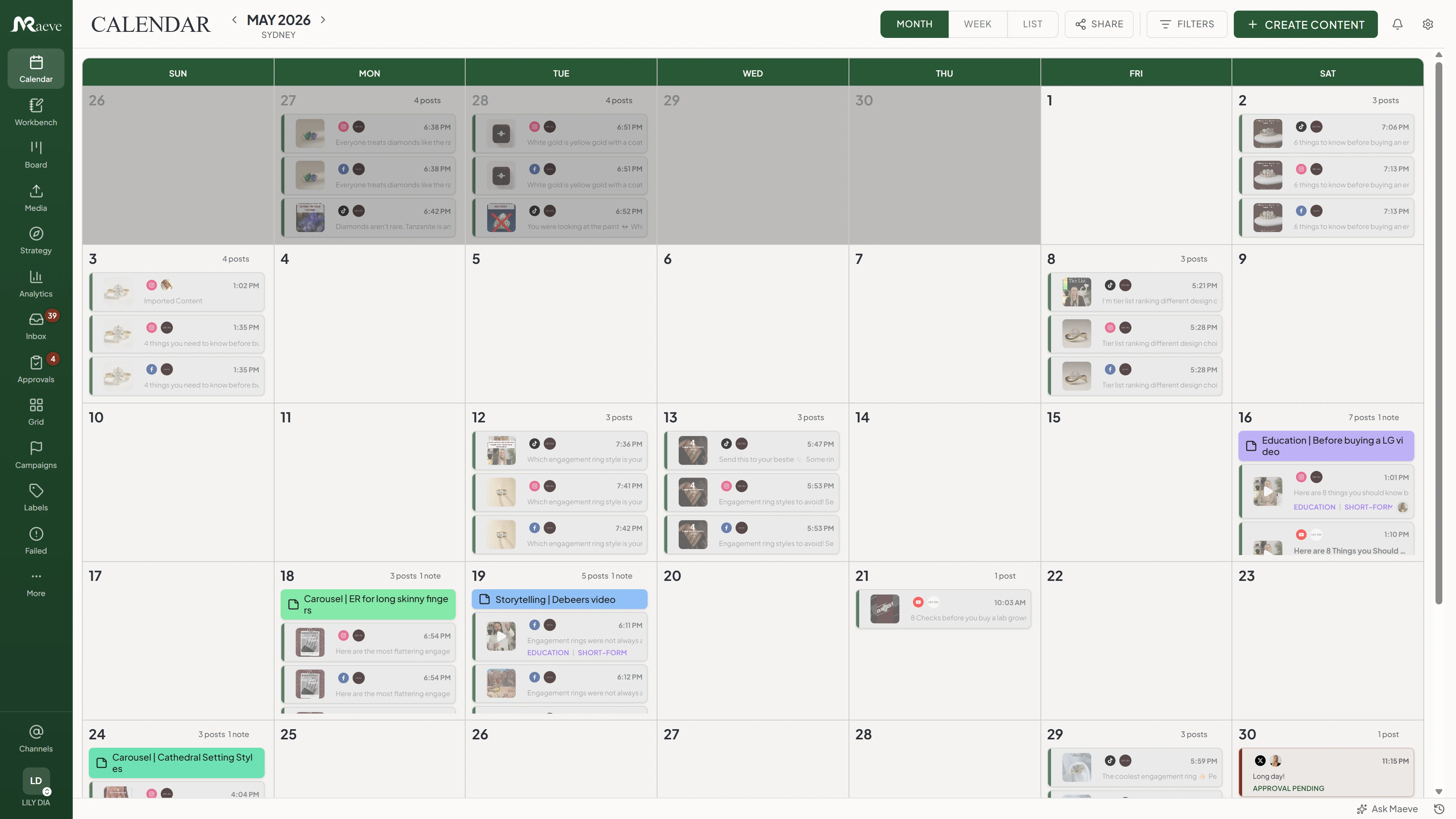
Drafts, scheduled posts, published posts, and failed posts all sit on the same calendar, color-coded by status, with every channel in the same view. Give each platform its posting times and queue posts into them, or set an exact time on a single post, and drag a post to a new slot when the week moves. Month view is for the shape of a campaign, week view is for the next few days, and the board is for when the question is what is stuck, not what is next.

Maeve calendar in month view with each day stacked with scheduled posts, color-coded by status and platform

Every File Where You Can Find It Again

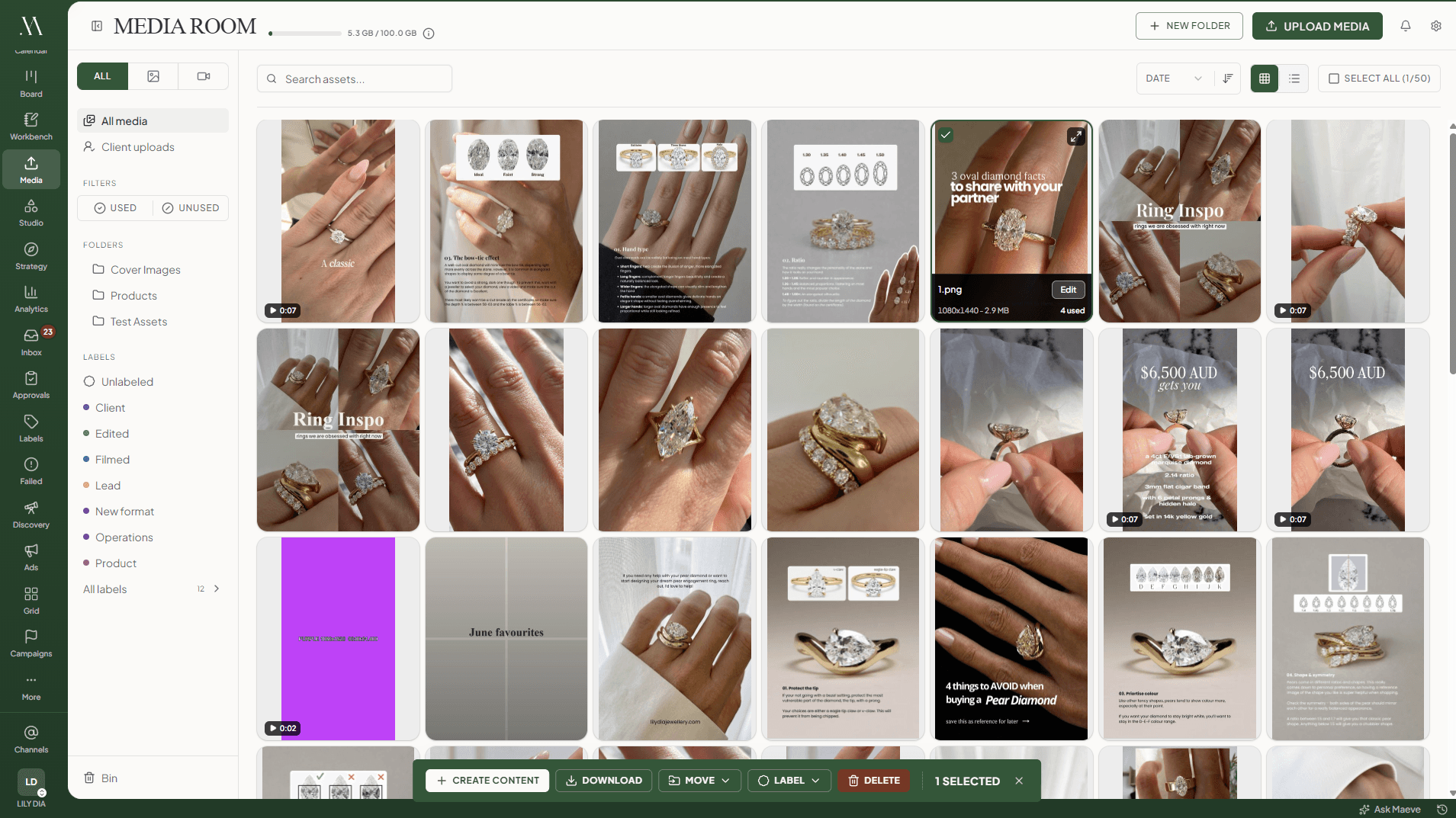
Media Room holds the images, videos, thumbnails, and campaign assets in folders with labels and alt text, and every asset shows which posts it is in right now, so nobody deletes the clip that publishes on Friday. Pick the files and build the post straight from them.

For anything visual on Instagram, the grid planner lays the profile out three wide with posted, scheduled, and mocked-up tiles together, and dragging a tile moves the publish time with it.

Maeve Media Room library with folders down the side and asset cards showing file specs, usage counts, and labels

Nothing Publishes Before Its Sign-Off

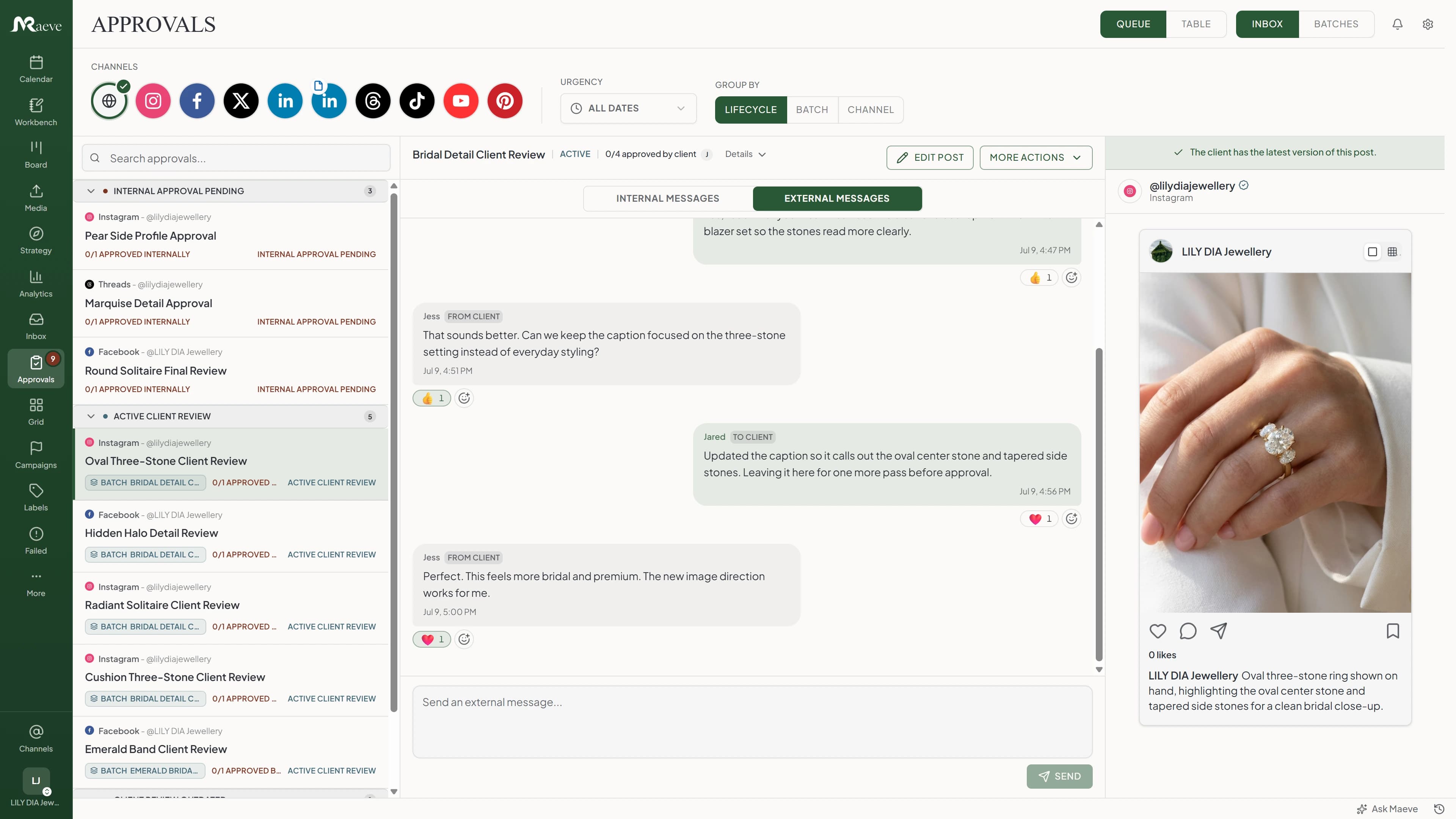
A post can wait as a draft and go through internal review, client review, or internal first and then the client. You choose whether any one approver is enough, everyone has to approve, or people approve in a set order, and the decision, the comments, and the version all stay on the draft itself.

A post under review is locked, and editing an approved post resets the approval, so the version that was signed off on is the version that goes out.

Maeve approvals view with an internal approval thread beside the post preview

The Client Says Yes From A Link

Send a batch of drafts as one link. The client opens it on their phone, scrolls the posts the way they will actually look, and approves, asks for changes, or comments on the post itself. No account, no seat to buy, and nothing else in the workspace is reachable from that link. You can see what they have approved, what needs changes, and what they have not looked at yet.

The Maeve client review link as the client sees it, with the batch name, four posts waiting on them, an approve all pending button, the caption, and approve and request changes buttons beside the Instagram preview

The Replies Come Back To The Post

Publishing is not the end of it. Comments and direct messages from Instagram, Facebook, and Threads land in one queue with the post beside the conversation, so whoever answers can see what the customer is reacting to. Assign a conversation, leave an internal note, and resolve it when the question is actually answered.

An Instagram comment open in Maeve Social Inbox with the threaded brand reply, assignment and resolve controls, a reply composer, and the original post beside the conversation

The Numbers Land Where The Posts Are

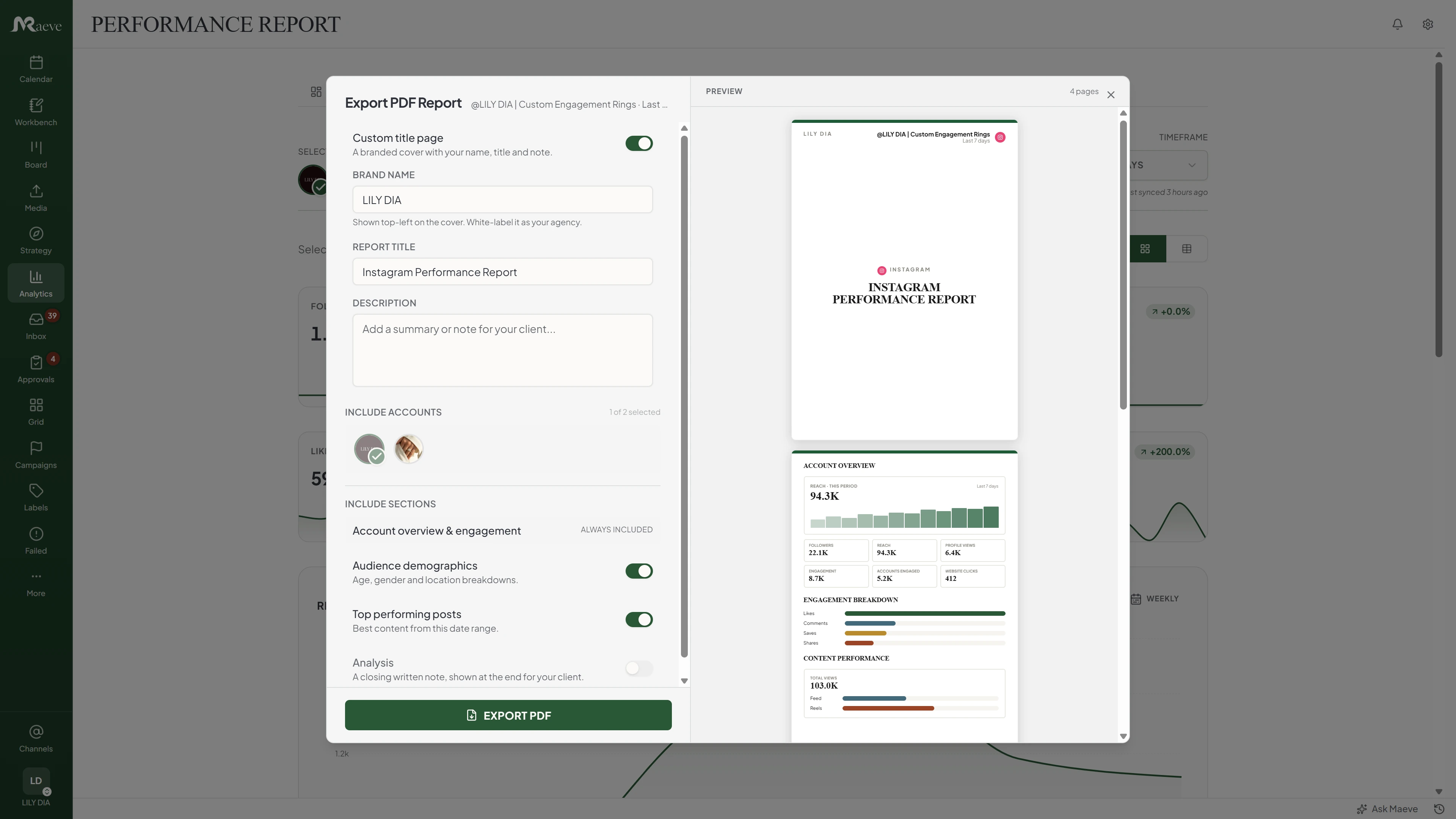
Once posts publish, audience, reach, engagement, follower growth, and top posts come back into the same workspace, per platform or across all of them together, and the monthly report exports as a PDF with your name on the cover.

Analytics covers the six platforms that report data back, which are Instagram, YouTube, Facebook, TikTok, Pinterest, and Threads. LinkedIn and X publish through Maeve, and their numbers stay in their own apps.

Maeve analytics with the Export PDF Report panel open, showing a branded cover and a report preview

A Failed Post Never Fails Quietly

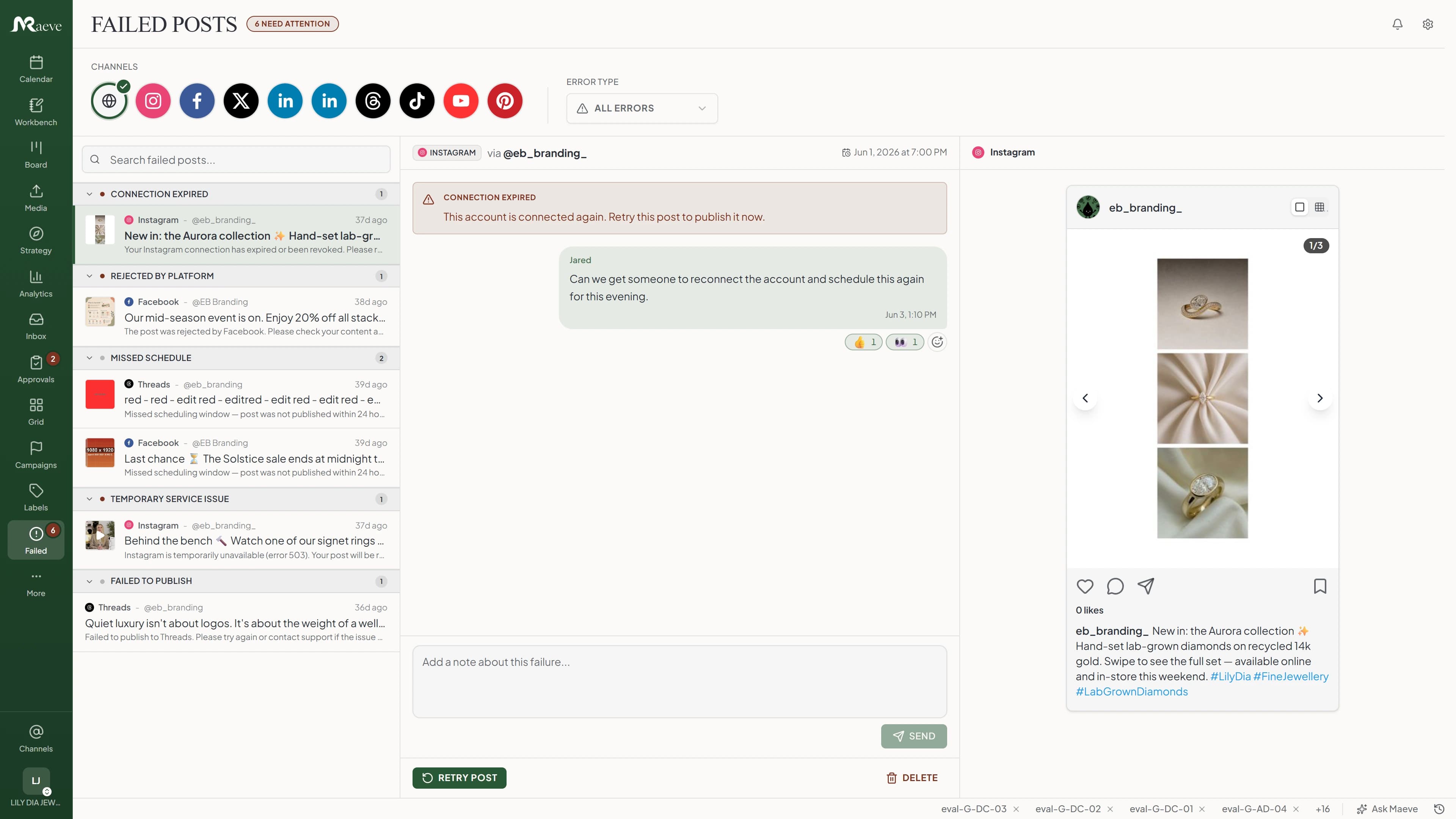
Platforms go down, connections expire, a video misses a requirement. Temporary failures retry on their own, and anything that still will not publish lands in a recovery queue grouped by what went wrong, with the platform's error in plain words and the fix one click away: reconnect, reschedule, or retry. If the account needs reauthorizing, Maeve tells you instead of retrying into the same wall.

Maeve failed-posts view with posts grouped by error type, an Instagram connection error with reconnect guidance, and the post preview

Built For The Way You Work

The platform is the same, the week is not. A creator batching Reels on a Sunday, a cafe owner posting between shifts, and an agency running a dozen client calendars are all doing social media management, and each one wants a different door into it.

The Whole Platform, Feature By Feature

Planning, writing, media, sign-off, publishing, replies, reporting, and recovery, in one workspace.

Content WorkbenchIdeas, research with its sources, content series, notepads, and strategy briefs, so the step between a thought and a scheduled post has somewhere to live.
Social CalendarMonth, week, and list views holding drafts, scheduled posts, published posts, failed posts, channels, labels, and who is doing what.
ComposerOne idea turned into the platform versions: captions, media, titles, threads, first comments, live previews, and the posting options each network supports.
Per-Platform VersionsThe LinkedIn caption can be calmer, Instagram can hold the hashtags in a first comment, YouTube gets a title and tags, X becomes a thread, Pinterest picks a board, all from the same post.
First Comments And Hashtag GroupsSchedule the first comment so the caption stays readable, and drop in saved hashtag sets while you write rather than pasting them from a notes app.
Media RoomImages, videos, thumbnails, and campaign assets in folders with labels, alt text, a usage history, and posts you can build straight from the files.
Grid PlannerThe Instagram profile laid out three wide, with posted, scheduled, and mocked-up tiles together, and drag to reorder before anything goes live.
Tags, Pillars, And CampaignsLabels, content pillars, formats, campaigns, campaign phases, and hashtag groups, any of which can filter the calendar and the board.
Internal ApprovalsTeam review inside the post, with the decision, the policy, the comments, and the version stamp on the same draft. Standard and above.
Client Review LinksA link the client opens on their phone to approve, request changes, comment, or react, with no account and no seat. Standard and above.
Social InboxComments and direct messages from Instagram, Facebook, and Threads in one queue, with the post beside the conversation and internal notes the customer cannot see.
Analytics ReportsAudience, reach, engagement, follower growth, and top posts on Instagram, YouTube, Facebook, TikTok, Pinterest, and Threads, with a PDF export carrying your name on the cover.
Failed Post RecoveryTemporary failures retry on their own, and anything else lands in a queue with the platform's reason, the preview, and a retry once the cause is fixed.
Eight PlatformsInstagram, Facebook, LinkedIn, TikTok, YouTube, X, Pinterest, and Threads, with posts, Reels, Stories, carousels, Shorts, Pins, threads, and first comments where each one supports them.
Workspaces And RolesSeparate workspaces for brands, clients, and side projects, with manager, editor, creator, and viewer roles set inside each one.
Scheduling And PublishingPosts go out at the time you picked, you can batch a week or a month in one sitting, and every channel sits on the same calendar.

Publishes To Eight Platforms

Each platform keeps its own caption, media, and posting options inside the same post, so one idea lands natively on all of them without becoming eight disconnected drafts.

Every Part Connects

A post is not stuck where it was made. It can start as an idea in the workbench, pick up media, move through review, sit on the calendar, publish, and come back through the inbox and the numbers, keeping its recovery path the whole way.

Social Media Management Software FAQ

What Is Social Media Management Software?

It is one place to plan, write, schedule, publish, organize, reply, approve, and report on social content. A scheduler is one part of it. Maeve also has the Content Workbench, the Social Calendar, the Composer, the Media Room, the Grid Planner, the Social Inbox, Analytics Reports, labels and hashtag groups, internal approvals, client review links, and Failed Post Recovery.

How Is This Different From A Social Media Scheduler?

A scheduler handles the publishing queue. Maeve treats scheduling as one layer inside the wider workflow, so the idea, the media, the sign-off, the reply, and the report all sit in the same workspace. If your search is only about publishing posts, the scheduler page is the one to read.

Which Platforms Can Maeve Publish To?

Instagram, Facebook, LinkedIn, TikTok, YouTube, X, Pinterest, and Threads, with feed posts, Reels, Stories, carousels, Shorts, Pins, video Pins, threads, first comments, and the platform-specific options each network allows.

Can I Manage More Than One Social Media Account?

Yes. Plans differ in how many social connections and workspaces they include, so a solo brand, a small team, and an agency with a long client list can each pick the size that fits. The pricing page has the current limits.

Can One Post Be Adapted For Different Platforms?

Yes. Write the main caption in the Composer, choose the platforms, then change the caption, title, thread, media, first comment, or posting options for each one before it publishes.

Does Maeve Include A Content Calendar?

Yes. The Social Calendar shows drafts, scheduled posts, published posts, failed posts, channels, labels, and assignments in month, week, and list views, and it is the surface the rest of the work hangs off.

Does Maeve Organize Media?

Yes. The Media Room stores images, videos, thumbnails, and campaign assets with folders, labels, alt text, and a usage history showing which posts a file is already in, and you can start a post from a file you picked.

Can Teams And Clients Approve Posts Before Publishing?

Yes. Internal approvals keep the team's review inside the post, and a client review link lets an outside reviewer open a batch on their phone to approve, request changes, comment, or react without a paid seat. Both sit on the Standard plan and above.

Does Maeve Include A Social Inbox?

Yes, for Instagram, Facebook, and Threads. Comments and direct messages from those three come into one queue with the post beside the conversation, so a reply has the context it needs. The other platforms publish through Maeve, and their replies stay in their own apps.

Does Maeve Include Analytics And Reports?

Yes, on the six platforms that report data back: Instagram, YouTube, Facebook, TikTok, Pinterest, and Threads. You get audience, reach, engagement, follower growth, and top posts, plus a PDF export with your name on the cover. LinkedIn and X publish through Maeve, and their numbers stay in their own apps.

What Happens If A Scheduled Post Fails?

Temporary failures retry on their own. Anything else lands in a recovery queue with the platform's reason, the post, and the way to fix it and send it again, so nothing gets rebuilt from scratch. If the account needs reconnecting, Maeve says so rather than retrying into the same wall.

Who Is Maeve Best For?

Creators, founders, small businesses, lean teams, and agencies who want one place to manage social accounts instead of splitting planning, media, publishing, inbox, approvals, and reporting across separate tools.

Free Tools For The Work Around Publishing

These are free and you do not need an account to use them.

Built by two founders who run their own brands on it

Run it all from one place