
Your client opens a link and says yes
The slow part of agency work is rarely the work, it's waiting on the client. Screenshots in Slack, a spreadsheet of captions, four email threads with the same subject line and a yes you have to go digging for. Send the posts as one link instead. They see each one the way it'll actually publish and either approve it or tell you what to change. No account, no password, no seat on your plan. It's what makes Maeve approval software with client review built in rather than a separate tool the sign-off lives in.

maevesocial.com/reviews
September content review
“The two ring reveals are the priority, the rest can wait.”
Needs your review
- @lily_dia_jewellery#1Needs your review
Client reveal: the Toi et Moi
26 Sept, 9:00 am
- @lilydia.jewellery#2Needs your review
What 2mm of clearance looks like
27 Sept, 5:00 pm
Everything else
- @lily_dia_jewellery#3Approved
How we set an emerald cut
22 Sept, 9:00 am
Jessrequested changes24 Sept, 11:02 am
“Can we try the cover on the knit sleeve?”
Renshared version 224 Sept, 4:10 pm
Ren
Swapped the cover and moved the price onto the second line.
24 Sept, 4:11 pm
Jess
Much better. Happy with this one.
25 Sept, 8:40 am
Message everyone in the review…
The feedback lands on the post, not in your inbox
When a client wants a different photo, they say so on the post itself, and your reply sits underneath it. The whole back-and-forth stays attached to the thing being discussed, so when you come back a week later there is no hunting through email to work out which crop she meant. They can react with an emoji when a comment would be overkill, and attach a screenshot when words aren't enough.
Approve and Request changes sit right below the thread. Ask for changes and the post flips state, your team fixes it, and the new version goes back up on the same link.

Why your wedding band doesn't sit flush
Samapproved version 321 Sept, 9:12 am
Jaredshared version 321 Sept, 8:40 am
Samrequested changes20 Sept, 4:05 pm
“Swap the cover to the close-up of the gap between the rings.”
They can see what you changed
Ask a client to re-read a caption they already read and you lose a day. When you send a new version, the thread gets a card showing what actually moved: the caption diffed word by word, additions tinted and deletions struck through, and any media that came or went shown as its own strip.
So the second look is about the change rather than the whole post, which is the difference between a same-day yes and another week of waiting.

What changed
Version 3, 21 Sept, 8:40 amCaption
Your wedding band not sitting flush isn't bad luck. It comes down to the setting. It comes down to the profile of the engagement ring beside it. Here is what to ask your jeweller before you buy.
Media
Media edits
Cover changed, Crop changed
Post type
FeedReel
Schedule
Moved from 22 Sept, 9:00 am to 24 Sept, 9:00 am. Approvals stay valid when only the time moves.
Everything they've been sent, in one place
A client working with you for a year has a lot of links in their inbox. They don't have to find the right one. Signing in with the email you invited shows every review you've ever sent them, split into what's waiting on them and what they've already dealt with.
Each row says which workspace it came from, how many posts are in it and how many still need them. Still no password, and still no seat on your plan.
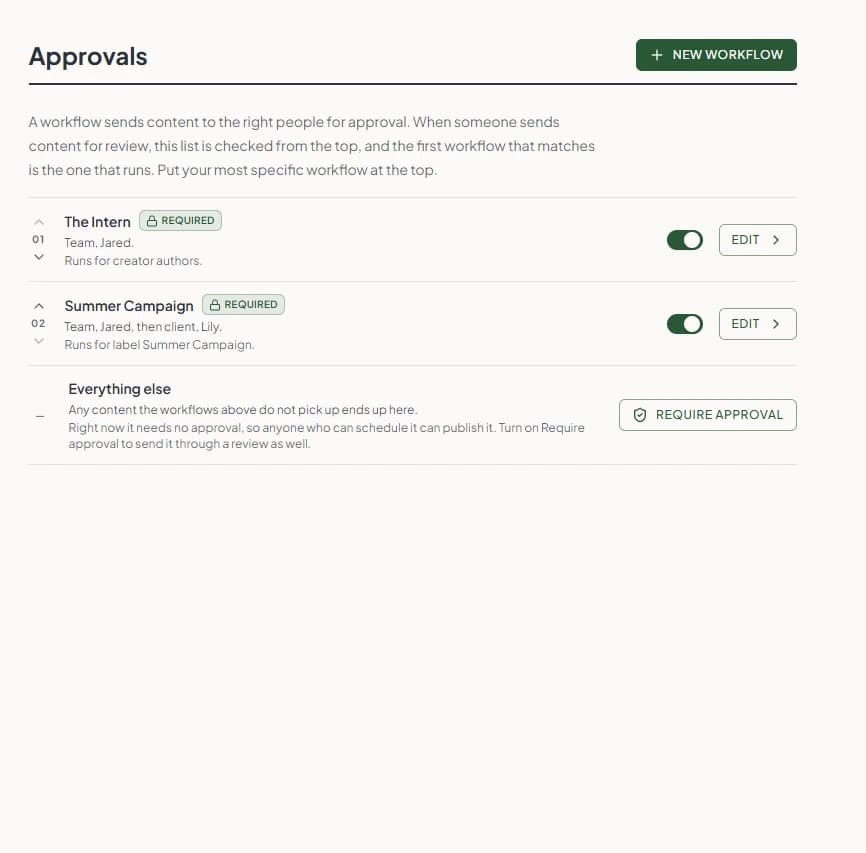
Decide who sees it, and in what order
A workflow sends content to the right people. One can go to your team and stop there, another can go to your team and then on to the client, and each one says plainly who that is: “Team, Jared, then client, Lily.”
Maeve checks the list from the top and runs the first workflow that matches, so the most specific one goes at the top. Anything the list doesn't pick up lands in Everything else, which needs no approval until you say it does.
Know what the client has actually done
Everything out for review sits in one list, split into what's waiting on you, what's with someone else and what's done. A row with the client says so, and names who it's waiting on.
So nobody has to ask where a post got stuck. You can see a client sitting on stage two of two without opening anything, and chase that one rather than all of them.
Approvals
InboxReviewsWhy your wedding band doesn't sit flush
What 2mm of clearance looks like
Client reveal: the Toi et Moi
Three bands, one stack
How we set an emerald cut
What the client can do on the link
Enough to give you a real answer, and nothing that lets them wander into the rest of your workspace.
What you keep control of
The client gets a link. You keep the rules about what that link can do, who it belongs to, and how long it lives.
Questions
What's a client review batch?
A set of draft posts you send to a client through one shareable link. They open the link, scroll through every post laid out the way it'll publish, and either approve, request changes, or leave a comment. Your team stays in Maeve. The client doesn't have an account.
Do clients have to sign up for anything?
No. The link uses a per-batch token. Clients land on the review page, identify themselves with the email address you invited, and they're in. No password, no signup, no extra seat on your plan. The most-upvoted complaint we kept hearing about competitor tools was "my client can't get into yet another platform." The review link exists to skip that.
How is this different from team approval?
Team approval is for staff who already have a Maeve login signing off internally. Client review is for the people outside your team. Most agencies run both back to back: the team clears it, then it goes out to the client.
What can the client do on the link?
Per post: approve, request changes, leave a comment up to 2,000 characters, attach a screenshot or markup, or react with one of five emojis. They see the real native preview for each platform plus the scheduled time, and they can scroll the post list without opening each one. Internal-only notes stay hidden.
Does the client go post by post?
Yes. The review opens as a list of what's waiting on them, and they work through it one at a time, each with its own Approve and Request changes. Decisions are recorded as they go, so they can stop halfway and pick it up later without losing anything.
Does the review link work on a phone?
Yes, and that's how most clients open it. The list of posts and the full preview both work on a phone, so a client can clear a review from a bus stop.
Does the client have to find the right email every time?
No. They can sign in with the email address you invited and see every review you've sent them, split into what's waiting on them and what they've already done. Each one shows the workspace it came from and how many posts still need them.
Any approves, or does every reviewer have to?
Either. Each batch has a policy: any (one approval is enough) or all (every invited reviewer must approve before the post is signed off). Useful if a single brand contact is fine for one batch, but a multi-stakeholder launch needs all of them on the record.
What happens when a client requests changes?
The post comes back to your team with the client's note attached to it. Edit the post, resubmit, and the link surfaces the new version. Earlier decisions are kept with a version number, not overwritten, so the decision a client made always points at the exact version they saw.
Can I override a client decision?
Admins can, and they have to type a reason, which is recorded against the review. Editors and viewers can't. It's an admin-only escape hatch for the days a client goes silent and the campaign is going out anyway.
Can the link expire?
Yes. Give the link an expiry date and it stops working after it. Useful for time-sensitive approvals you don't want sitting in someone's inbox three weeks later for someone else to find. Default is no expiry.
What if the client loses the email?
Resend link from the batch list mails the reviewer a fresh copy. If the batch shouldn't be live at all any more, cancel it from the same row and the link stops working immediately.
Where does the audit trail live?
Approval History under your workspace. Every resolved batch shows who reviewed, who approved, who requested changes, when each decision happened, and the comment thread. Internal team approvals are in the same view, so the chain of accountability is one place per workspace.
Which plan includes it?
Standard and Premium. Internal team approvals (no external client) come on Basic and above; the external-client batch flow is the Standard-tier feature. Pricing page has the comparison.
Does it cover all nine platforms?
Reviewers see a native-style preview for Instagram, Facebook, Threads, LinkedIn, X, TikTok, YouTube, Pinterest and Google Business Profile, including Reels, Stories, carousels, threads and first comments. What they see is what publishes, give or take how the network renders it on the day.
Is the agency white-labelled on the review page?
Not yet. The review page is unbranded and clean, with no Maeve header and no "powered by" stripe, but a custom logo and brand colors on the link itself isn't shipped. It's a known request and on the roadmap. Honest scope.