
Social media scheduler for TikTok
Schedule TikTok videos and photo posts instead of holding your phone at 6pm waiting to post. Add the media, write the caption, scrub to the cover frame you want, and set the comment and disclosure options, which come straight from your own account so you cannot pick something TikTok will refuse. It publishes at the time you set, or lands in your TikTok drafts when it needs finishing in the app.
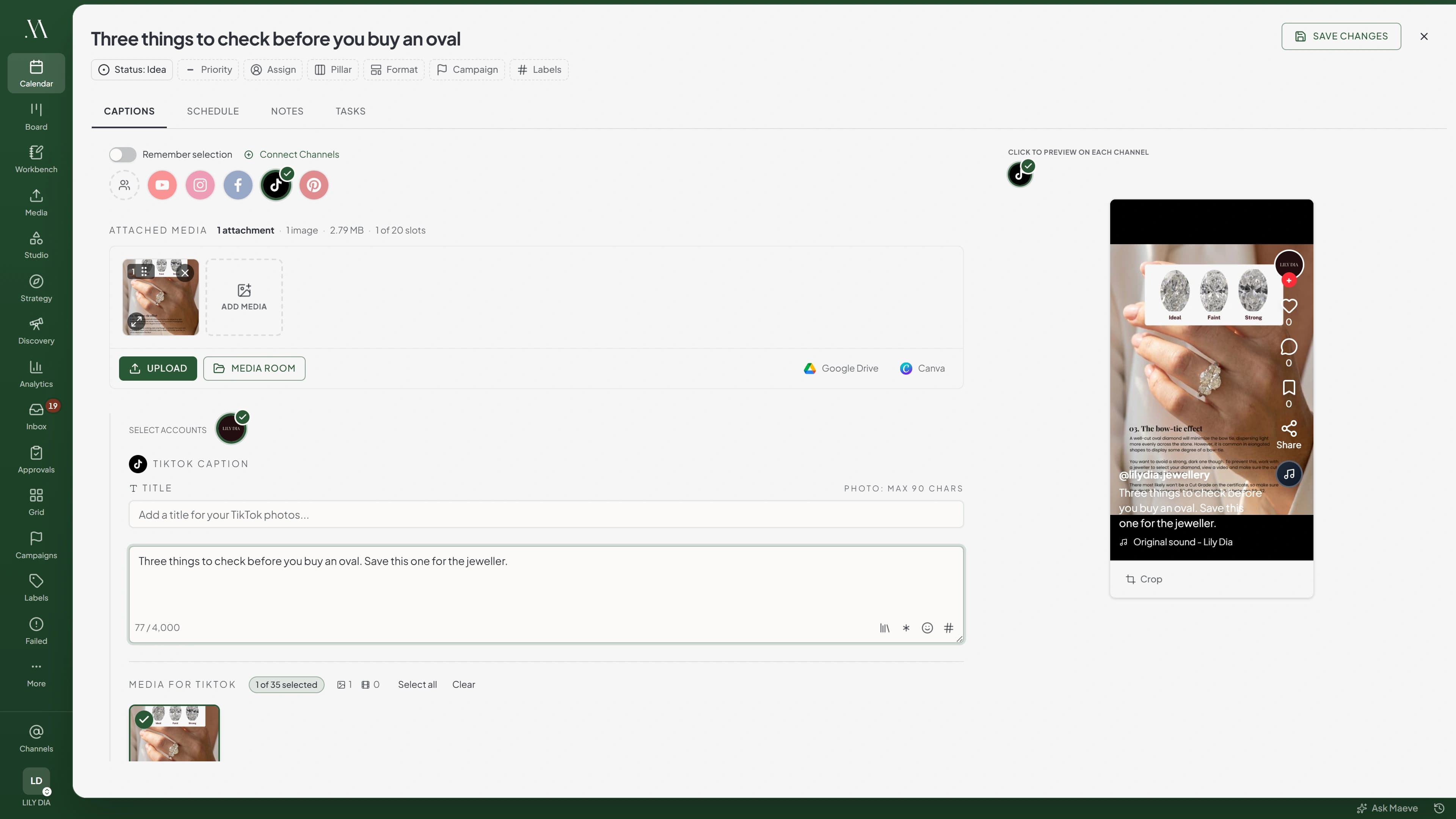
Video or photos, with TikTok's rules in view
A video post is one video, 3 seconds to 10 minutes, with the caption and a cover frame you scrub to yourself instead of whatever still TikTok happened to grab. A photo post is one image or a carousel, with a title, your slide order kept and a cover image you choose.
TikTok will not take video and images in the same post, so the composer keeps that in front of you while you build. It also catches the things TikTok is quietly fussy about: a photo outside its dimensions gets a prompt to crop before it queues, and when TikTok reports a maximum video length for your account, Maeve holds you to that one rather than a generic number.
Handling this alongside Reels and Shorts from one draft is what makes it a scheduler for creators as much as brand accounts.
The settings TikTok actually allows you
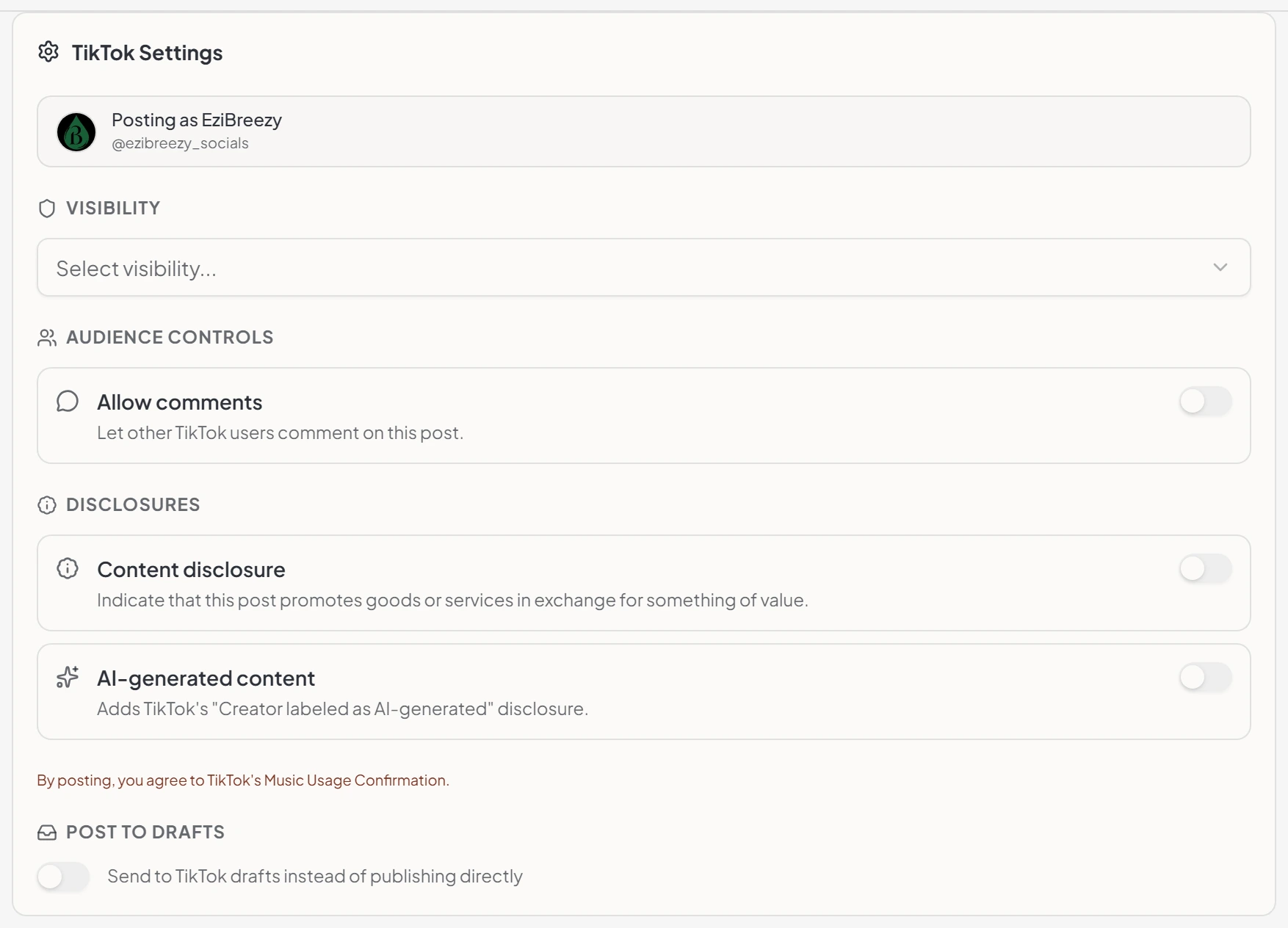
Maeve asks TikTok what your account can do and shows what comes back. If comments, duets or stitches are disabled on your account, the switch is locked rather than letting you set something that will not stick. Duet and stitch only appear on video posts, because TikTok does not offer them on photos.
Disclosures are built in the way TikTok wants them. Say whether the post promotes someone else, your own business, or both, flag AI-generated content separately, and the rules on the combinations are enforced here rather than discovered at publish time. Branded content cannot go out private, and a disclosure with neither type chosen is blocked.
One thing worth knowing up front: a direct video post always publishes public. TikTok's endpoint has no privacy setting at all, so Maeve shows Public rather than offering a choice that would be ignored. Photo posts do get the full visibility list.
Pick the track before you post
Sound is most of why a TikTok works, and picking it after the fact is not really an option when the post is scheduled. Browse TikTok's Commercial Music Library from inside the composer, pick a track for a direct video post, and set how much of the mix is the music against your original sound.
Photo posts have their own setting for this. TikTok can add music to them automatically, and that is on unless you turn it off.
Hand it back to TikTok to finish
Some posts need a native effect, a sound, or a privacy choice you can only make inside the app. Send to TikTok drafts puts the upload in your TikTok inbox with the caption, the media and the cover frame already in place, and you finish it there whenever you are ready. It works for videos and photo posts alike.
If TikTok does not return publishing options for your account, Maeve switches the post to drafts and says so in the composer, rather than letting you schedule something that was never going to publish directly.
See which videos actually held people
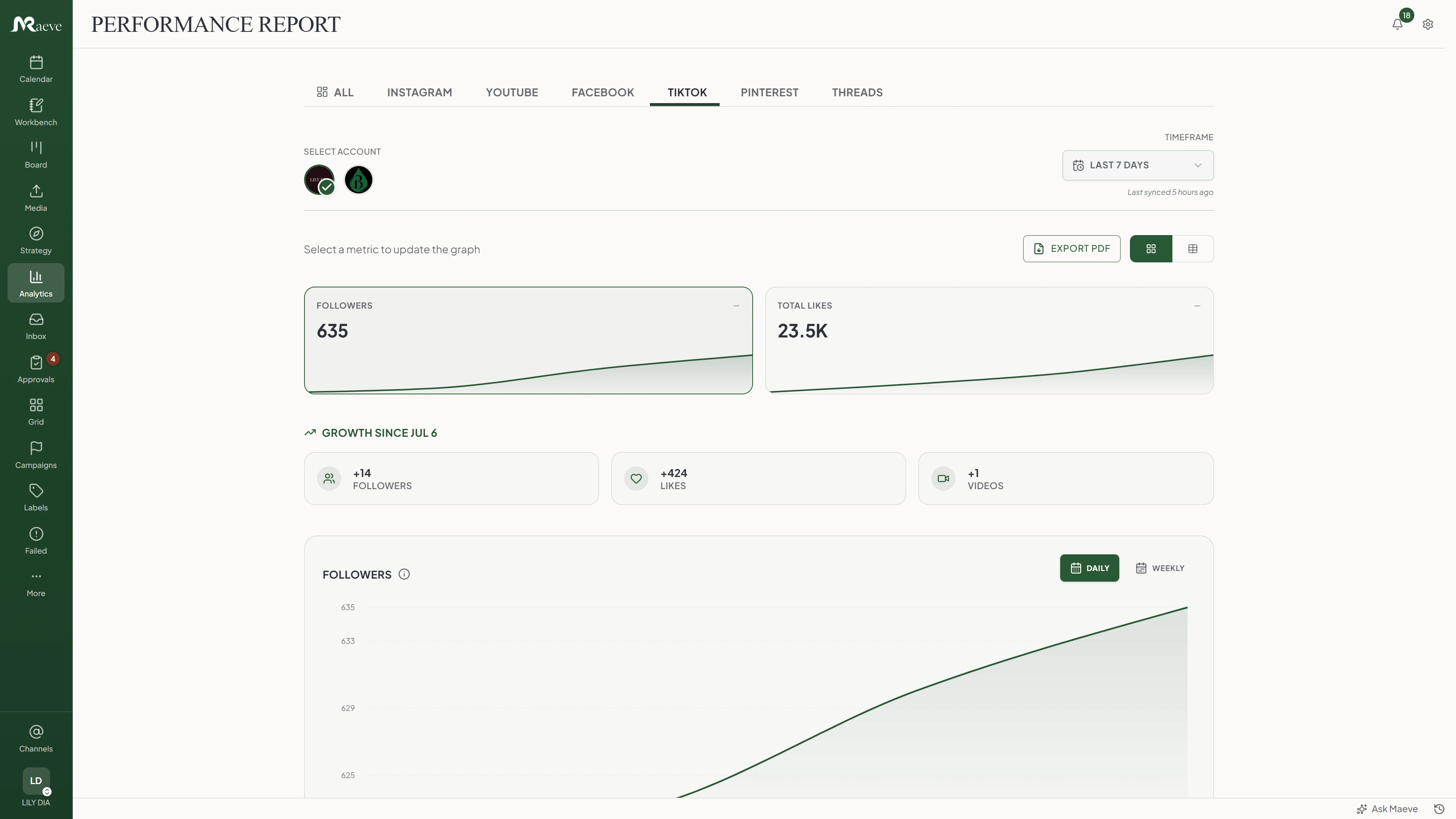
Followers, views, engagement, engagement rate and total likes, with channel stats underneath for videos, following, likes gained and new videos. Per video you get views, likes, comments, shares, saves, reach, average watch time and full watch rate, which is the share of people who stayed to the end and the number most creators actually chase.
There is also an audience breakdown by gender and country, a heatmap of when your posts do best, and a comparison against the TikTok-reported average for your business category.
Being straight about one thing: TikTok publishes no account-level reach or impressions, so you will not find those here. The views and engagement figures are lifetime totals for the videos published inside your chosen window rather than activity that happened during it. On Standard and above the month exports as a branded PDF with the audience breakdown and your top three videos.
The comments come back to you
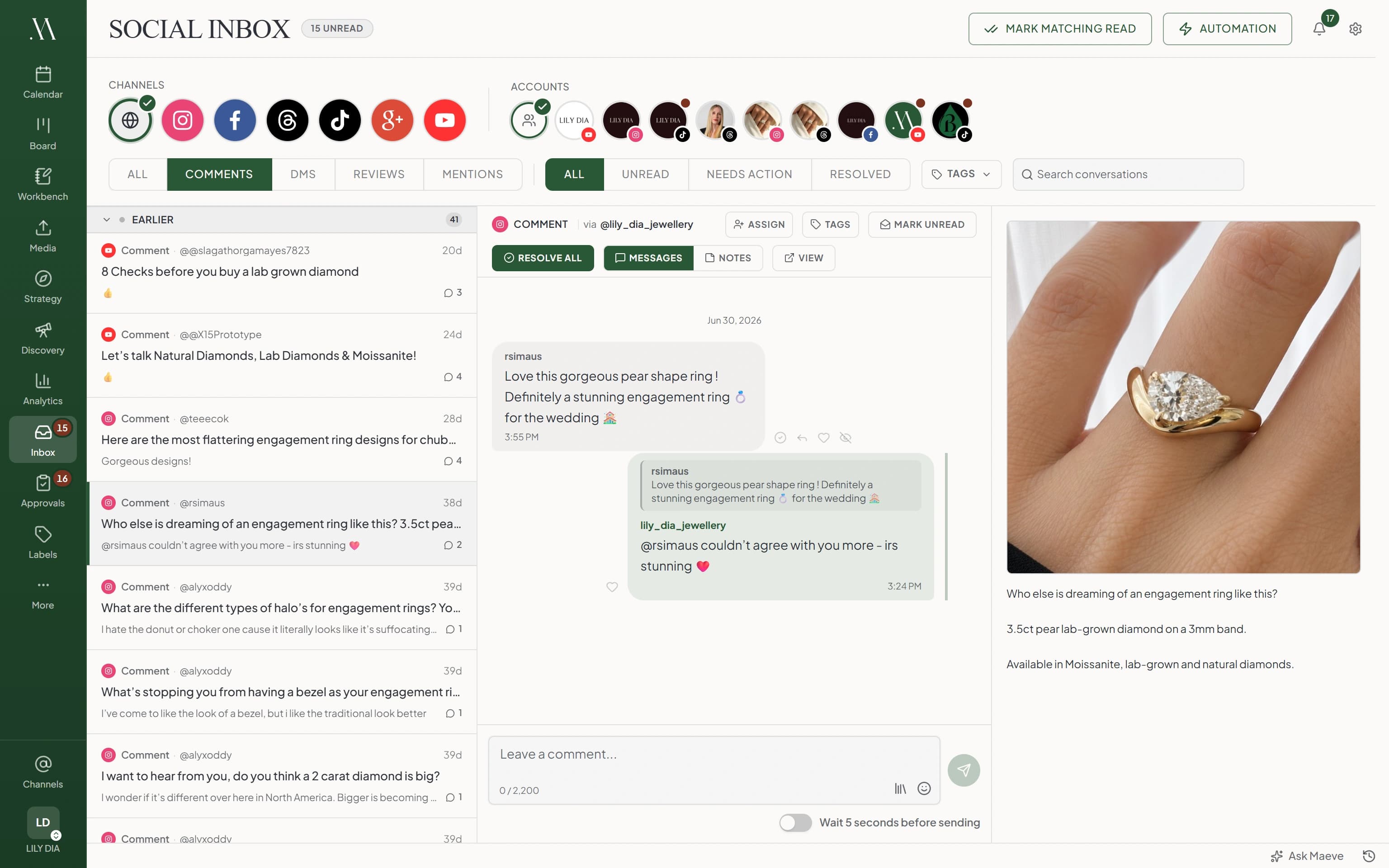
Comments on your videos land in the Social Inbox, next to Instagram, Facebook, Threads, YouTube and Google. Reply, hide one, delete one, or like it. TikTok and Instagram are the only two networks where liking a comment is possible at all, so this is not a thing most tools can offer.
Comments arrive by webhook rather than a poll, so they turn up as they happen, and ninety days of history comes in when you connect. Videos by other creators that tag you arrive too, with their thumbnail and numbers attached.
Two honest notes. A reply always answers a specific comment, because TikTok gives no way to start a new thread on your own video. And there are no TikTok direct messages for any tool to reach.
Find the trend before you plan the month
Discovery has TikTok's trending hashtags ranked by country and industry, with how each one has moved over thirty days. That part works before you have connected anything at all, so you can look at it on day one.
Connect a TikTok account and you also get the trending music chart with audio you can play in the browser, TikTok's own trending search terms with related-term expansion, and hashtag suggestions from a keyword in twenty languages that go straight into a caption.
What the TikTok scheduler does
Built around how TikTok actually behaves: media required, settings read per account, a native handoff for the posts that want finishing in the app.
The limits, before you hit them
TikTok's rules and ours, in one place.
Questions
What can Maeve schedule on TikTok?
Video posts and photo posts. TikTok needs media on every post, so there is no text-only option. A video post is one video. A photo post is one image or a carousel, and you can attach up to twenty items to a post here.
Can I schedule TikTok videos?
Yes. Add the video, write the caption, scrub to the cover frame you want, and put it on the calendar. Direct publishing works when TikTok returns publishing options for your connected Business account. If it does not, Maeve switches the post to drafts rather than failing on the day.
Can I choose who sees a TikTok video?
Not for a direct video post. TikTok's publishing endpoint has no privacy setting, so a direct video always goes out public, and Maeve says so rather than letting you pick something that will be ignored. Photo posts do get the visibility choice, drawn from what TikTok allows on your account. If a video needs to go out privately, send it to drafts and set it in the app.
Can I schedule TikTok photo posts or carousels?
Yes. One image or a carousel, with your slide order kept, a cover image you pick, a TikTok crop and a title of up to 90 characters. TikTok allows 35 photos on a post and Maeve's composer takes twenty.
Can I mix videos and photos in one TikTok post?
No. TikTok will not take a post with both, so the composer stops you while you are building rather than letting it fail at publish time.
Can I control comments, duets and stitches?
Yes, and Maeve asks TikTok what your account is allowed to do first. Comments can be turned off on any post. Duet and stitch are video-only settings, because TikTok does not offer them on photo posts. If TikTok has any of them disabled on your account, the switch shows as locked instead of letting you set something that will not stick.
Can I add music from TikTok?
Yes, on direct video posts. Browse TikTok's Commercial Music Library from the composer, pick a track, and set how much of the mix is music against your original sound. Photo posts have a separate auto-add music setting, which is on by default.
What does sending to TikTok drafts do?
It puts the upload in your TikTok inbox instead of publishing it, with the caption, media and cover frame already in place. Useful when the post needs a native effect, a sound, or a last look inside the app. It works for both videos and photo posts.
Does Maeve support TikTok disclosures?
Yes. Turn content disclosure on and say whether the post promotes someone else, your own business, or both, and there is a separate switch for AI-generated content. Maeve enforces TikTok's rules on the combinations, so branded content cannot go out private and a disclosure with neither type chosen is blocked before it publishes.
Do TikTok comments come into the Social Inbox?
Yes. Comments on your videos arrive in the Social Inbox by webhook rather than polling, and you can reply, hide, delete and like them from the workspace. TikTok and Instagram are the only two networks where liking a comment is possible at all. Ninety days of history backfills when you connect. There are no TikTok direct messages, and a reply always has to answer a specific comment.
What TikTok analytics do I get?
Followers, views, engagement, engagement rate and total likes in analytics and reports, with channel stats for videos, following, likes gained and new videos. Per video: views, likes, comments, shares, saves, reach, average watch time and full watch rate. There is also an audience breakdown by gender and country, a best-times-to-post heatmap, and a comparison against the average for your business category.
Can I see what is trending on TikTok?
Yes, in Discovery. Trending hashtags by country and industry work without connecting a TikTok account at all. Connect one and you also get the trending music chart with audio previews, TikTok's trending search terms, and hashtag suggestions you can paste straight into a caption.
Is there a limit on how much I can post in a day?
TikTok allows 15 publishes per account in a rolling 24 hours. Maeve counts what each account has used and stops a batch before it burns through the allowance, rather than letting the last few fail.
What permissions does connecting ask for?
Ten are required, covering your profile, publishing and analytics, and declining one of those refuses the connection rather than setting it up half working. Five more are optional: comment reading, comment management, Spark, keyword discovery and mention monitoring. You can turn those down and still publish and report, you just lose the feature attached to each.
What happens if a scheduled TikTok post fails?
It lands in Failed Posts with the media, the settings and TikTok's own reason. Maeve separates a policy or eligibility block from a connection that needs reauthorising, and when TikTok is rate limiting it schedules the retry for when the limit lifts instead of burning attempts.