
Connecting and Publishing to TikTok
Updated
Connect the TikTok account you want to publish from. Check the signed-in username before approving access.
In Maeve, choose direct publishing to publish on schedule, or send the post to TikTok drafts and finish it in the TikTok app.

- 1Pick the network
- 2Approve on the network
- 3Connected
Connect available channels
3 / 20Before You Connect
You need to be signed in as the account holder in the browser you use to connect. Check the username before you continue because TikTok authorizes the account already signed in there.
Available visibility settings and publishing options depend on the connected account. Maeve displays the options TikTok returns for that account.
Connecting an Account
- 1
Check which TikTok account is signed in
Open TikTok in the same browser and confirm the username. Maeve connects the account that TikTok authorizes.
- 2
Open Settings, then Social channels in Maeve
Select TikTok from the connection grid.
- 3
Sign in on TikTok
Sign in on TikTok's sign-in page. Maeve does not receive or store your password.
- 4
Approve the requested permissions
Maeve checks the permissions needed for account details, insights and publishing before it finishes the connection. Optional permissions control features such as comments, Spark authorization and discovery data.
- 5
Confirm the Connected Account
Check the connected handle and profile picture. The composer shows whether the account supports direct publishing or requires delivery to drafts.
What Maeve Asks Permission For
| Permission | What stops working without it |
|---|---|
| Publish and upload video | Maeve cannot publish posts |
| Profile and account type | Maeve cannot read the handle or confirm the account is professional |
| Video list and insights | Analytics and posting-time data are unavailable |
| Comment list and manage | TikTok comments are unavailable in your inbox |
| Creator insights | Audience data is unavailable |
| Spark authorization | Spark boosting a post from Maeve stops working |
| Keyword discovery and brand insights | TikTok keyword, hashtag and sound research stops working |
Direct Posting and Drafts
Select TikTok in the composer, then choose how to deliver the post:
- Direct publishing: Maeve publishes at the scheduled time. Video posts use Public visibility. Photo posts can use other visibility options allowed by your account.
- Send to TikTok drafts: Maeve sends the media to your TikTok inbox. Open TikTok to add the caption, choose visibility, and finish publishing.
Turning on draft delivery clears and locks the caption and title fields. If you selected a music track in Maeve, remove it when prompted. Add the caption, title, and music in TikTok instead.
What You Can Publish
Attach one video or up to 35 images. Use separate posts for video and photos.
TikTok section
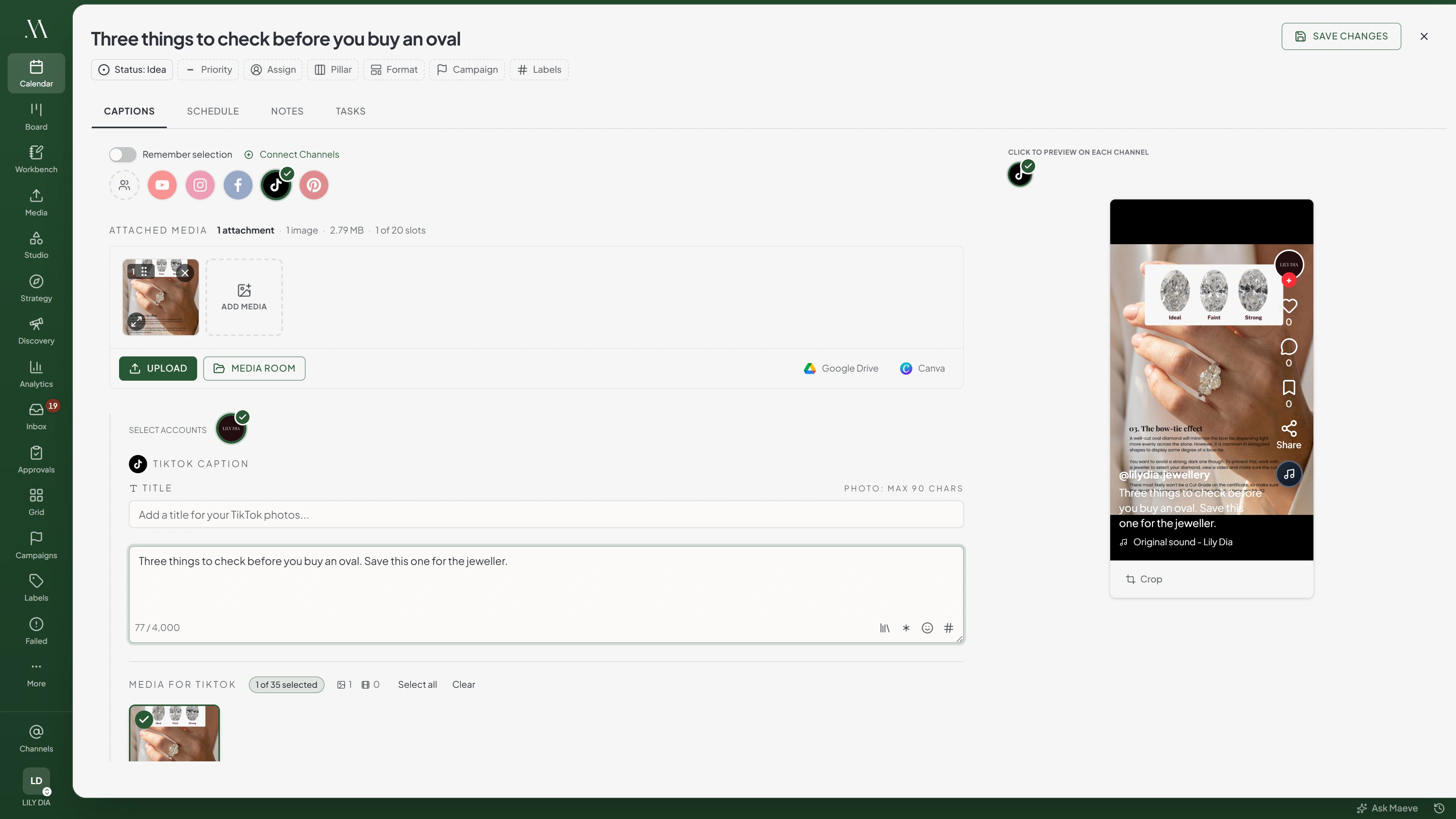
TikTok Caption
Write for TikTok...
0 / 2,200A photo post gets 4,000 instead.
Media for TikTok
0 of 35 selectedUp to 35 photos, or one video, never bothTikTok Settings
- Visibility
- Audience Controls
- Disclosures
- Turn on drafts
Will not publish without
- A visibility level
- A content disclosure answer
- Video. One video, with a cover frame you choose
- Photo posts. Up to 35 images, with a cover image you choose, and music TikTok can add on its own
The Limits
| What | Limit |
|---|---|
| Video caption | 2,200 characters |
| Photo post caption in Maeve | 4,000 characters |
| Title | 90 characters |
| Items per photo post | 35 |
| Video size | 1GB, though the composer does not stop you until 4GB |
| Video length | 3 seconds to 10 minutes |
| Video resolution | At least 360 by 360 |
| Video formats | MP4, WebM and MOV |
| Image size | 20MB |
| Image dimensions | Within 1080 by 1920 portrait, or 1920 by 1080 landscape |
| Image formats | JPEG, WebP and PNG |
Check the maximum duration shown for your account. If TikTok returns a limit below 10 minutes, that lower limit applies.

Transform
Aspect Ratio
Audience Controls and Disclosures
Set Comments, Duet, and Stitch for the post. If a control is disabled in your TikTok account settings, it is also disabled in Maeve. Change the account setting in TikTok before enabling it for a post.
Duet and Stitch apply to videos. Photo posts offer comments but do not send the AI-generated content flag.
If you turn on Content disclosure, select Paid partnership, Promoting your own business, or both. You must answer this before publishing. Paid partnership cannot be combined with Private visibility.
Review the TikTok consent statement shown with your disclosure selection. It includes the Music Usage Confirmation and, for paid partnerships, the Branded Content Policy.
What Will Stop a Post
- A post with no media. TikTok has no text-only post
- Images and video in the same post. TikTok takes one or the other. Split it into two posts
- A video over 1GB. Compress or trim it before scheduling. The composer allows files up to 4GB, but publishing rejects files over 1GB
- A video shorter than 3 seconds, or longer than the maximum TikTok reports for that account
- A missing visibility or content disclosure answer. Both block publishing
- A video that is not MP4, WebM or MOV
- An image over 20MB, or outside 1080 by 1920 portrait or 1920 by 1080 landscape. Crop it in the composer or the Media Room first
- A non-public visibility on a direct video post. Send it to drafts instead

TikTok will refuse
Select a visibility level before publishing to TikTok.
6 of the ones people hit
When the Connection Breaks
If an account shows Needs reconnecting, restore its connection before the next scheduled post is due.
- Open Settings, then Social channels.
- Find the affected account and select Reconnect.
- Sign in to the same account and approve the requested permissions.
Reconnecting keeps scheduled posts attached to the account. After reconnecting, retry any posts that failed while the connection was unavailable.
Your connected channels
2TikTok
@yourbrand
TikTok Business@yourotherbrand
Needs reconnectingThis account's connection has expired. Reconnect it in Settings and try again.
Errors TikTok Returns
| Error message | What to do |
|---|---|
| TikTok direct video content must be public | The video is scheduled to publish directly with a non-public visibility. Set it to public, or send it to TikTok drafts and choose the visibility in the app |
| Video exceeds TikTok's 1GB limit. Current size: 2.30GB | The message carries the actual size. Compress the video or trim it |
| TikTok requires a Business account for direct publishing. Convert the profile in TikTok, then reconnect it in Settings | The account is not a Business account |
| TikTok returned a different account. Please reconnect and authorize the TikTok account already shown in Maeve | You signed into a different TikTok account while reconnecting |
| TikTok posts cannot mix videos and images | The post has both. Split it into a video post and a photo post |
| TikTok requires at least one media item before publishing | The post is a caption on its own. Attach a video or images |
| TikTok rejected the photo post | TikTok refused one of the images. The message carries its reason, which is usually dimensions or format |
| This account's connection has expired | Reconnect the channel in Settings, Social channels, then retry the post |
Questions
Why can I not schedule a private TikTok video?
Direct video publishing uses Public visibility. Turn on Send to TikTok drafts, then open the video in TikTok and choose visibility before publishing.
Can a TikTok photo post be private?
Yes, if TikTok offers that visibility for your account. The Public requirement applies to direct video posts.
Why is Send to TikTok drafts locked on for my account?
TikTok has not returned direct publishing options for the account. Send the media to drafts and finish publishing in TikTok.
Why are the Duet or Stitch toggles greyed out?
They are disabled in the connected account's TikTok settings. Change those settings in TikTok before enabling them for a post.
How long can a TikTok video be?
Use a video from 3 seconds to 10 minutes. If TikTok reports a lower maximum for your account, use that limit.
Can I put images and a video in one TikTok post?
No. Attach one video or up to 35 images. Create separate posts if you need both.
Why did my music selection disappear when I turned on drafts?
Music selected in Maeve is not included in draft delivery. Remove the selected track when prompted, then choose music in TikTok.