
Social media scheduler for Facebook
Schedule Facebook Page posts, Reels and Stories, including link posts that keep their call-to-action button. Facebook is the one that gets forgotten, and then a customer looks up the Page and the last post is from March. Write the caption, add the photo, the video or the link, and drop it on the calendar with everything else.
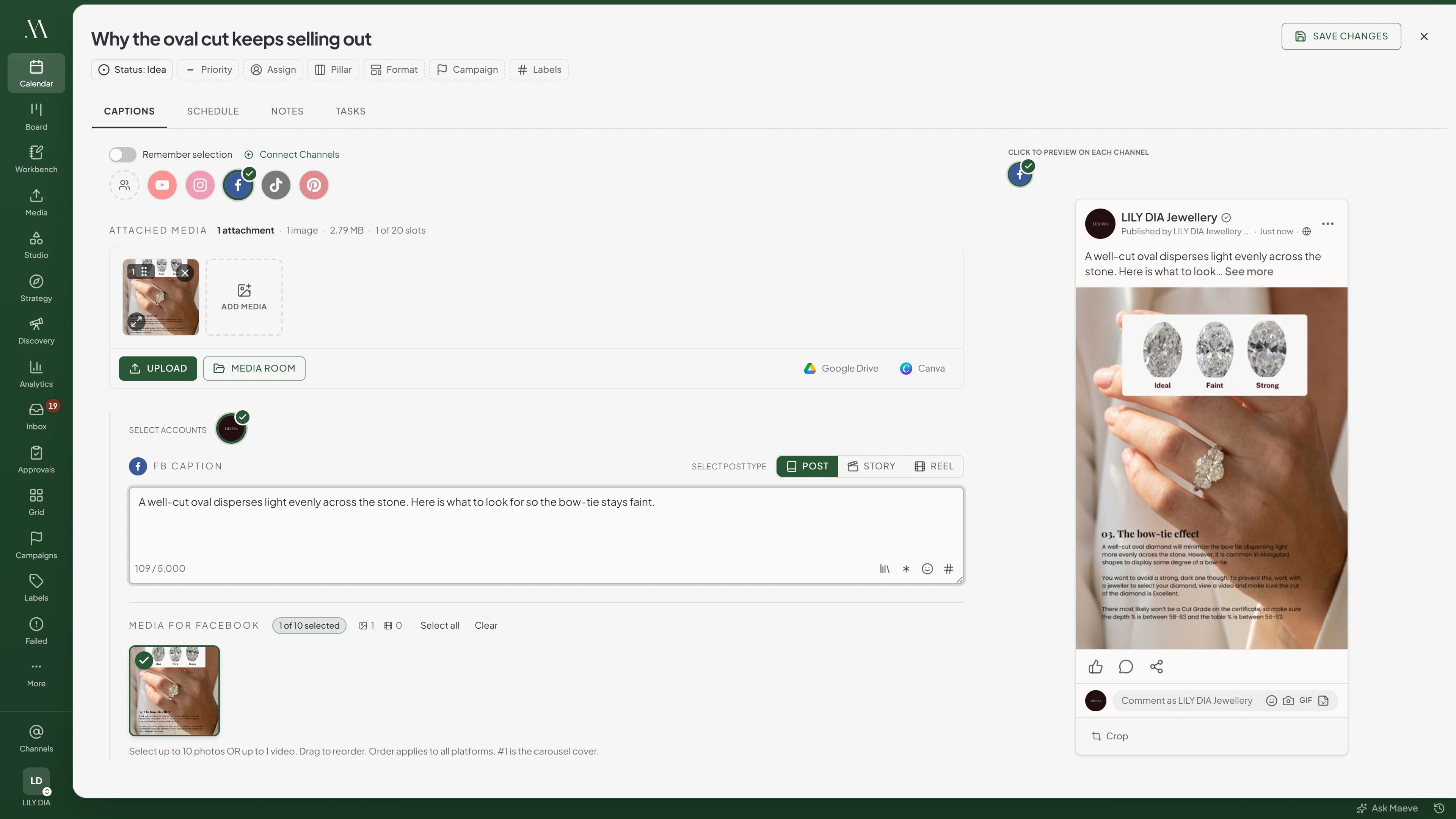
Every shape a Page post takes
Text on its own for the message that carries itself. One image, up to ten, or one video, with a crop set for Facebook when the frame needs to be different here. Facebook will not take images and video in the same post, and Maeve says so while you are building it rather than on the day.
Reels take one vertical video between 3 and 90 seconds. Stories are where the time goes on most tools, because six frames means six posts. Here you attach the set to one Story post and Maeve splits them, publishing each a second after the last so the run holds its order.
A first comment can go on a feed post, so the supporting note or the hashtag group lands underneath a few seconds after publishing instead of sitting in the caption.
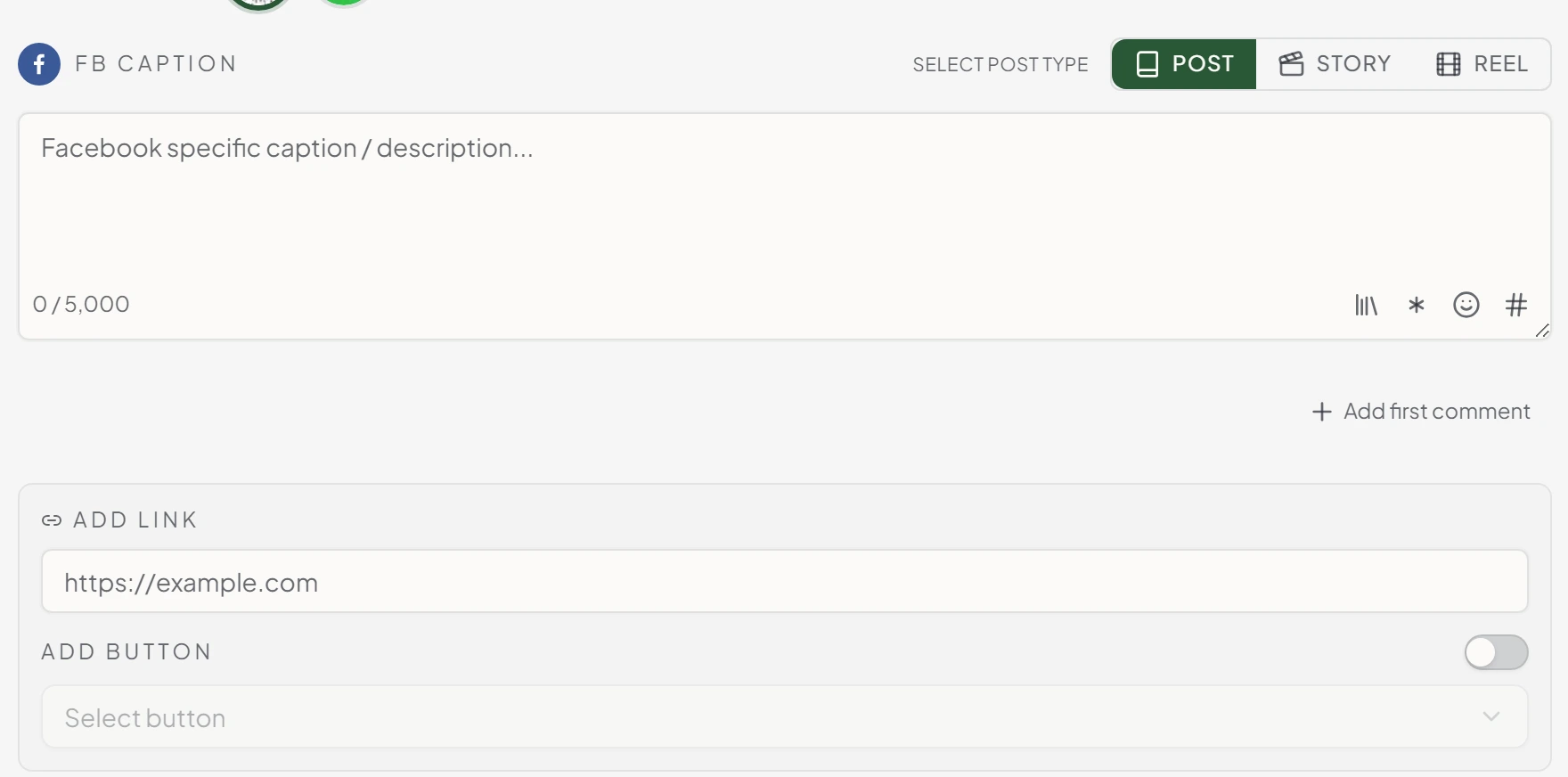
The link post keeps its button
A post built to send people somewhere should have the thing that sends them. On a feed post with no media, add the URL and turn the button on: Learn More, Sign Up, Download, Watch More, Book Travel, Listen Music, Use App or Install App. Leave it off and the link goes out on its own.
The rest of the Facebook panel sits beside it. The post type, the Facebook caption at 5,000 characters, and the first comment. Attach media and the link field switches off, because Facebook stops treating it as a link post the moment there is a photo on it.
Fix the typo after it has gone out
Everyone has published a post and spotted the mistake ten seconds later. Facebook is the only network in Maeve where you can just fix it. Edit the caption on the live Page post from the workspace, or take the post down, without opening Facebook to do it.
Maeve also stores the permalink as the post publishes, so going to look at the real thing is one click rather than a scroll down the Page.
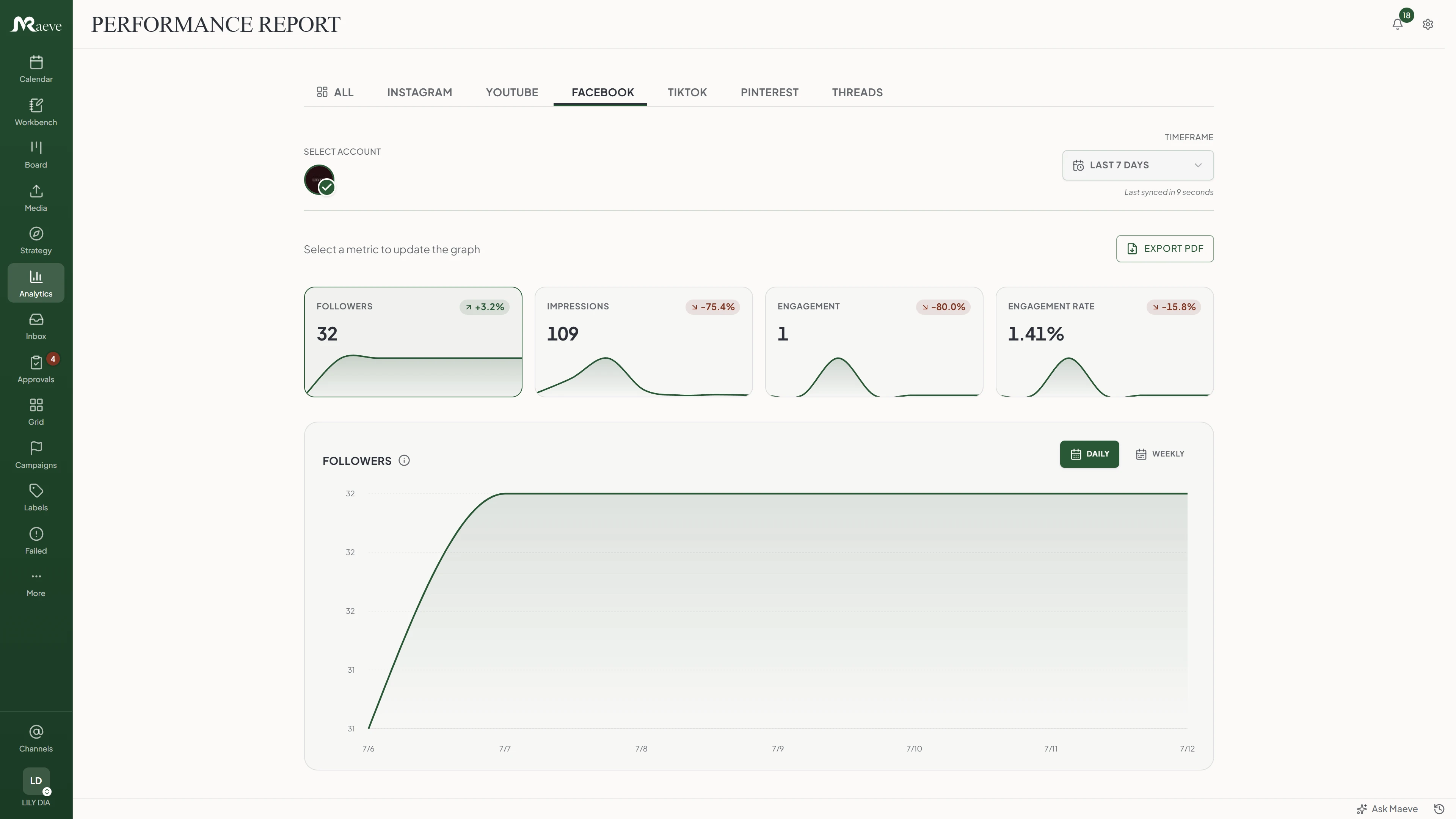
See what earned attention
For the Page: followers, impressions, reach, page views, video views, engagement and engagement rate, with followers gained and lost counted separately so a flat total does not hide what happened underneath it. For each post: reactions, comments, shares, clicks and views.
Audience data is top cities and top countries. Facebook gives out no age or gender breakdown for a Page, unlike Instagram, so you will not find one here. Post-level history also builds up from the day you connect rather than being backfilled, so the first couple of weeks fill in as you go.
On Standard and above the month exports as a branded PDF with the Page metrics, the top cities and countries, and your best posts.
The Page conversation comes back to you
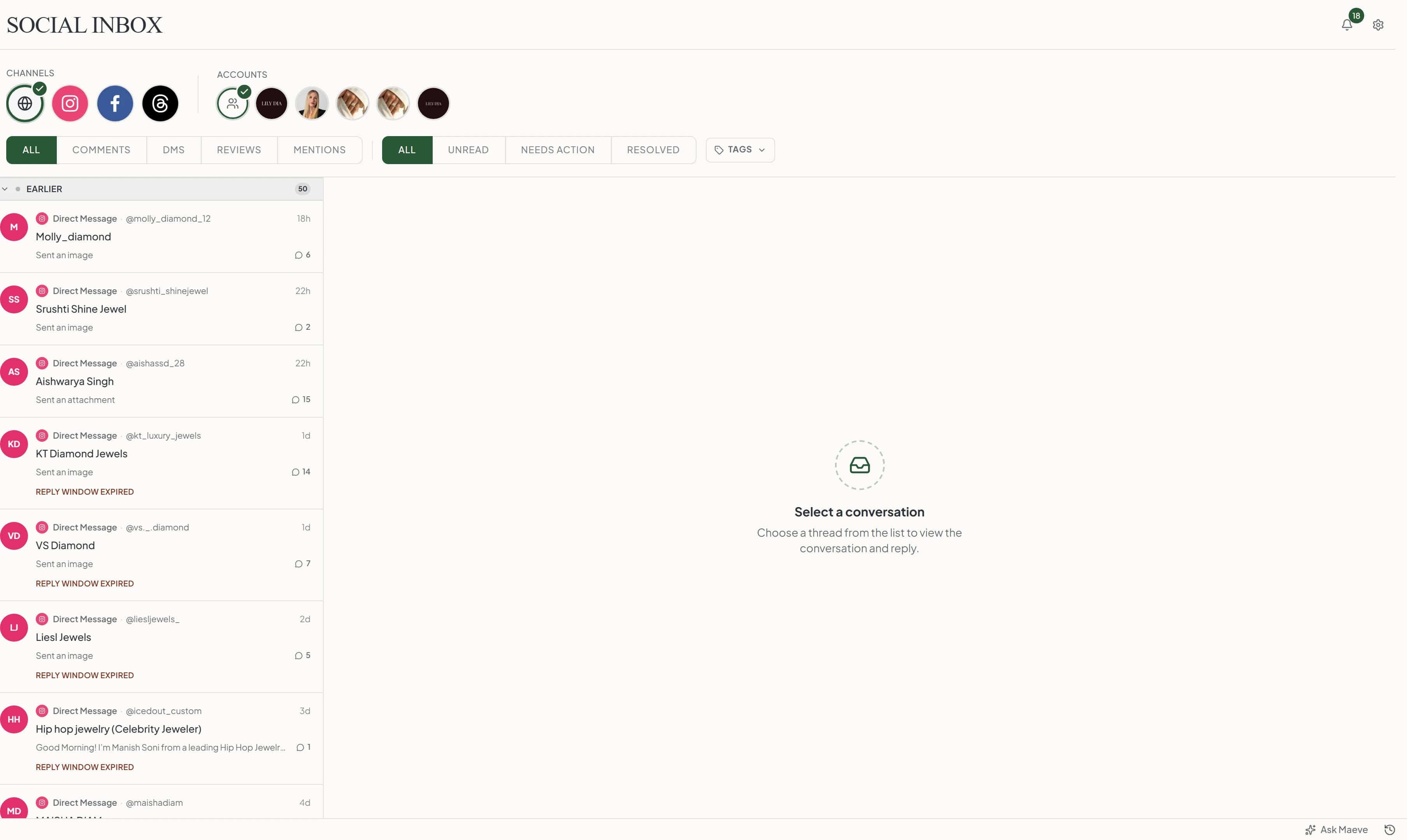
Comments, direct messages, mentions and Page recommendations all land in the Social Inbox, so the post does not vanish the moment it publishes. Open the thread, see the Page context, reply from the workspace, and leave an internal note for whoever picks it up next.
You can hide a comment or delete it outright, which Instagram and Threads do not allow. The one thing to know is Meta's rule on messages: you have 24 hours from the customer's last one to reply. The thread says when that has run out, so you find out in the list rather than after typing an answer.
What the Facebook scheduler does
From the plain Page update to the Reel, with the button, the first comment and the recovery path all attached to the post.
The limits, before you hit them
Facebook's rules and ours, in one place.
Questions
What can Maeve schedule on Facebook?
Page posts, Reels and Stories. A feed post can be text on its own, a link with a button, one image, up to ten images, or one video. A Reel is one vertical video. A Story is image or video, and a set of media becomes a run of frames.
Can I schedule text-only Facebook posts?
Yes. Write the caption, pick the Page and put it on the calendar. Nothing else is required, so the plain Page update is as quick to schedule as anything else.
Can I schedule a link post with a button?
Yes, on a feed post with no media. Add the URL, turn the button on and pick it: Learn More, Sign Up, Download, Watch More, Book Travel, Listen Music, Use App or Install App. Leave the button off and the link posts on its own. Attach any media and Facebook stops treating it as a link post, so the field switches off.
Can I schedule Facebook Reels?
Yes. One vertical video, between 3 and 90 seconds, as an MP4. Maeve checks all of that before the post queues rather than letting Facebook reject it on the day.
Can I schedule Facebook Stories?
Yes. Attach several images or videos to one Story post and Maeve splits them into separate frames, publishing them a second apart so the order holds. You build one post instead of six. Video frames run 3 to 60 seconds.
Can I schedule a first comment on Facebook?
Yes, on feed posts. Write it in the composer with the supporting note or the hashtag group in it, and Maeve posts it a few seconds after the post goes live. Stories do not take one, because Facebook gives them nothing to comment on.
Can I fix a Facebook post after it has published?
Yes, and Facebook is the only network here where you can. Edit the caption on a live Page post from the workspace, or take the post down. Meta only allows this on posts that went out through Maeve.
Is there a limit on how much I can post in a day?
Facebook allows 35 publishes per Page in a rolling 24 hours, and 30 of those can be Reels. A Story with six frames spends six. Maeve counts what each Page has used and warns you in the composer when you are down to the last five.
Can Facebook and Instagram posts be planned together?
Yes. Pick both in the same composer and each gets its own caption, media, post type and settings. They connect separately though, so a Facebook Page does not bring an Instagram account with it.
Do Facebook comments and messages come into Maeve?
Yes, and more than that. Comments, direct messages, mentions and Page recommendations all arrive in the Social Inbox. You can reply, hide a comment, or delete one, which is something Instagram and Threads do not allow. Meta only lets you answer a message for 24 hours after the customer last wrote, and the thread tells you when that has run out.
What Facebook analytics do I get?
For the Page: followers, impressions, reach, page views, video views, engagement, engagement rate, and followers gained and lost counted separately, all in analytics and reports. For each post: reactions, comments, shares, clicks, views and engagement rate. Audience data is top cities and top countries, because those are the only two Facebook gives out.
Do I need a Facebook Page, and what does connecting ask for?
A Page, yes. Personal profiles and Groups cannot be connected. Connecting asks for publishing, comments and messages, insights and ads access together, and all of it is required, so declining one part refuses the connection rather than setting it up half working. Every Page you manage can be connected, each as its own channel.
What happens if a scheduled Facebook post fails?
It lands in Failed Posts with the caption, media, Page, timing and the reason Facebook gave all kept together. Fix the one thing that broke, or reconnect the Page, then retry without rebuilding the post.