Maeve Social The All-in-One Social Media Project Management Platform

Running social means five tools open at once: the plan, the scheduler, the approval spreadsheet, the inbox, the analytics. Maeve does the whole job in one place: plan, approve, publish, reply, report.

3 days free. Cancel anytime.

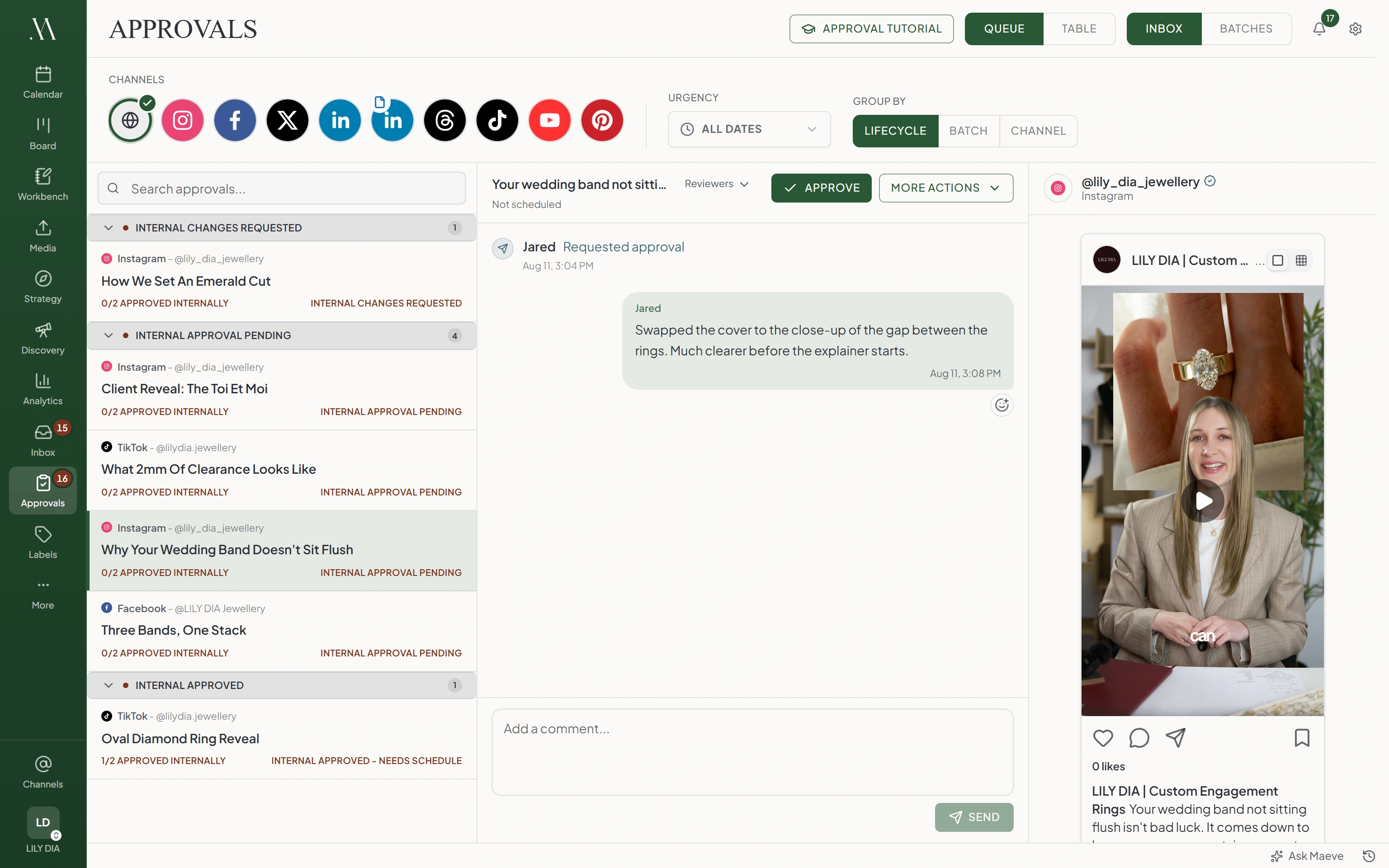
Maeve approvals workspace with the app sidebar, a queue of posts grouped by review stage, and an open post showing its preview and internal approval thread side by side

So what does Maeve Social do?

The Content Editor

  • Instagram
  • Facebook
  • TikTok
  • YouTube
  • LinkedIn
  • X
  • Threads
  • Pinterest
  • Google Business

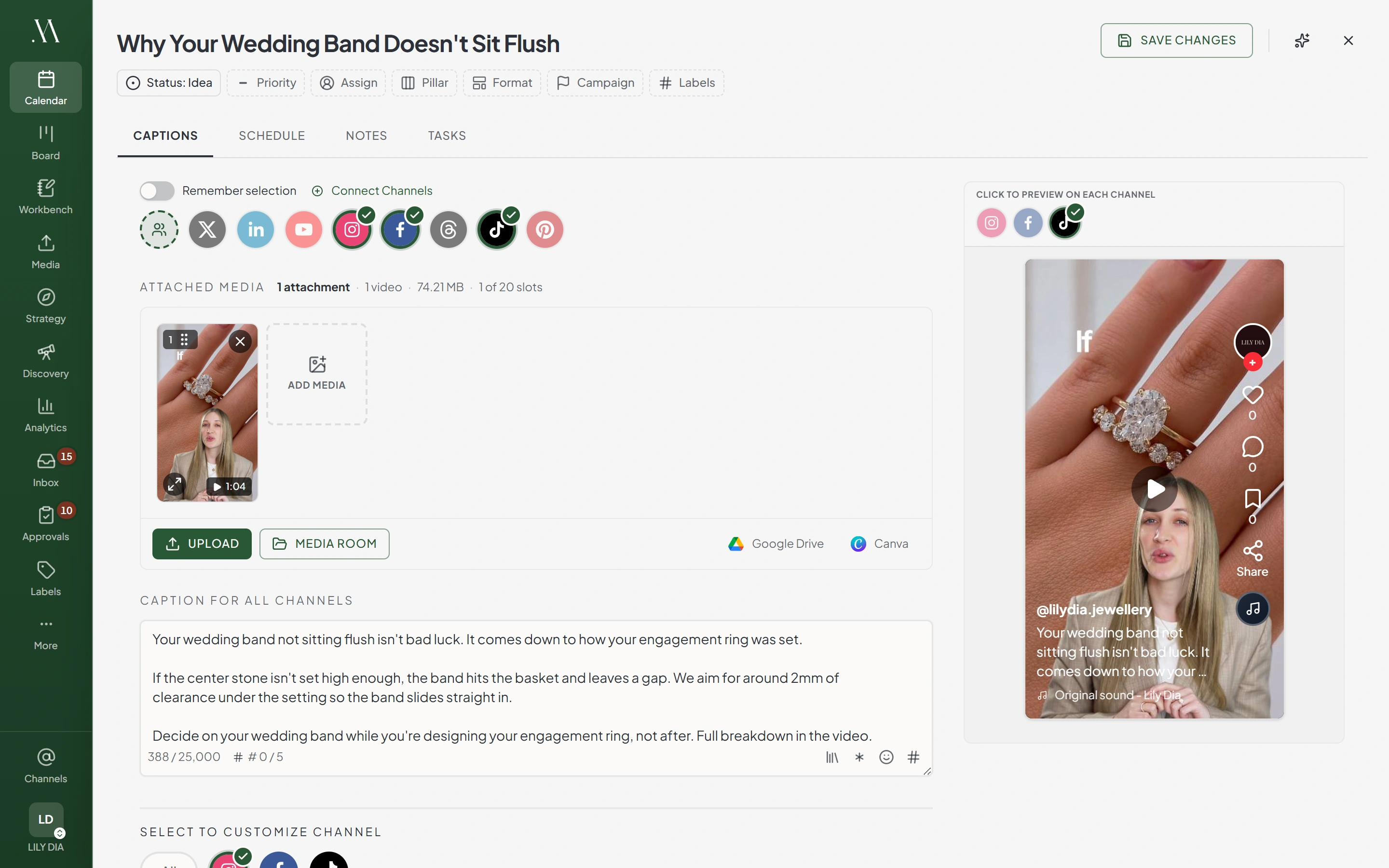
Write the post once, pick the channels, and Maeve schedules and publishes it to all nine platforms. Tweak anything a platform needs done its own way, and posting everywhere takes a few minutes instead of an hour of reposting the same thing app by app.

Maeve content editor with the app sidebar visible and a wedding band fit post drafted: Instagram, Facebook, and TikTok selected, a try-on video attached, one caption for all channels, and a live TikTok preview beside it
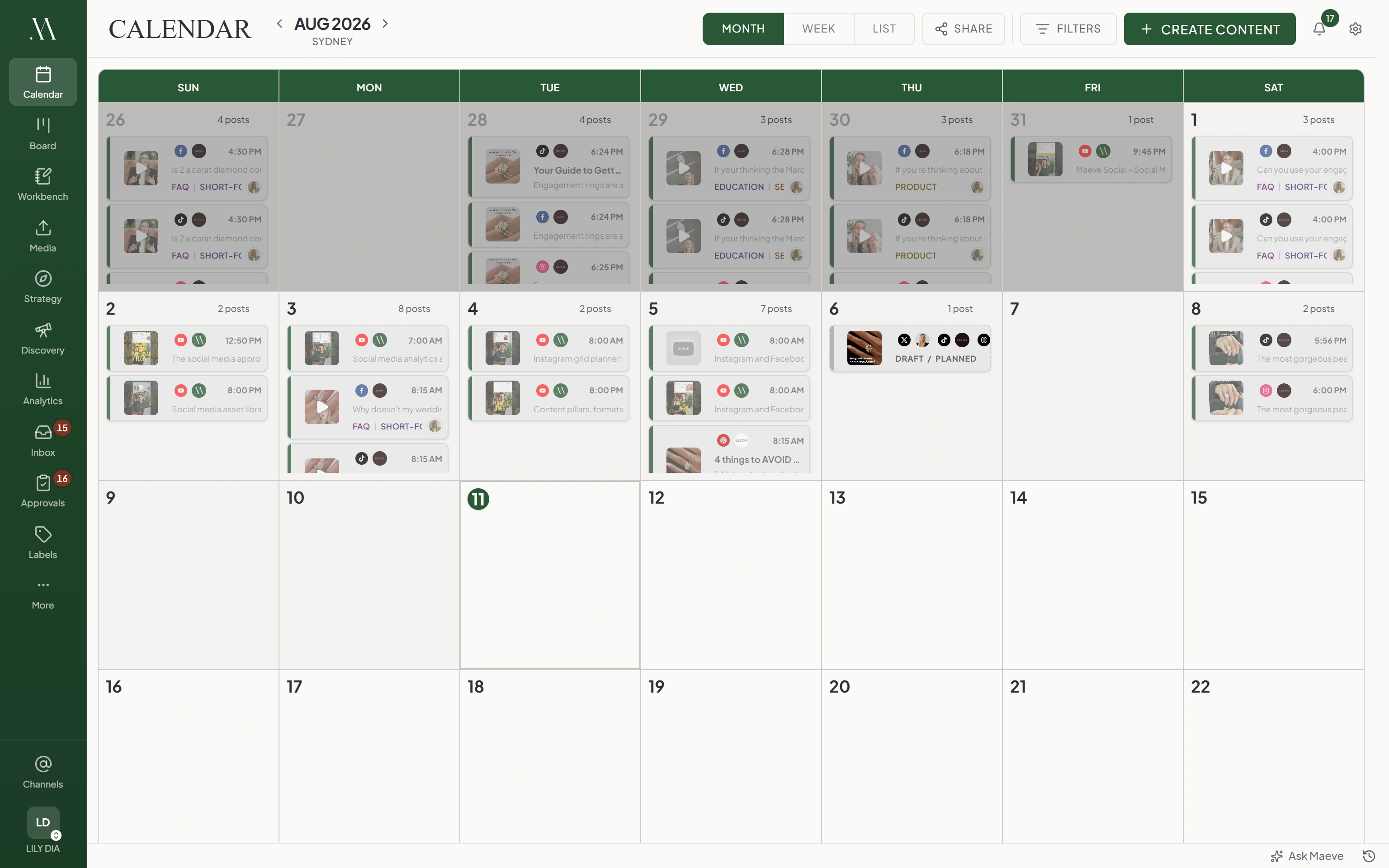
Maeve calendar in month view with the app sidebar, days stacked with scheduled posts showing thumbnails, times, platforms, and content labels

The Calendar

Your whole schedule in one place, month, week, or list, with drag to reschedule and your notes and tasks sitting on the same calendar as the posts. When a client asks what's coming, send a view-only link that shows only what you choose and stays current as the plan changes.

Maeve mobile app showing a list of draft posts with their platform and last-edited date
Maeve mobile app composer with channel picker, caption field, media, and post type controls

Maeve on Your Phone

Coming Soon · In App Review

A full port of Maeve for iOS, so anything you can do at your desk you can do from your phone. Where it really pays off is reviews: clients log in without needing a subscription and get a push notification the moment a post is waiting on them. Coming soon to the App Store.

The Approvals Workspace

Every approval, from your team or a client, runs through one dashboard, so managing sign-off at scale is one view instead of a hunt through individual posts. Batch a whole month of content into a single review link, and your client is notified the moment it's waiting on them, so reviews stop stalling on a chase email you have to remember to send.

Maeve approvals workspace with the app sidebar, a queue of posts grouped by review stage, and an open post showing its preview and internal approval thread side by side
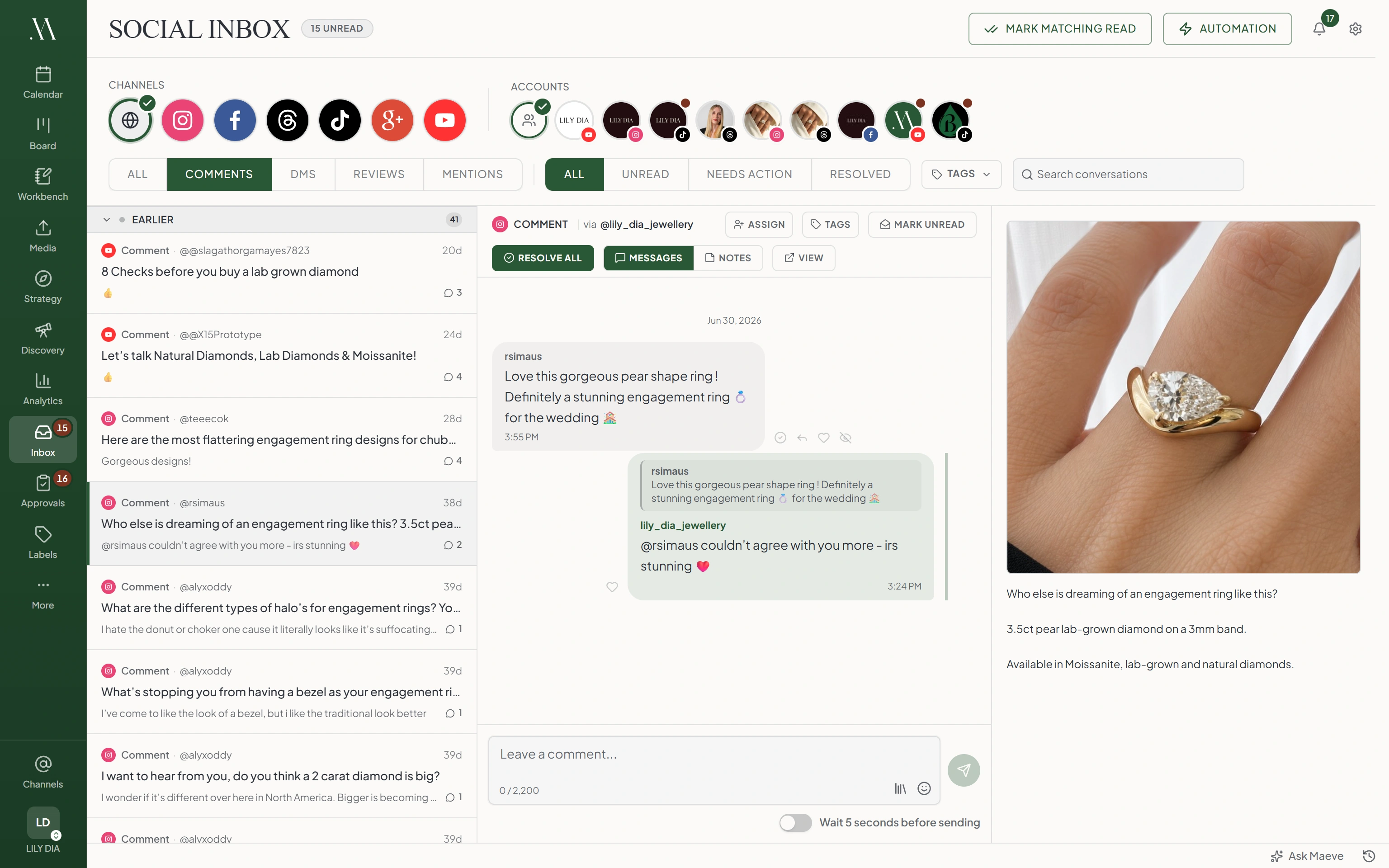
Maeve social inbox with the app sidebar, a queue of comments, an open conversation with the brand's reply, and the related post preview

The Social Inbox

Comments, DMs, mentions, and reviews all land in one queue, so a customer asking a question never sits unanswered in an app nobody checked. Hand a conversation to a teammate, leave notes the public never sees, and on Instagram and Facebook, set auto-replies that handle the repeat questions for you.

The Workbench

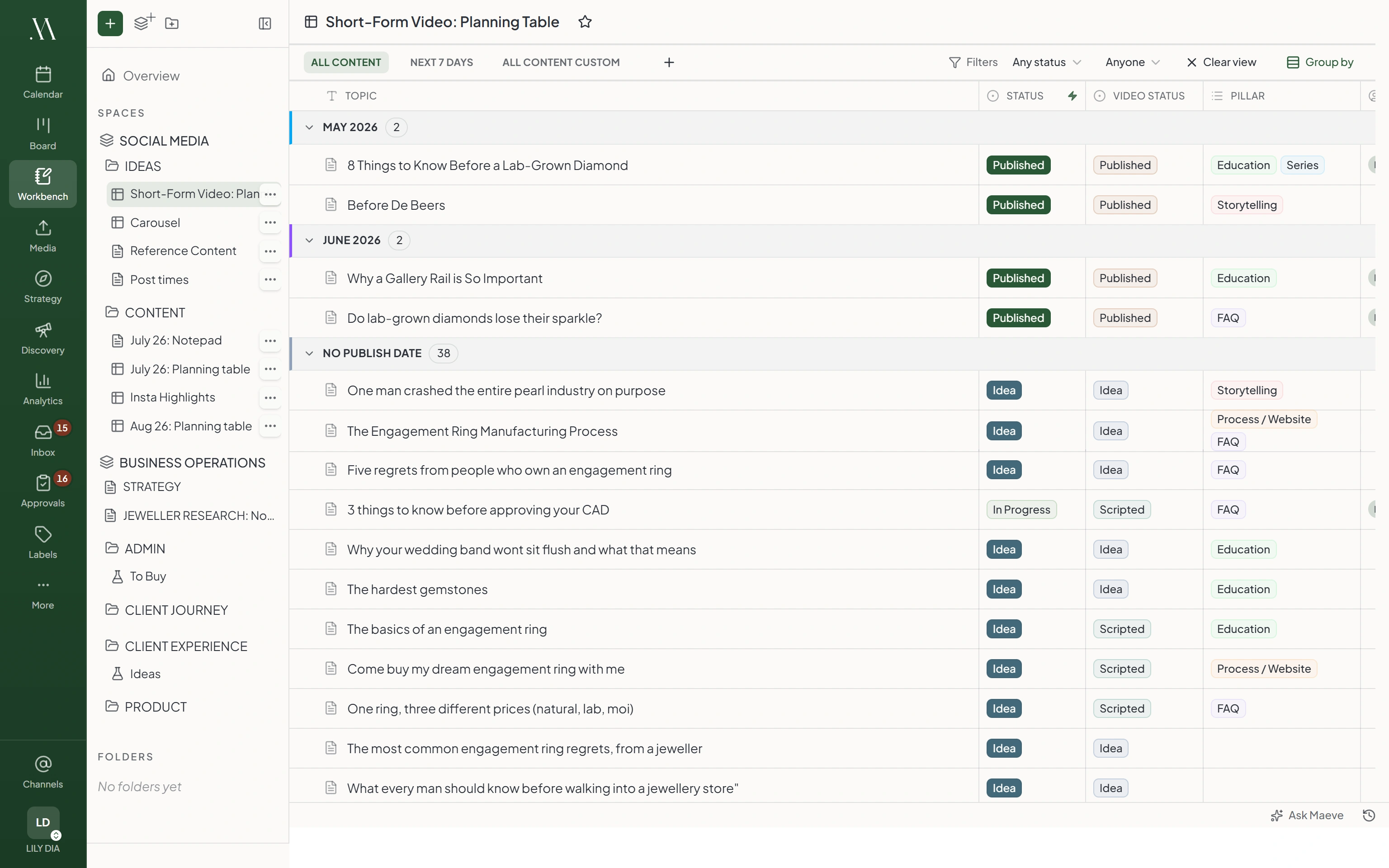
The planning side of the business lives here: spaces and folders for organizing, and every page is a dedicated tool, a document for briefs and scripts or a content table for planning the posts, written together in real time. Set it up around the way you already work, and since every row of a content table is a real draft, there's no spreadsheet to keep up to date.

Maeve workbench with the spaces and pages tree beside a short-form video planning table, rows grouped by publish month with status, video status, and pillar columns

Content and Task Boards

A kanban board for your content, where posts move across the columns on their own as they go from draft to review to published, so the board stays up to date without anyone dragging cards. Tasks get their own board beside it, linked to the posts they belong to, so the whole team works out of one tool.

Maeve content board with post cards flowing across Idea, Draft, Review, Scheduled, and Published columns
Maeve task board with task cards across Backlog, To Do Next, In Progress, Review, and Done columns
Maeve media room library with the app sidebar, storage meter, filters, folders, and asset cards showing file specs and usage counts

The Media Room

All your photos and videos in one library, sorted with folders, labels, and favorites, upload once and use it everywhere. When a client owes you assets, send an upload link, no login needed, and the files land in the right folder instead of trickling in over email. Every file shows which posts it's on, so you never delete something that's about to go out.

Maeve strategy goals view with cards for active days, posts published, and follower growth, each showing progress and pace against its target

Strategy: Goals, Bets, and Retros

Set a goal, like 10,000 followers by March, and it tracks itself from your analytics. Bet with your team on whether Reels will beat carousels this month, and let the numbers decide who was right. The review then pulls the results together for you, so you head into next month with a plan instead of a guess.

Maeve labels view with grouped diamond-cut labels, usage counts, and tabs for content pillars, formats, and hashtags

Labels, Pillars, Formats, and Hashtags

Tag every post by pillar, format, and label, and your analytics break down the same way, so the question of which kind of content actually works gets an answer instead of a hunch. The same tags filter the calendar, board, and library, and saved hashtag sets drop straight into a caption.

Maeve Instagram grid planner with drafts and posted tiles laid out in the three-wide feed, plus empty slots to fill

Instagram Grid Planner

Posted, scheduled, and mocked-up posts sit together in the real three-wide feed, so what you're arranging is the grid your profile will actually show. Drag tiles into order and the publish times swap to match, and when a mockup looks right, one click makes it a real draft instead of a screenshot you rebuild later.

Analytics & Reports

  • Instagram
  • Facebook
  • TikTok
  • YouTube
  • Threads
  • Pinterest
  • Google Business

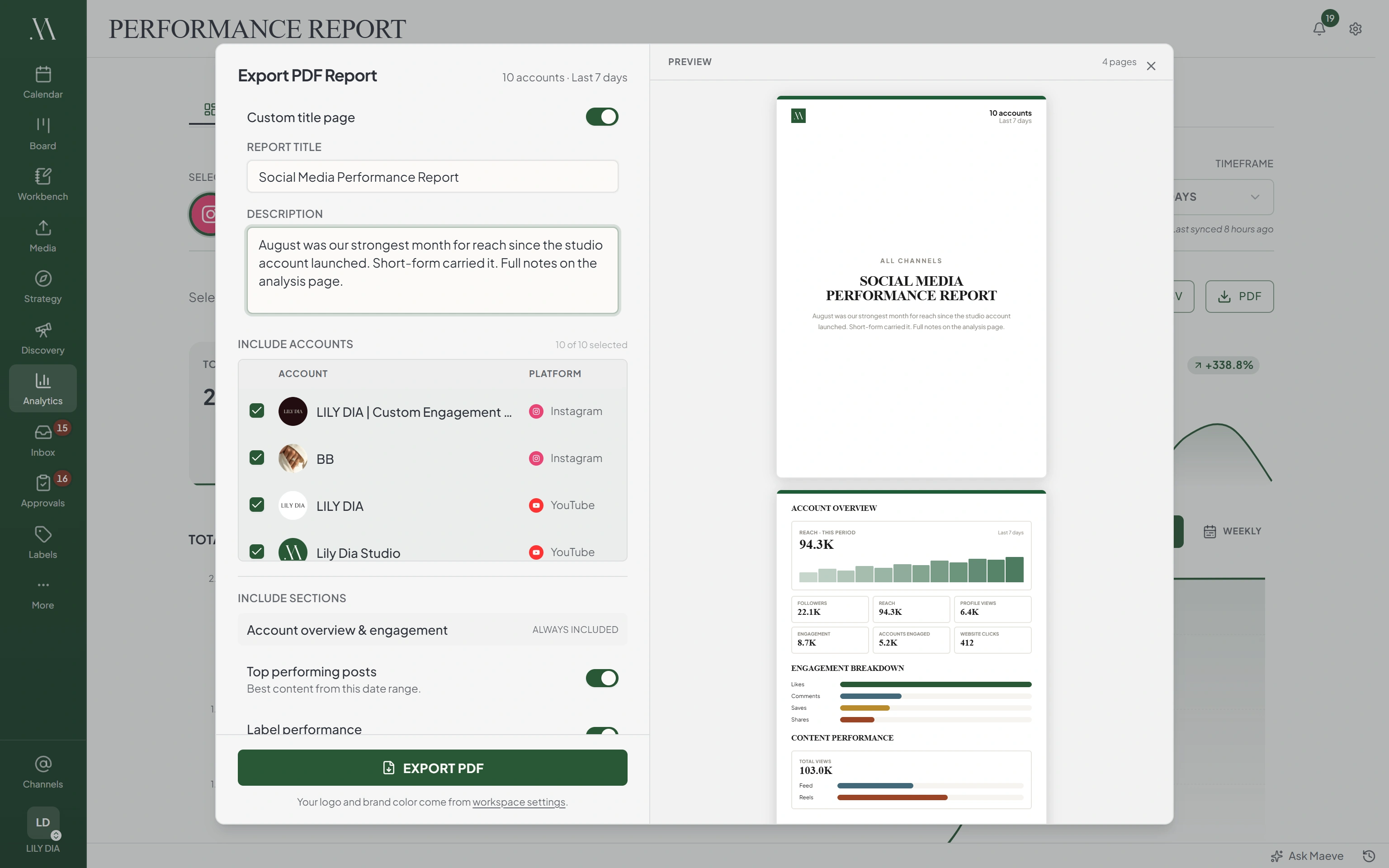
See how everything is actually doing: reach, views, engagement, and follower growth in one place, with every number compared to the period before, so you always know whether you're growing. When the month ends, the client report is one export, a PDF with your name on the cover, instead of an afternoon of screenshots pasted into a deck.

Maeve analytics with the Export PDF Report panel open: accounts and sections to include on the left, and a live preview of the branded cover page and account overview charts on the right
Maeve failed-posts view with scheduled posts grouped by error type, an Instagram connection error and reconnect guidance, and the post preview

Failed Posts

When a post fails, Maeve tells you what happened in plain words and puts the fix one click away, reconnect, retry, or reschedule. Temporary blips retry themselves, so the only failures you ever see are the ones that need you, and nothing fails quietly.

Maevestaged for review
Draft three captions for Friday's launch

Done. Three drafts, staged in your composer to check.

IGDoors open Friday. Here's the full look inside.Draft
TTThree years of work, one launch. This is it.Draft
inThe list goes live at 9am. Details below.Draft

Maeve, the Built-In Assistant

Maeve already knows your workspace, every post, the calendar, the analytics. Ask what's working and it answers from your real numbers, suggests what to make next, and turns a brainstorm into drafts staged for you to check. It can never publish or delete a post unless you confirm that exact one.

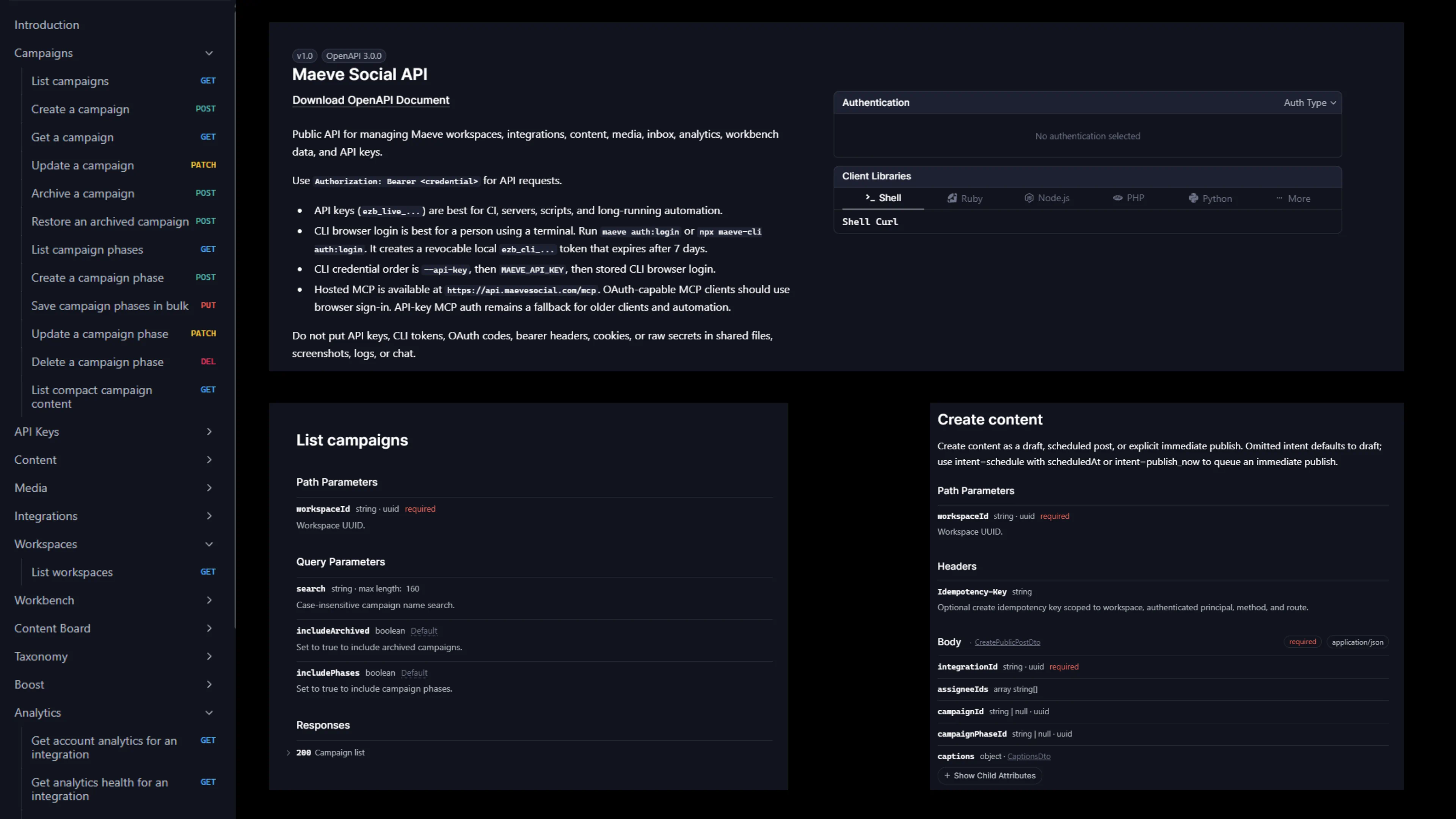
Maeve Social API reference with an endpoint sidebar, the OpenAPI overview, and campaign and content endpoints

MCP & CLI

Connect your AI agents over MCP and hand them the routine work: planning the week, staging drafts, scheduling posts, pulling the numbers, without you ever opening the dashboard. The one thing an agent can never do is publish without your confirmation on that exact post, and there's a full CLI and API underneath.

Deep Support for All 8 Platforms.

Swipe to see all platforms

Use the arrow keys, Home, and End to move between platform tabs. Press Tab to move into the selected platform details.

Instagram

Post Anywhere

  • Create single images, videos, carousels, Reels, and Stories.
  • Smart Stories: Upload multiple photos or videos and we fan them out into individual stories at post time.
  • Preview how your post will look once published.

Intelligent Media Handling

  • Automatic format optimization for Instagram's requirements.
  • Custom cropping for each image (4:5 vs 1.91:1).
  • High-resolution media support with automatic processing.

Advanced Reel Controls

  • Choose whether your Reel appears on your main feed.
  • Upload custom cover images.
  • Select the perfect frame for your thumbnail.

Tag Everything

  • Tag people in your photos
  • Tag products from your catalog to drive sales.
  • Invite collaborators to co-author posts.
  • Search and add locations.

Boost Engagement

  • Pin your first comment to start conversations.

Made for Creators, Businesses, and Agencies

Creators / Founders

You're building a business on your own, and staying visible is half of it. Schedule a week across every platform in one sitting, so you show up everywhere your audience is without posting taking over your week.

See the creator scheduler

Businesses

Social is a lead channel, and someone, the founder or the marketing team, has to run it alongside everything else. Plan the week together, publish everywhere at once, and see what actually worked, so the posts keep going out even when the business gets busy.

See the business scheduler

Agencies

You're running social for a roster of clients, and the admin multiplies with every one you take on. Each client gets its own workspace under one login, sign-off runs through the social media approval software, and the monthly report goes out as a PDF with your name on the cover, not ours.

See the agency workspace

Plans from $20 a Month

Basic

$20USD / mo

Best for freelancers and small businesses

Billed $240 yearly

  • 1 user account
  • 2 workspaces
  • 20 social connections
  • Publish to 9+ platforms
  • 800 AI credits every month
  • Content Workbench
  • Strategy briefs & content pillars
  • Social Calendar & Grid Planner
  • Recurring & evergreen posts
  • First comment scheduling
  • Social Inbox for comments, DMs & reviews
  • Saved captions & replies
  • Advanced analytics & best times to post
  • Media Room with folders & Canva import
  • Hashtag & Label Manager
  • API, CLI & MCP access
  • 20GB Media Storage
Start My Free Trial

3 days free. Cancel anytime.

Standard

$79USD / mo

Best for agencies, teams and businesses

Billed $950 yearly

  • Everything in Basic +
  • 5 team members
  • 5 workspaces
  • 50 social connections
  • 1,500 AI credits every month
  • Roles and permissions
  • Internal collaboration & approvals
  • Client review links, no client seat needed
  • Client portal & contact management
  • Comment-to-DM & keyword auto-replies (IG & FB)
  • Grid Planner share links & PDF export
  • All-channels aggregate analytics
  • PDF analytics reports
  • Shareable calendars & ad boosting
  • 50GB Media Storage
Start My Free Trial

3 days free. Cancel anytime.

Premium

$158USD / mo

Best for large agencies and businesses

Billed $1900 yearly

  • Everything in Standard +
  • Unlimited team members
  • Unlimited workspaces
  • Unlimited social connections
  • 3,000 AI credits every month
  • Team performance insights
  • Dedicated Success Manager
  • White-glove phone support
  • 100GB Media Storage
Start My Free Trial

3 days free. Cancel anytime.

Every plan includes

The full publishing engine for Instagram, TikTok, YouTube, Facebook, X, LinkedIn, Threads, Pinterest, and Google Business Profile. The Social Inbox for comments, DMs, and reviews, advanced analytics, the Media Room, the Grid Planner, failed post recovery, and API, CLI, and MCP access so your tools and AI assistants can work in Maeve too.

Secure Payment via Stripe

Don't Get
Left Behind.

Start My Free Trial

3 days free. Cancel anytime.