
Connecting and Publishing to Google Business Profile
Updated
Connect a Google Business Profile location to publish updates, events, and offers on its business listing in Search and Maps. Each location uses one social connection.

- 1Pick the network
- 2Approve on the network
- 3Connected
Connect available channels
3 / 20Before You Connect
You need a Google account that manages the Business Profile. The location must be verified before Google will accept posts.
Each location is its own channel connection. A business with three branches creates three connections and counts as three against your plan.
Connecting a Location
- 1
Open Settings, then Social channels
Select Google Business Profile from the connection grid.
- 2
Sign in with Google
Sign in with the Google account that manages the listing. Maeve does not receive or store your password.
- 3
Review the permission
Google asks for management access to your Business Profile. It covers reading, editing, creating and deleting business listings, including publishing posts.
- 4
Pick the locations
With one location on the account, Maeve connects it without asking. With several, tick the ones you want in this workspace and add them together.
What Maeve Asks Permission For
Approve management access to your Business Profile.
| Permission | What stops working without it |
|---|---|
| Manage your Business Profile | Maeve cannot list locations, publish posts, or read analytics |
If no locations appear, check that you signed in to the Google account that manages the verified listing.
The Three Post Types
Select the post type before filling in its fields:
- Standard: Write an update. You can include one image and a call to action button.
- Event: Enter a title and start and end dates. Add an image or button if needed.
- Offer: Enter a title and date range. You can add a coupon code, redemption link, and terms. Offers do not support a call to action button.
For events and offers, set the end after the start. Use All day or enter a time for both dates.
Buttons
For a Standard or Event post, choose Book, Order online, Shop, Learn more, Sign up, or Call now.
Enter an HTTPS URL for the button. Call now uses the phone number on your Business Profile and does not need a link.
For an Offer, use the redemption link field instead of a button. Its URL must also use HTTPS.
What You Can Publish
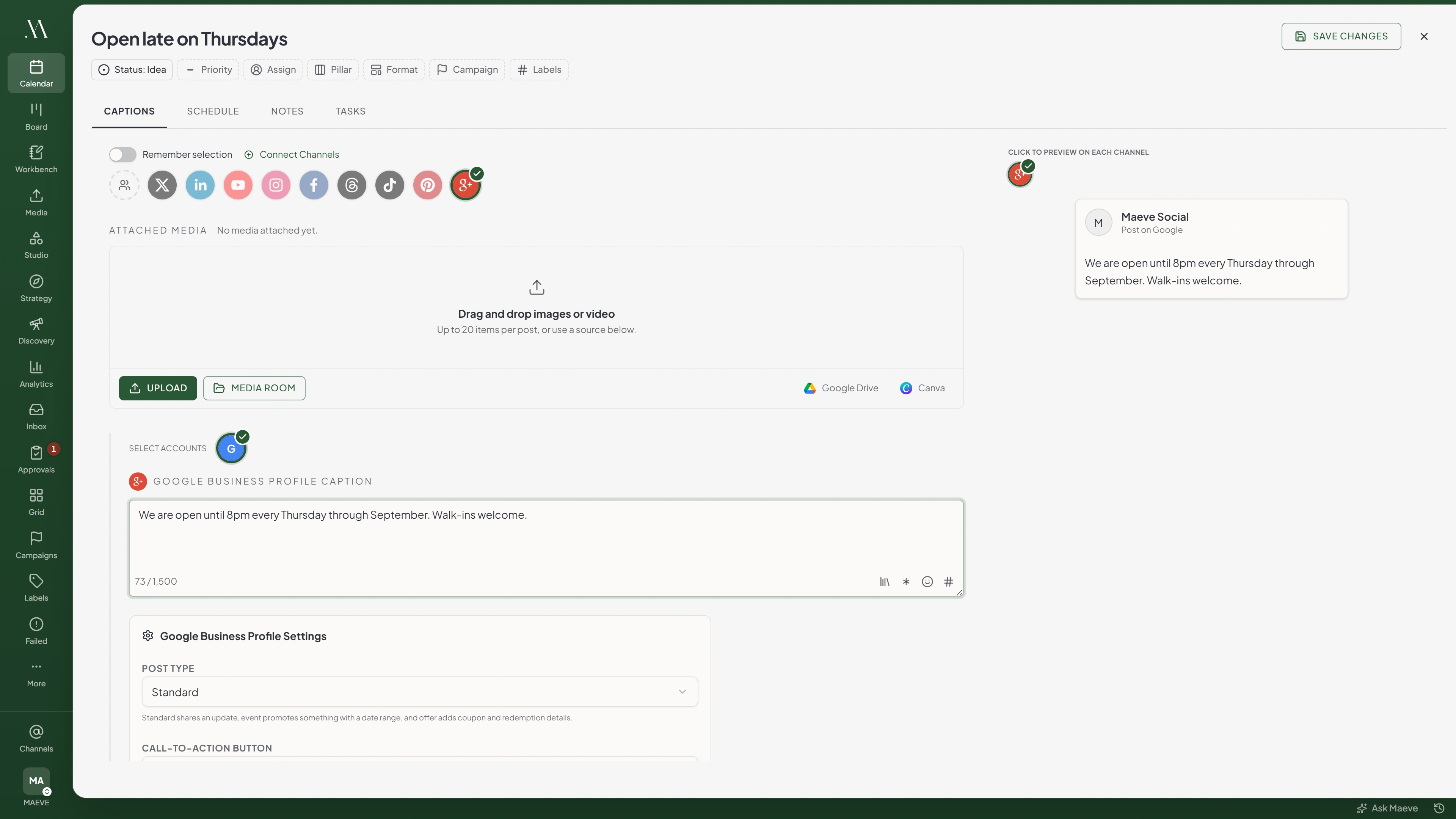
Select Google Business Profile in the composer. Add text, one image, or both.
Google Business Profile section
Google Business Profile Caption
Write for Google Business Profile...
0 / 1,500Media for Google Business Profile
0 of 1 selectedOne image. Video is not acceptedGoogle Business Profile Settings
- Post Type
- Call to action
- Event details
- Offer details
Video is not supported for Google Business Profile posts in Maeve.
The Limits
| What | Limit |
|---|---|
| Post text | 1,500 characters |
| Images per post | 1 |
| Video | Not supported |
| Button link | Must be HTTPS |
| Offer redemption link | Must be HTTPS |
What Will Stop a Post
- A post with no text and no image. One of the two is required
- A video. Images only
- More than one image
- A button with no link, unless it is Call now
- A button link that is not HTTPS
- A button on an offer post. Use the offer redemption link instead
- An event or offer with no title, or missing either date
- A date that does not exist, such as 31 February
- An offer redemption link that is not HTTPS
- An event or offer where one date has a time and the other does not
- An event or offer ending before it starts
- Event or offer fields on a standard post. Switch the post type first

Google Business Profile will refuse
Google Business Profile posts require text or one image.
5 of the ones people hit
When the Connection Breaks
If an account shows Needs reconnecting, restore its connection before the next scheduled post is due.
- Open Settings, then Social channels.
- Find the affected account and select Reconnect.
- Sign in to the same account and approve the requested permissions.
Reconnecting keeps scheduled posts attached to the account. After reconnecting, retry any posts that failed while the connection was unavailable.
Your connected channels
2Google Business Profile
Your Business
Business ProfileYour Second Location
Needs reconnectingThis account's connection has expired. Reconnect it in Settings and try again.
Errors Google Returns
| Error message | What to do |
|---|---|
| Google Business Profile posts require text or one image | The post is empty. Add one or the other |
| Add a link for the Google call-to-action button before publishing | Enter an HTTPS destination URL, or select Call now |
| The Google call-to-action link must be an HTTPS URL | The link is HTTP or malformed. Use the HTTPS address |
| CTA buttons are not supported on Google Business Profile offer posts | Remove the button, or change the post type away from offer |
| Add an event title before publishing this Google Business Profile post | An event or offer post has no title. The field is labelled Offer Title on an offer |
| Add event start and end dates before publishing this Google Business Profile post | An event or offer post is missing one or both dates |
| Google event dates must be valid dates like 2026-08-01 or 2026-08-01T09:00 | A date that does not exist, such as 31 February |
| The Google offer redemption link must be an HTTPS URL | The redemption link starts with http rather than https |
| Google Business Profile does not support media type "video". Allowed media types: image | A video is attached. Images only |
| Google event start and end must both include a time or both be date-only | One date has a time and the other does not. Make them match, or use All day |
| The Google event end must be after the start | The dates are the wrong way round |
| Event details are only available on Google event or offer posts | Event fields are set on a standard post. Switch the type |
| Coupon code, redemption link, and terms are only available on Google offer posts | Offer fields are set on another type. Switch to offer |
Questions
Can I post a video to Google Business Profile?
No. Use text, one image, or both for Google Business Profile posts in Maeve.
Why can I not add a button to my offer post?
Offer posts do not support buttons. Add a redemption link in the offer fields instead.
What is the difference between a standard, event and offer post?
Use Standard for an update, Event for an event with a title and dates, or Offer for a promotion with a title and dates. Offers can include a coupon code, redemption link, and terms.
Why was my event post rejected over its dates?
Check that both dates include a time or both use All day. The end must be after the start, and both dates must be valid.
Do I need a verified Business Profile?
Yes. Verify the location with Google before publishing.
How do I post to more than one location?
Connect each location, then select the locations you want to publish to in the composer. Each uses one social connection.
Does the Call now button need a phone number?
It uses the phone number already saved on your Business Profile. You do not enter a number or link in the post.