
Connecting and Publishing to Threads
Updated
Connect your Threads account to publish text, images, video, or a thread. Each post can contain up to 500 characters and 20 media items.

- 1Pick the network
- 2Approve on the network
- 3Connected
Connect available channels
3 / 20Connecting an Account
- 1
Open Settings, then Social channels
Select Threads from the connection grid.
- 2
Continue with the right Threads account
Threads opens its own page. Sign in there if asked, then check the handle before you continue. Your password never reaches Maeve.
- 3
Approve every permission
Approve the requested permissions. Missing permissions can prevent replies from loading in the inbox or make analytics unavailable.
- 4
Confirm the Connected Account
Maeve shows the handle and picture it connected. If it is not the account you meant, you were signed into another one in that browser.
Connect Threads and Instagram separately. Each account uses one social connection.
What Maeve Asks Permission For
| Permission | What stops working without it |
|---|---|
| Basic access | Maeve cannot read the handle or profile picture |
| Content publishing | Maeve cannot publish posts |
| Manage and read replies | Threads replies are unavailable in your inbox |
| Manage mentions | Mentions are unavailable |
| Delete | Maeve cannot remove a post it published |
| Insights | Analytics and posting-time data are unavailable |
| Location tagging | You cannot tag a location on a post |
What You Can Publish
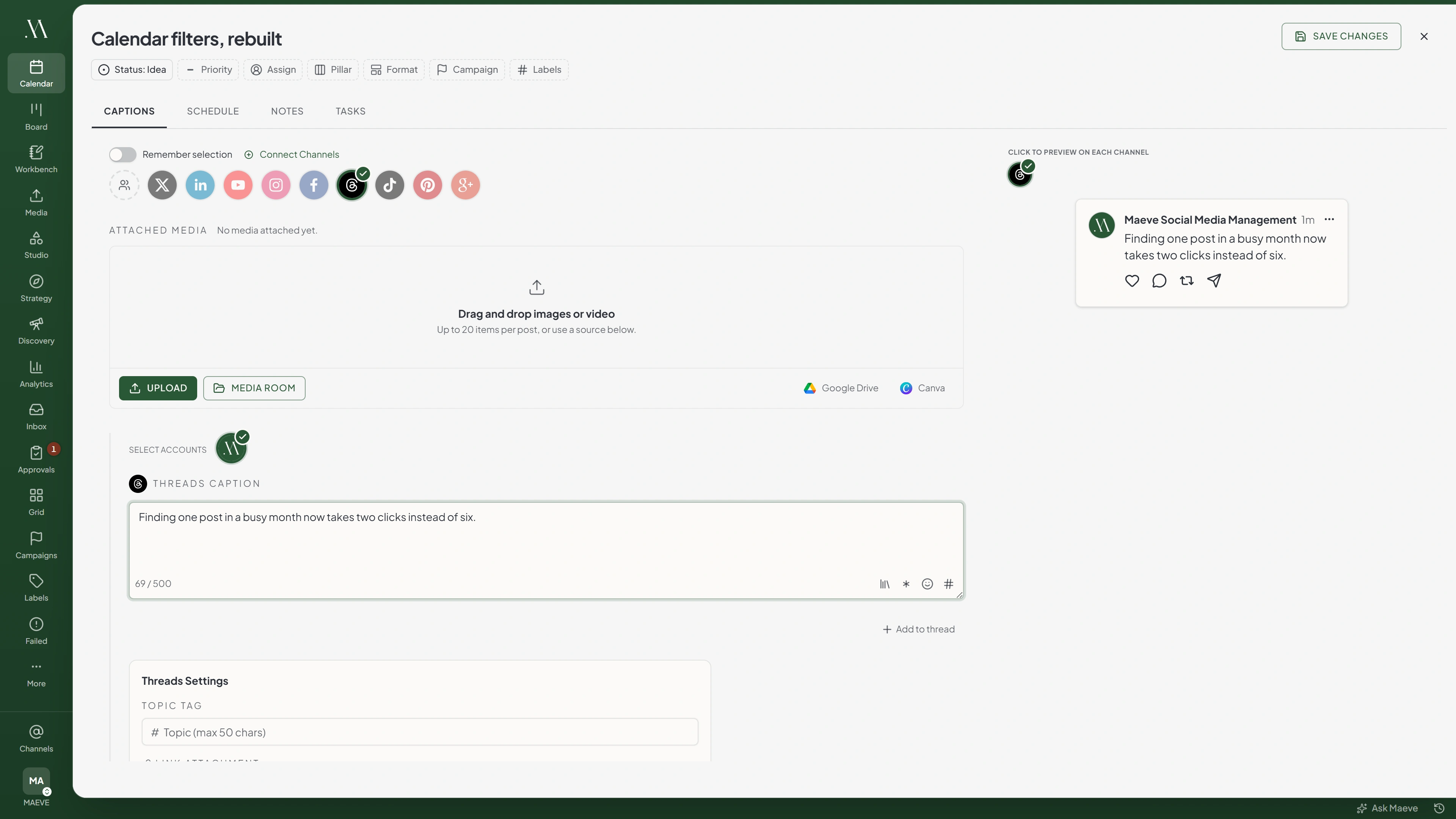
Select Threads in the composer and enter the post text. Add media if needed.
Threads section
Threads Caption
Write for Threads...
0 / 500Media for Threads
0 of 20 selectedUp to 20 items, photos and video togetherThreads Settings
- Location
- Topic Tag
- Who can reply
- Link attachment
- A post. Up to twenty images or videos, and they can be mixed
- A thread. The first post plus up to 20 replies, each published as a separate post
You can combine images and video within the 20-item limit.
The 500 Character Limit
Keep the first post and each reply within 500 characters. Split longer text across replies. The free social thread splitter divides a long draft into ordered posts within the limit, without rewriting it.
If you selected several platforms, edit the Threads caption separately when the shared caption exceeds this limit.
The Settings on a Post
Open the Threads settings below the caption:
- Topic tag: Choose one topic for the post.
- Link attachment: Add a URL to show as a link card. This option is removed when you attach media.
- Who can reply: Select anyone, profiles you follow, mentioned accounts, followers, or the parent post author. The default allows anyone.
- Location: Select a location to tag.
These settings apply to the first post in a thread. They are not copied to replies.
Threads does not support a scheduled first comment or editing the caption after publishing. Deleting a published thread in Maeve removes the first post. Delete its replies separately.
The Daily Publishing Quota
Threads sets an account's publishing allowance over a rolling 24-hour period. Maeve checks the remaining allowance before publishing.
Each post in a thread uses one publish. A first post with 20 replies needs 21 available publishes. If the account has insufficient allowance, schedule later or retry once allowance becomes available.
If a thread stops after publishing some replies, retry it without editing its content. Maeve resumes from the last published reply. Editing a partially published thread prevents that retry.
The Limits
| What | Limit |
|---|---|
| Caption | 500 characters |
| Each message in a chain | 500 characters |
| Media per post | 20 |
| Replies per thread | 20, plus the first post |
| Media per chain message | 20 |

Transform
Aspect Ratio
What Will Stop a Post
- A caption over 500 characters, on the first post or any reply in a chain
- More than twenty media items on one post
- More than 20 replies in a thread
- A daily quota that is already spent, including a chain that needs more than the quota has left

Threads will refuse
Threads supports at most 20 thread messages.
4 of the ones people hit
When the Connection Breaks
If an account shows Needs reconnecting, restore its connection before the next scheduled post is due.
- Open Settings, then Social channels.
- Find the affected account and select Reconnect.
- Sign in to the same account and approve the requested permissions.
Reconnecting keeps scheduled posts attached to the account. After reconnecting, retry any posts that failed while the connection was unavailable.
Your connected channels
2Threads
@yourbrand
Threads Account@yourotherbrand
Needs reconnectingThis account's connection has expired. Reconnect it in Settings and try again.
Errors Threads Returns
| Error message | What to do |
|---|---|
| Threads publish limit reached. This account has used 250 of 250 publishes in the last 24 hours | The account has spent its rolling 24 hour allowance. The numbers come from Threads. Retry once the window moves on |
| Threads supports at most 20 media items per post | Remove the extras, or split them across a chain |
| Threads thread reply exceeds the 500 character limit | One of the replies is too long. The message number is in the error |
| This account's connection has expired | Reconnect the channel in Settings, Social channels, then retry the post |
Questions
How long can a Threads post be?
Up to 500 characters per post. The limit applies separately to the first post and every reply.
Why did my Threads post fail when nothing was wrong with it?
Check the error in Failed Posts. If the account has reached its rolling 24-hour publishing quota, retry when allowance becomes available.
Does a long chain use up more of the daily quota?
Yes. Each post uses one publish, so a first post plus 20 replies uses 21. Maeve checks that enough allowance remains before starting.
Can I put a link in a Threads post?
Yes. Use Link attachment to display a link card on a post without media. Adding media removes the link attachment.
Is Threads the same connection as my Instagram account?
No. Connect Threads and Instagram separately. Each account uses one social connection.
Can I control who replies to a Threads post?
Yes. Set Who can reply in the Threads settings. Choose anyone, profiles you follow, mentioned accounts, followers, or the parent post author.
Can I put images and video in the same Threads post?
Yes. Attach up to 20 images and videos in total.