
Connecting and Publishing to YouTube
Updated
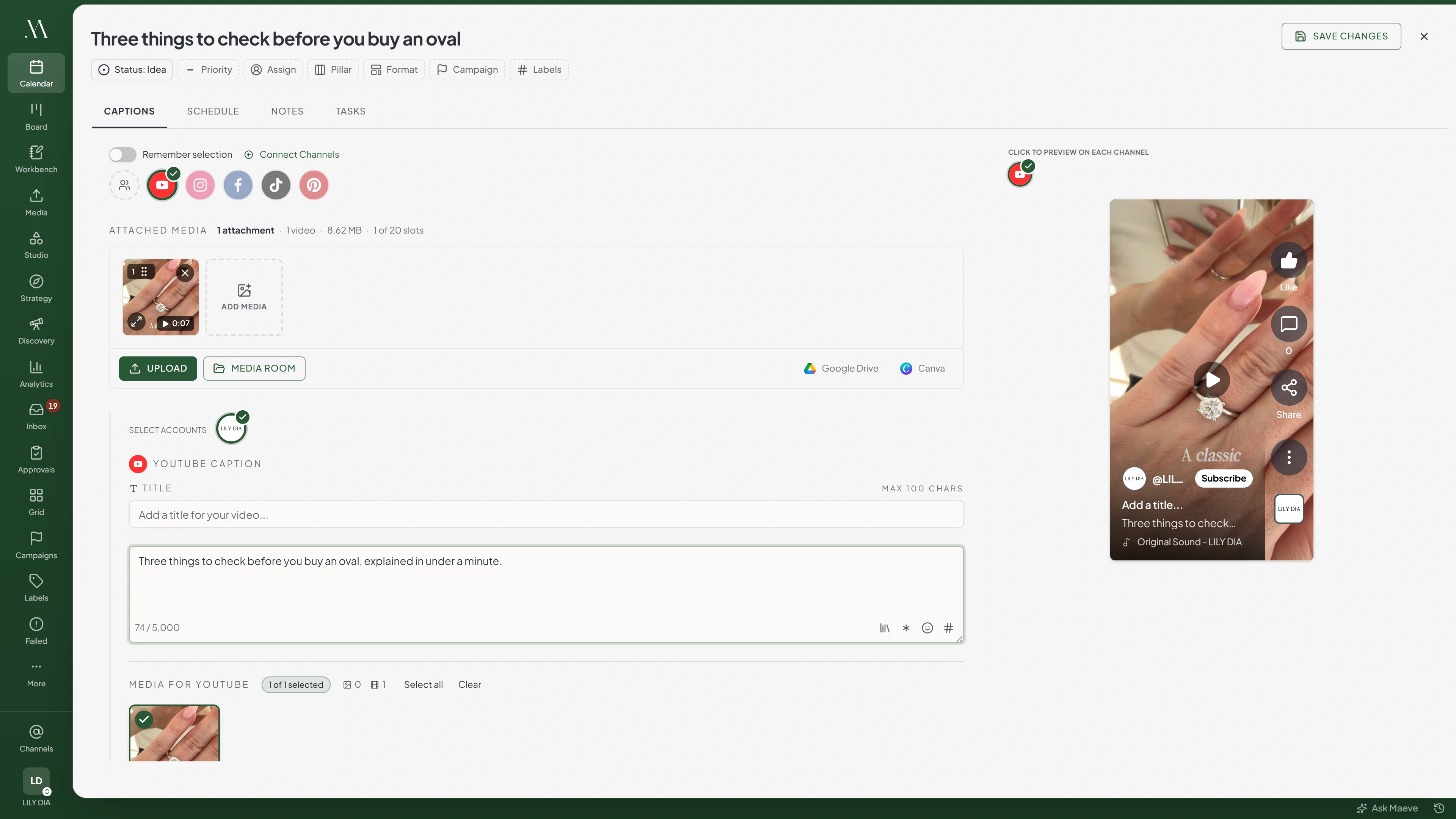
Attach one video and enter a title to publish to YouTube from Maeve. The video's dimensions and duration determine whether Maeve treats it as a Short or a regular video. Regular videos also require a custom thumbnail.

- 1Pick the network
- 2Approve on the network
- 3Connected
Connect available channels
3 / 20Before You Connect
You need to be the owner or a manager of the channel, and you sign in with the Google account that holds it.
If your Google account has several channels, select the ones you want to add. Each channel uses one social connection.
Connecting a Channel
- 1
Open Settings, then Social channels
Select YouTube from the connection grid.
- 2
Sign in with Google
Sign in on Google's sign-in page. Maeve does not receive or store your password.
- 3
Approve the Requested Permissions
Approve upload, channel, and analytics access. If Maeve reports missing permissions, repeat the connection steps and approve the requested access.
- 4
Pick the channels
With one channel on the account, Maeve connects it without asking. With several, tick the ones you want in this workspace and add them together.
- 5
Confirm the Connected Channel
Maeve shows the channel name and picture it connected. If it is not the one you meant, you picked the wrong channel or signed in with the wrong Google account.
What Maeve Asks Permission For
| Permission | What stops working without it |
|---|---|
| Upload | Maeve cannot publish posts |
| Read-only channel access | Maeve cannot read the channel name or list your videos |
| Full channel access | YouTube comments are unavailable in your inbox, and you cannot reply from Maeve |
| Analytics read | Analytics and posting-time data are unavailable |
Shorts and Regular Videos
Maeve treats a video as a Short when it meets both requirements:
- It is square or vertical, with an aspect ratio of 1:1 or narrower.
- It is 180 seconds or shorter.
A 200-second vertical video is a regular video. A 30-second landscape video is also a regular video.
Attach a custom thumbnail for a regular video. Maeve requires one before publishing. For Shorts, choose the thumbnail in the YouTube app.
What You Can Publish
Select YouTube in the composer, attach one video, and fill in the title.
YouTube section
YouTube Caption
Title
Max 100 charsWrite for YouTube...
0 / 5,000Media for YouTube
0 of 1 selectedOne video. Images are not accepted at allYouTube Settings
- Visibility
- Category
- License
- Custom Thumbnail
- Notify Subscribers
- Allow Embedding
- Made for Kids
Will not publish without
- A title
- A custom thumbnail on anything longer than a Short
- Regular videos. MP4 or MOV, and a custom thumbnail you have to supply
- Shorts. MP4 or MOV, square or taller and 180 seconds or less, with no thumbnail
The Limits
| What | Limit |
|---|---|
| Title | 100 characters, required |
| Description | 5,000 characters |
| Videos per post | 1 |
| Video size | 512MB |
| Video formats | MP4 and MOV |
| Short length | 180 seconds or less |
| Thumbnail size | 2MB |
| Thumbnail formats | JPEG and PNG |

Transform
Aspect Ratio
The Settings on a Video
Open the YouTube settings in the composer and review these fields:
- Visibility. Public, Unlisted or Private
- Category. Choose the category for the video
- Tags. Enter tags separated by commas
- License. Standard YouTube License or Creative Commons Attribution
- Custom thumbnail. Required on a regular video, JPEG or PNG up to 2MB. YouTube may require channel verification to accept custom thumbnails. Check the published video: a thumbnail upload failure does not stop the video publishing
- Notify subscribers. Whether the upload goes out to your subscriber feed
- Allow embedding. Whether other sites can embed the video
- Made for Kids. Indicate whether the video is made for children. YouTube limits features on videos marked this way
What Will Stop a Post
- A post with no video. YouTube has no text or image post
- An image attached as post media. Remove it and attach a video
- More than one video. One per post
- A missing title. YouTube will not take an untitled upload
- A regular video with no custom thumbnail. Attach a JPEG or PNG thumbnail. Shorts do not require one
- A thumbnail over 2MB, or one that is not a JPEG or PNG
- A video over 512MB, or in a format other than MP4 or MOV

YouTube will refuse
Add a YouTube title before publishing.
5 of the ones people hit
When the Connection Breaks
If an account shows Needs reconnecting, restore its connection before the next scheduled post is due.
- Open Settings, then Social channels.
- Find the affected account and select Reconnect.
- Sign in to the same account and approve the requested permissions.
Reconnecting keeps scheduled posts attached to the account. After reconnecting, retry any posts that failed while the connection was unavailable.
Your connected channels
2YouTube
Your Channel
YouTube ChannelYour Other Channel
Needs reconnectingThis account's connection has expired. Reconnect it in Settings and try again.
Errors YouTube Returns
| Error message | What to do |
|---|---|
| Select a custom YouTube thumbnail before publishing long-form videos | The video is not a Short and has no thumbnail |
| YouTube custom thumbnails must be 2 MB or smaller | The thumbnail is too large. Compress it or choose another |
| YouTube API quota exceeded for today | The channel has used its daily upload allowance at YouTube. The post fails and is not retried |
| Thumbnail must be a JPEG or PNG image | The thumbnail is in another format. Convert it |
| Add a YouTube title before publishing | The post has no title. YouTube requires one on every upload |
| YouTube requires at least one media item before publishing | The post has a description and no video |
| YouTube supports video files only | An image is attached. Remove it |
| This account's connection has expired | Reconnect the channel in Settings, Social channels, then retry the post |
Questions
What makes a video a Short rather than a regular video?
A Short is square or vertical and no longer than 180 seconds. Videos outside those dimensions or duration are treated as regular videos.
Why is Maeve asking for a thumbnail?
Maeve requires a custom thumbnail for regular videos. Attach a JPEG or PNG up to 2MB. Shorts do not require a custom thumbnail.
Can I schedule a private or unlisted YouTube video?
Yes. Select Public, Unlisted, or Private in the post's YouTube visibility settings.
Why are YouTube comments not showing in my inbox?
Your connection may be missing comment access. Reconnect the channel and approve the requested permissions.
Can I upload more than one video in a post?
No. Create a separate post for each video.
Do I need a verified YouTube channel?
YouTube may require channel verification for custom thumbnails. If a thumbnail is missing after publishing, check the channel's verification status in YouTube.