
What Lands in Your Inbox
Updated
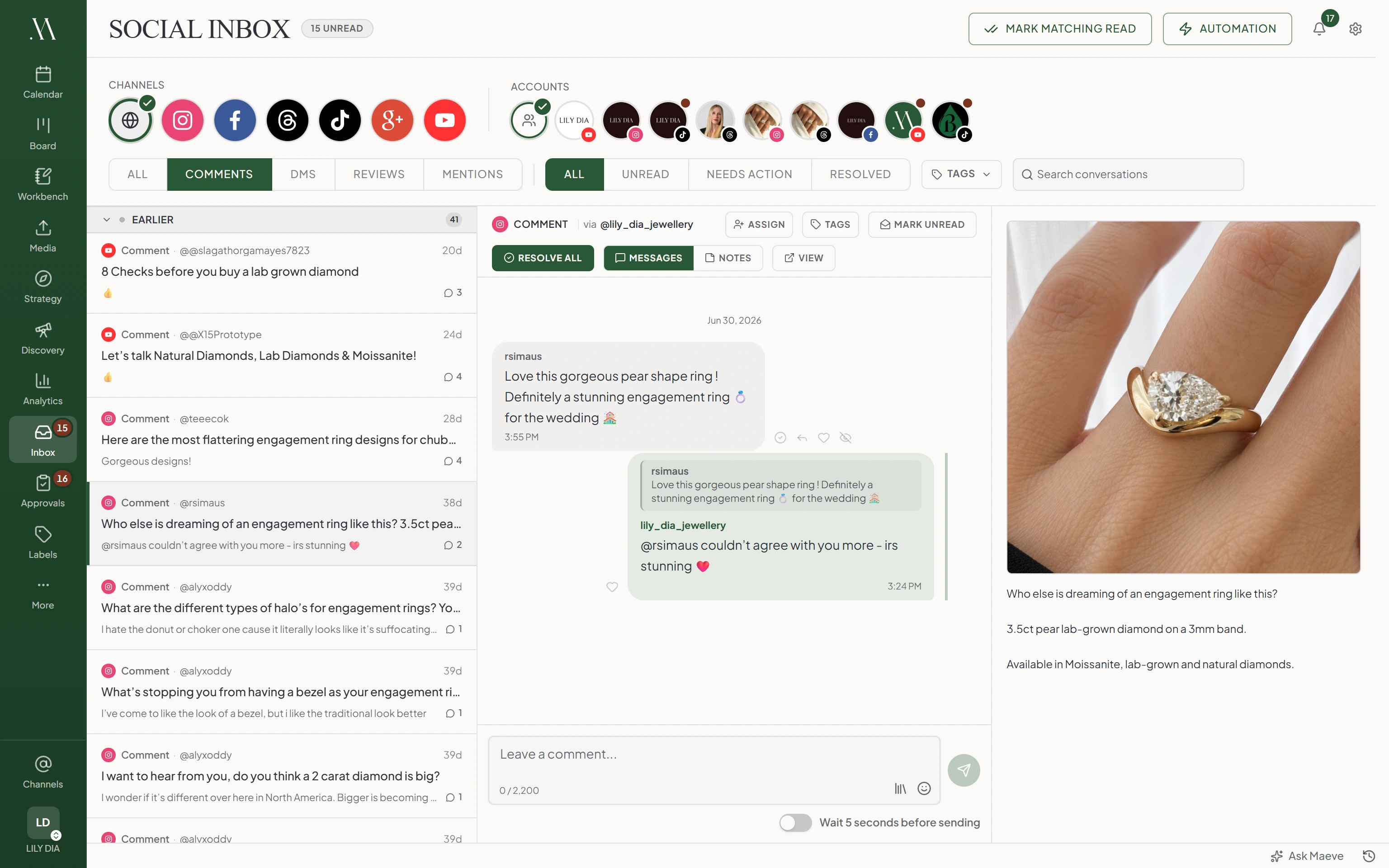
Open Social Inbox to read conversations from your connected accounts. The inbox is available on every plan. The types of conversation available depend on the platform and the permissions granted to the connection.
Four Kinds of Conversation
Use Type to choose the conversations you want to read.
| Type | What It Contains |
|---|---|
| Comments | Comments on your posts |
| DMs | Private messages with a person |
| Reviews | Business reviews or recommendations |
| Mentions | Posts that mention your account |
What Each Network Sends
| Network | Comments | Direct Messages | Reviews | Mentions |
|---|---|---|---|---|
| Yes | Yes | No | No | |
| Yes | Yes | Yes | Yes | |
| Threads | Yes | No | No | Yes |
| TikTok | Yes | No | No | Yes |
| YouTube | Yes | No | No | No |
| Google Business Profile | No | No | Yes | No |
LinkedIn, X, and Pinterest do not feed Maeve's inbox.
How Conversations Are Grouped
Comments on the same post appear in one conversation. Select the conversation to read the comments and see the original post beside them. A post with 40 comments occupies one row in the list.
Direct messages are grouped by person for each connected account. Each review or mention has its own conversation.
Narrowing the List
- Select a Channel to choose a platform.
- Select an Account if you manage several accounts on that platform.
- Choose a Type and Status.
- Add a tag filter if you want conversations labeled with a particular topic.
Use Needs action to find unresolved conversations. Unread shows unread conversations, while Resolved shows those already handled. Select All to remove a type or status restriction.
Filters work together. If a conversation is missing, remove filters and search again. Selecting several tags matches conversations with any of those tags.
Searching
Enter a person's name or handle, words from a post caption, or the connected account's name in search. Search also checks the conversation's most recent message; it does not search every message in the thread.
Keep the other filters in mind while searching. Clear them if you need to search across the inbox.
Reviews
Select Reviews to find Google Business Profile reviews and Facebook recommendations. Open a review to read the feedback and any available rating or recommendation details.
Google review replies are text only and allow up to 4,096 bytes in Maeve. Sending another reply replaces the business's previous reply. Reviews cannot be hidden or deleted from Maeve.
When a Channel Sends Nothing
- Check that the correct account is connected and selected in the inbox.
- Clear the type, status, and tag filters.
- Check the account for a connection or permissions warning.
- If access is missing, open Settings > Social channels, select Reconnect, and complete the authorization steps.
Publishing access does not always include inbox access. Older YouTube connections may need reconnection to grant comment permissions. TikTok inbox access requires an eligible Business connection and the relevant permissions. Check the account warning after reconnecting; reconnection does not make an unsupported account type eligible.
Questions
Which plans include the Social Inbox?
Every plan includes the Social Inbox. Automatic replies require Standard or Premium.
Which networks send direct messages to the inbox?
Maeve supports Instagram and Facebook direct messages in the inbox.
Why are all the comments on one post in a single conversation?
Comments are grouped by their original post. Select the conversation to read all its comments and see the post beside them.
Where do Instagram story mentions show up?
Under DMs, with the story attached.
Which networks send reviews?
Google Business Profile reviews and Facebook recommendations appear under Reviews.
What does search look at?
Search checks the person's name or handle, the original post caption, the most recent message, and the connected account name. It does not search every message.
Why is my YouTube inbox empty when my videos have comments?
Check the account and inbox filters first. Older YouTube connections may lack comment permissions. Reconnect under Settings > Social channels and approve the required access.