
Choosing a Post Type
Updated
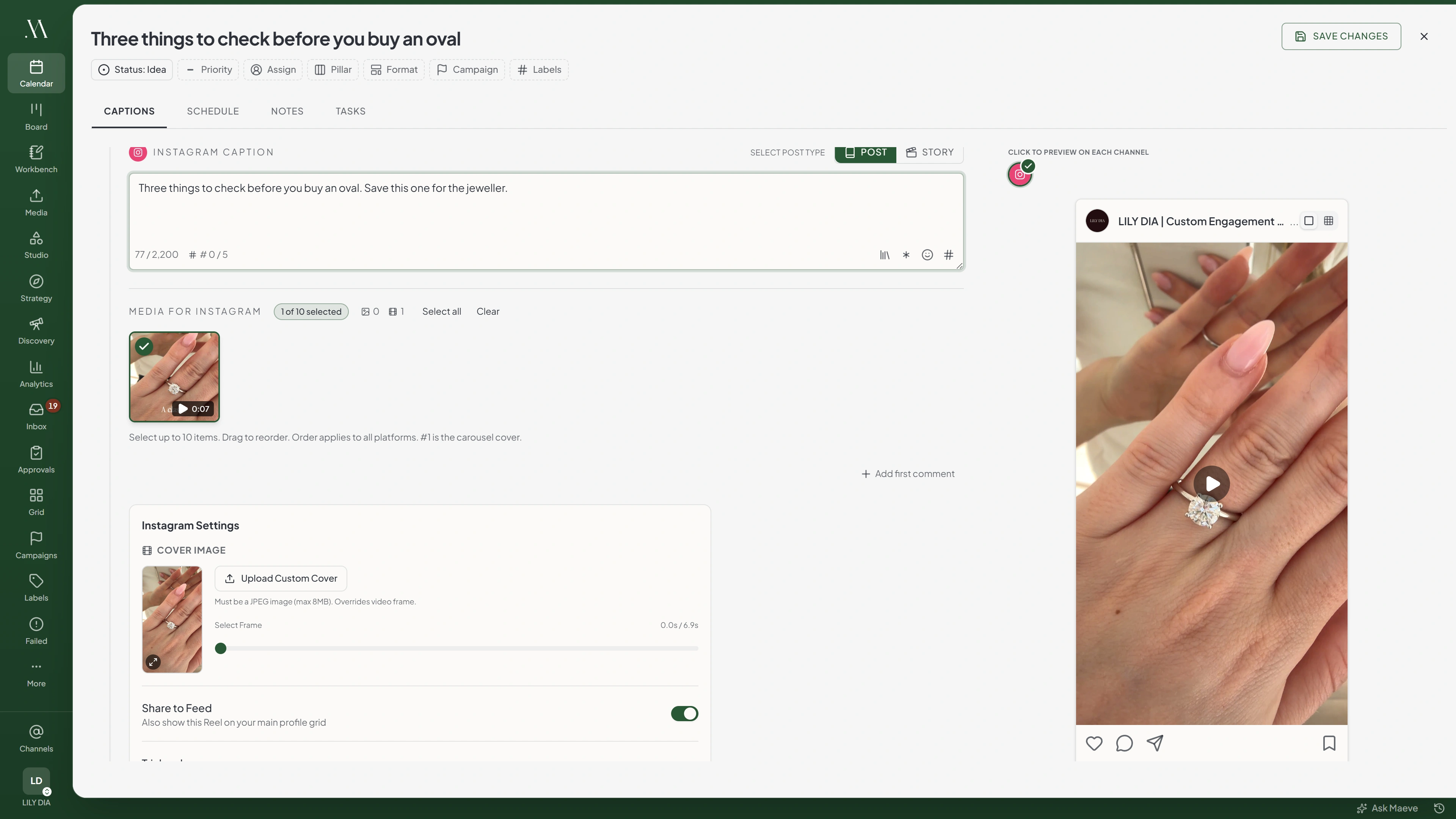
Choose the post type before writing the caption or adding tags. It determines which fields are available and what media you can publish.
Instagram and Facebook have a post type toggle. Other platforms use the attached media or their own settings to determine the format.

One post type per draft
Instagram Caption
Select Post Type
October bookings are open. Two Saturdays left.
46 / 2,200FB Caption
Select Post Type
October bookings are open. Two Saturdays left.
46 / 5,000Selecting a Post Type
Select Post, Story, or Reel in the channel section. This selection applies to the draft, so changing it under Instagram also changes it for Facebook.
| Network | What you can pick |
|---|---|
| Post or Story | |
| Post, Story or Reel | |
| Everywhere else | Nothing to pick |
For an Instagram Reel, select Post and attach one video.
Formats Determined by Media or Settings
- Instagram. A video on a Post publishes as a Reel. Meta has no separate feed video any more, so a single video is always a Reel unless you set the type to Story. A video inside a carousel stays part of the carousel
- YouTube. A video is a Short when it is square or taller and runs 180 seconds or less. Anything else is a regular video, which also needs a thumbnail
- TikTok. Attaching a video makes a video post, and attaching images makes a photo post. One post cannot hold both
- X and Threads. A chain is written in the thread section rather than picked as a type. Write one message and it is a single post
- LinkedIn and Pinterest. Prepare the feed post or Pin using the channel's available fields
- Google Business Profile. Standard, event and offer live in its settings panel rather than on the post type toggle

What each network makes of it
- InstagramReelA lone video is promoted
- FacebookPostReel is a choice, not a default
- TikTokVideo postVideo attached
- YouTubeShortSquare or taller, under 180s
What Changes When the Type Changes
Check which fields are supported before switching to Story.

Instagram Caption
October bookings are open. Two Saturdays left.
46 / 2,200Instagram Settings
- Collaborators
- Cover Image
- Share to Feed
| What it affects | Post | Story |
|---|---|---|
| Instagram caption | 2,200 characters | No caption |
| Facebook caption | 5,000 characters | No caption |
| First comment | Yes | No |
| Instagram alt text | Sent | Not sent |
| Instagram collaborators | Yes | No |
| Instagram product tags | Yes | No |
Maeve disables the Instagram and Facebook caption fields for Stories and does not send a first comment. Instagram Stories also do not send alt text, collaborators, or product tags.
Stories
Select Story, then attach the images or videos in publishing order. Maeve creates a separate Story for each selected item, scheduled a second apart.
Both networks want vertical media. Facebook stories run 3 to 60 seconds, and so do Instagram stories.
Post type: Story
Media for Instagram
3 of 10 selected- 1Shopfront
- 2Back room
- 3Closing up
- Story 1 of 3Shopfront9:00:00
- Story 2 of 3Back room9:00:01
- Story 3 of 3Closing up9:00:02
Reels
A Facebook Reel is one vertical video, 3 to 90 seconds, at least 540 by 960, and it cannot carry a photo alongside it.
For an Instagram Reel, select Post and attach one video. Then review these settings:
- Cover. A frame from the video, or a JPEG you upload
- Share to Feed. Whether the Reel also appears on your profile grid
- Trial reel. Shows it to people who do not follow you first, and Instagram checks account eligibility when you publish
- Audio. A track from Instagram, available on the Facebook login
Instagram Settings
- Cover ImageMust be a JPEG image (max 8MB). Overrides video frame.Upload Custom Cover
- Share to FeedAlso show this Reel on your main profile grid
- Trial reelYou must have 1000 followers
- Music or original soundAdd a track to your Reel.
Before You Schedule
Set the type, attach the media, and then complete the available fields. Check the preview after changing type to confirm the format and media selection.
Questions
Why is there no Reel option for Instagram?
Select Post and attach one video to publish an Instagram Reel. Select Story if you want a Story. A video within a carousel remains part of the carousel.
Can the same post be a Story on one network and a Post on another?
No. The toggle is shared across the draft. Create separate posts if Instagram and Facebook need different types.
Why did my first comment not publish on a story?
Stories do not support a scheduled first comment. Use a feed post if you need one.
What happens if I attach several images to a story?
Maeve creates a separate Story for each selected item, scheduled a second apart.
How do I choose between a YouTube Short and a regular video?
Use a square or vertical video up to 180 seconds for a Short. Other videos are treated as regular videos and require a custom thumbnail.
Why can I not type in the caption for my Instagram story?
Maeve does not send captions for Instagram or Facebook Stories. Select Post to use the caption field.
Where is the post type for Google Business Profile?
Open the Google Business Profile settings and choose Standard, Event, or Offer. Each requires different fields.