
Threads and Chains
Updated
Use the thread section under X or Threads to add replies to your first post. Each platform supports up to 20 replies after the caption, for 21 posts in total.
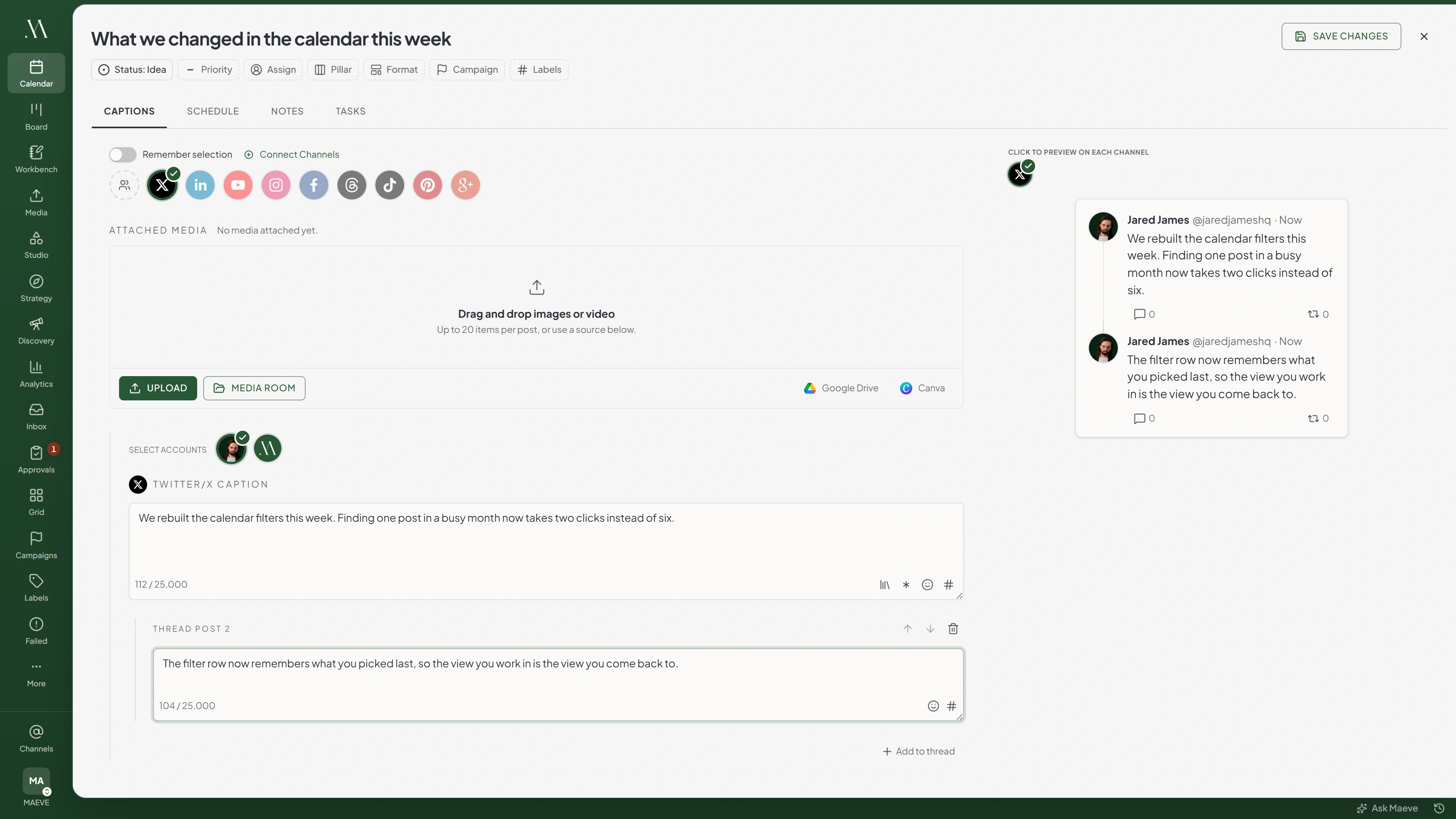

Thread
- 1
We rebuilt the way scheduling works this month. Here is what changed and why.
77 / 25,0001 / 4 - 2
The old queue filled the next free slot. That was fine with one channel and unusable with nine.
95 / 25,0000 / 4 - 3
Now every channel keeps its own times, and a post lands on the slot that belongs to it.
87 / 25,0002 / 4
Each message warns at 280, where a standard account stops, and runs to 25,000 on Premium.
Writing a Thread
- Select X or Threads in the composer.
- Write the first post in that channel's caption field.
- Select Add to thread and write the next reply.
- Add more replies, then reorder or remove them as needed.
You can add up to 20 replies. Check the preview to confirm their order.

2 of 20 added
X Caption
We rebuilt the way scheduling works this month. Here is what changed and why.
77 / 25,000Thread
Thread Post 2
The old queue filled the next free slot. That was fine with one channel and unusable with nine, because every network wants a different time of day and the queue had no way to know which of them it was filling a slot for. Nine channels meant nine right answers and it only ever had one.
286 / 25,000PremiumThread Post 3
Now every channel keeps its own times, and a post lands on the slot that belongs to it.
87 / 25,000
Each Network Keeps Its Own
Write the X and Threads versions separately. You can use different text, media, and numbers of replies for each platform.
| What it allows | X | Threads |
|---|---|---|
| Messages after the caption | 20 | 20 |
| Characters per message | 25,000, warning at 280 | 500 |
| Media per message | 4 | 20 |
Keep each Threads post within 500 characters. For X, an active Premium subscription is required to publish more than 280 characters per post.
Media Belongs to the Message
Select media for each reply from the draft's attachments. You can reuse the same file in several replies.
X allows four media items per post and Threads allows 20. The draft's attachment limit still applies even when files are reused across replies.

4 attached, 4 slots per message
Thread media
X Caption
Media2 of 4 selectedShopfrontBack roomClosing upThe teamThread Post 2
Media1 of 4 selectedShopfrontBack roomClosing upThe teamThread Post 3
Media2 of 4 selectedShopfrontBack roomClosing upThe team
Shopfront is on the caption and on Thread Post 3. A full X thread is the caption plus twenty more at four slots each, which is 84 slots drawn from a pool of twenty files.
What the Counters Tell You
Check the character counter on each reply. X shows a Premium marker after 280 characters. Keep the text within 280 unless the selected account has an active X Premium subscription.
Threads limits each reply to 500 characters, including pasted text and emoji.
Threads and the Rest of the Post
Replies belong to the platform where you write them. Adding replies under X does not add replies to Threads or change other platforms' captions.
One draft
- XCaption plus 3 more4
- ThreadsCaption plus 1 more2
- InstagramNo thread section1
- PinterestNo thread section1
The solid block is the caption. Everything after it is a message the chain adds on that channel alone.
Questions
Which networks support threads?
Maeve supports threads on X and Threads. Select either platform to show its thread section.
How many messages can a thread hold?
Up to 20 replies after the first post, for 21 posts in total.
Can X and Threads have different chains on the same post?
Yes. Write and edit the replies separately under each platform.
Can each message in a thread have its own image?
Yes. Select media for each reply. X allows four items and Threads allows 20 per post. You can reuse a file in several replies.
Why does my X message show a Premium marker?
The text exceeds 280 characters. An active X Premium subscription is required to publish it.
Does a chain count as one post against the Threads daily limit?
No. Each post uses one publish. A first post plus 20 replies uses 21. Maeve checks the available allowance before starting.
What happens to the other networks when I write a thread?
Other platforms keep their own captions and media. Replies are only sent to the platform where you added them.