
Filtering the Calendar
Updated
Open Filters to narrow the calendar by status, channel, label, or assignment. Filters remain applied when you switch between Month, Week, and List. Select Clear all to reset them.
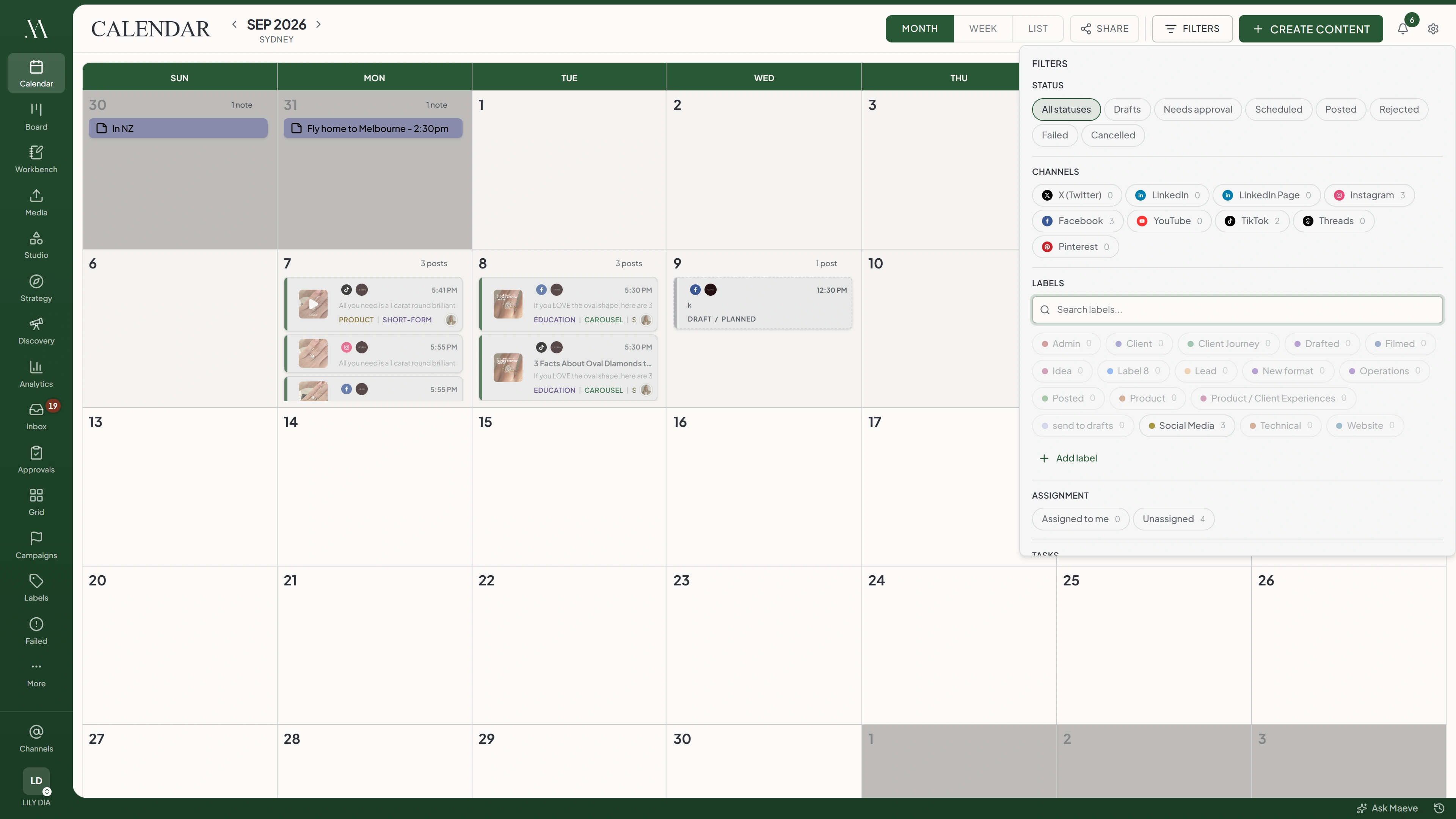

Filters
Clear allStatus
Channels
Labels
Assignment
Tasks
Campaigns
Other
The filter badge counts active selections, including display switches such as Tasks and Campaigns.
Status
Select one status at a time. Choose All statuses or Clear all to remove the status filter.
| Status | What it means |
|---|---|
| Drafts | Written but not scheduled |
| Needs approval | Waiting on a team or client decision |
| Scheduled | Has a time and is waiting for it |
| Posted | Published |
| Rejected | A reviewer requested changes |
| Failed | Reached the network and was refused |
| Cancelled | Stopped before it published |
Status options do not display matching post counts.
Channels
Select the platforms you want to see. You can select more than one. The count beside each option shows matching posts in the calendar's month range.
A platform with no posts can still be selected and will show an empty result.
Labels
Search for a label and select it to show matching posts. Labels with no posts in the period are disabled.
Managers and Editors can select Add label at the end of the list to create a label without leaving the calendar.
Assignment
Select Assigned to me to show your posts, or Unassigned to find posts without an assignee. Select the active option again to remove it.
Tasks
Turn on Tasks to show task due dates alongside posts. Maeve remembers this setting per workspace.
Tasks appear in month cells, above the time blocks in Week, and in their own List group.
Campaign Rails
Turn on Campaigns in Month view to display bands across each campaign's dates. Hover over a band to read its name and dates. Days with more than two campaigns show a count for the remaining ones.
This switch does not filter to a particular campaign and has no visual effect in Week or List. Open the campaign itself to review its posts.
Failures
With All statuses selected, failed and canceled posts are hidden by default. Turn on Show failures to include them.
If you only want failures, select Failed under Status. Show failures does not change the results while a specific status is selected.
What the Counts Cover
Channel and label counts use the month grid's range, including neighboring days that complete its weeks. They still use that range in Week view, so they may exceed the posts visible in the selected week.
Notes and Shared Calendars
Calendar notes do not follow post filters in Month or Week. In List, they appear only when All statuses is selected.
Calendar sharing has separate filters. Open Share and choose the posts and fields to include there; your current calendar filters are not copied.
Questions
Do filters carry between calendar views?
Yes. Month, Week, and List use the same selected filters.
Are my filters remembered?
Filters are stored in the URL, so reloads and bookmarks preserve them. Opening the calendar afresh resets them. Tasks is saved per workspace.
Can I filter the calendar to one campaign?
No. Campaigns displays date bands in Month view. Open the campaign itself to review its posts.
Why are my failed posts not on the calendar?
Select Failed under Status, or use All statuses with Show failures enabled.
I turned on Show failures and nothing changed. Why?
Check the status selection. Show failures only changes results under All statuses.
What do the numbers next to each option mean?
They count matching posts across the month grid's date range. Status options have no counts.
Why do the counts not match what I can see in week view?
The counts cover the month grid, including neighboring days, rather than only the visible week.
Why is a label greyed out?
No posts in the current period use that label.
How do I find work nobody has picked up?
Open Filters, then select Unassigned under Assignment.
Can I create a label from the calendar?
Yes. Managers and Editors can select Add label in the Labels section.
Can I search the calendar for a post by its words?
No. The search field in Filters searches label names, not post text.
Why does the badge say more than I have filtered?
The badge counts each selected option and active display switch. Three channels and two labels count as five selections.