
Is Maeve Social the right Planoly alternative?
Maeve Social is a Planoly alternative for creators and visual brands that need an Instagram grid alongside multi-channel content planning and client reviews. It is not a verified replacement for Planoly Creator Store. Separate the scheduling decision from your storefront and selling workflow.
When should you choose Maeve Social?
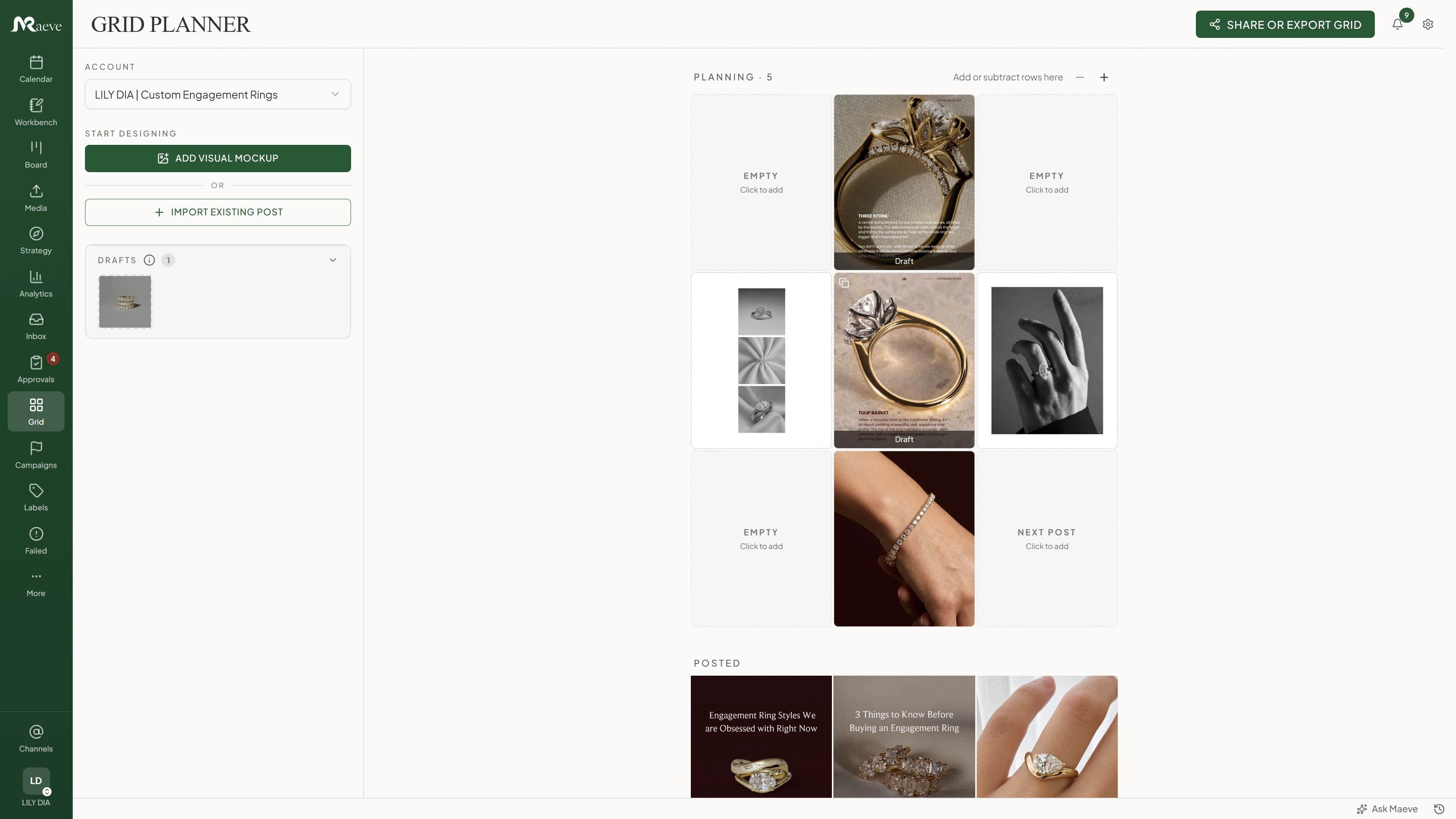
Choose Maeve Social if your visual content now involves briefs, reusable assets, multiple brands or external sign-off. Use the grid planner for the feed and the calendar for the full publishing plan.
What should you check for your setup?
Check your publishing formats, reviewer requirements and any storefront dependencies. Maeve Social supports visual content planning, but equivalent Creator Store selling, payment and customer-delivery features have not been verified.
What changes between Maeve Social and Planoly?
Visual feed planning
- Maeve Social
- Instagram grid planner, mockups and a wider publishing calendar.
- Planoly
- Instagram grid planning with arranging, previewing and date changes. Official source
Selling through your bio
- Maeve Social
- Equivalent storefront, checkout and product delivery are not verified.
- Planoly
- Creator Store handles a separate selling workflow for products, services and memberships. Official source
Client preview versus approval
- Maeve Social
- Standard/Premium review batches support approve, request changes and resubmit decisions.
- Planoly
- Plan Report is an account-free, read-only preview with a 14-day link; it is not documented as an approve/reject workflow. Official source
Publishing to X
- Maeve Social
- Maeve Social schedules X posts and threads; X analytics/inbox are not supported.
- Planoly
- Current Planoly help lists X as reminder-only. MCP access also exists in Planoly, so it is not a Maeve-only capability. Official source
Can the visual plan and the client review stay together?
Build a real campaign in the grid planner, adapt its posts for the channels you use and send a review batch. Ask for one revision during the trial. That shows how your visual plan survives feedback, not just how it looks on the first pass.
What does each tool cost for two client brands?
One internal user, two client brands with one external reviewer each, one Instagram professional account and one Facebook Page per brand: four connected profiles in total. The goal is external client approval. Prices below are in USD, before location-dependent taxes, checked October 10, 2026. Month-to-month billing is used where verified.
Maeve Social Standard: $99/month
Billed monthly, with five team members, five workspaces and 50 social connections. External review links and branded/scheduled PDF reports are included. Clients do not need Maeve Social accounts or paid seats. No add-ons are required for this scenario.
If you only need planning and publishing, Basic is $25/month for one user, two workspaces and 20 connections. It does not include external client review.
Maeve Social monthly plansPlanoly: $28 USD/month for planning
Growth is $28 on monthly billing and includes two workspaces and two users. The scenario fits those limits without extras. Its account-free Plan Report is read-only; an equivalent external approve/reject workflow has not been verified, so this is not approval-plan parity.
Check Planoly's pricing sourcePlanoly Growth costs $28/month for planning, but is not a verified substitute for approve/reject client review. Maeve Social Basic is $25/month for one user and two workspaces without external client review; Standard is $99/month when external review is required. Decide whether a read-only plan or actual approve/reject decisions meet the client’s needs.
Can I keep the Instagram grid workflow?
Yes. Maeve Social has a three-column grid planner, visual mockups and a publishing calendar. It supports Instagram feed posts, carousels, Reels and Stories for eligible Business or Creator accounts. Personal Instagram accounts must be converted before connecting for publishing.
Does Maeve Social replace Planoly Creator Store?
A replacement has not been verified. Planoly Creator Store supports selling products, courses, consultations, memberships and merchandise through a link-in-bio storefront. Maeve Social’s documented content workflow does not establish equivalent storefront, payment or customer-delivery features. Keep your selling setup in place until you have a separate migration plan.
What changes when a client joins the process?
Maeve Social Standard and Premium support external review batches without a client account or paid client seat. Reviewers can request changes before signing off. Custom logos and brand colors on that review page are not currently supported, even though PDF reports have branding options.
Which networks and formats does Maeve Social cover?
- Publishing: nine networks
- Instagram, Facebook, LinkedIn, TikTok, YouTube, X, Threads, Pinterest and Google Business Profile. Supported formats vary by account and network. Publishing coverage
- Analytics: eight networks
- The same list except X. Standard and Premium add multi-channel reporting, branded PDFs and scheduled delivery. Metrics and history depend on the network. Reporting coverage
- Inbox: six networks
- Instagram, Facebook, Threads, TikTok, YouTube and Google Business Profile. DMs are Instagram/Facebook only. LinkedIn, X and Pinterest do not feed the inbox. Inbox coverage
For Instagram, Maeve Social supports feed posts, carousels, Reels and Stories on eligible Business or Creator accounts; a personal account must be converted first. TikTok supports video and photo posts, but direct publishing depends on the connected account's available publishing options. Some posts need to be finished in TikTok drafts. Instagram requirements and TikTok requirements.
Can you import your Planoly queue and history?
Maeve Social's current guides do not document an automatic importer for Planoly drafts, scheduled queues, approval records or analytics history. A supported import format for that transfer has not been verified. Plan a manual cutover unless support confirms an importer for your export file.
Planoly Bulk Create can turn up to 20 media files into drafts, but that is not a migration into Maeve Social. Preserve your storefront, media and planned captions separately.
Export what you need to keep, reconnect your accounts and recreate a small test batch. Set a cutover date and pause duplicate scheduled posts in Planoly before publishing from Maeve Social. Your existing published posts stay on their social networks.
What should you test before switching?
- Upload a real set of campaign assets and find them again while composing a post.
- Plan the Instagram sequence, then adapt one post for a second network.
- Ask a teammate or client for a revision and follow it through to approval.
Can I keep a visual planning workflow in Maeve Social?
Yes. Maeve Social has an Instagram grid planner as well as a publishing calendar. Try it with your own campaign assets and check the account types and formats you need before moving your whole schedule.
Sources and scope
Competitor capabilities and pricing evidence were checked against the official pages below on October 10, 2026. Unverified rates and capabilities are labelled as such. This is a direct product comparison, not an independent ranking or a claim of feature-for-feature parity.
Maeve Social details come from its current pricing, product guides and feature documentation. The screenshots show Maeve Social. We have not represented this source review as hands-on testing of every competitor. Plans and network requirements can change before you subscribe.