
Is Maeve Social the right SocialPilot alternative?
Maeve Social is a SocialPilot alternative for agencies that want content briefs, media, posts and external review connected in a client workspace. Both tools support client approvals. Check client-facing branding requirements: Maeve Social review pages do not yet support custom logos or brand colors.
When should you choose Maeve Social?
Choose Maeve Social if you want a client workspace for planning through publishing, with email-invited review links and branded reporting on Standard or Premium. The review page itself has a separate branding limitation.
What should you check for your setup?
Check reviewer access, revision handling and client-facing branding separately. Maeve Social includes account-free review links on Standard and Premium, but review pages do not support custom logos or brand colors. Branded PDF reports are a separate feature.
What changes between Maeve Social and SocialPilot?
External approvals
- Maeve Social
- Review links on Standard/Premium; invited clients do not need accounts or paid seats.
- SocialPilot
- Premium clients can approve through Approve On-the-Go links without signing in; approval-only client seats are unlimited. Official source
Review-page branding
- Maeve Social
- No custom logo or brand colors on external review pages today.
- SocialPilot
- White-label branding and custom-domain capabilities are documented for the eligible plan. Official source
Reports versus portal branding
- Maeve Social
- Branded PDFs and scheduled reports start on Standard; this does not mean the review portal is white-labelled.
- SocialPilot
- Evaluate report and dashboard branding separately; white-label coverage has exceptions. Official source
Approval policy
- Maeve Social
- Use a review batch with the required reviewers, then verify the revised version before scheduling.
- SocialPilot
- Optional Auto-Approve can allow publishing without explicit sign-off if a post is still pending one hour before its scheduled time. Check that setting if explicit sign-off is mandatory. Official source
What happens after a client requests changes?
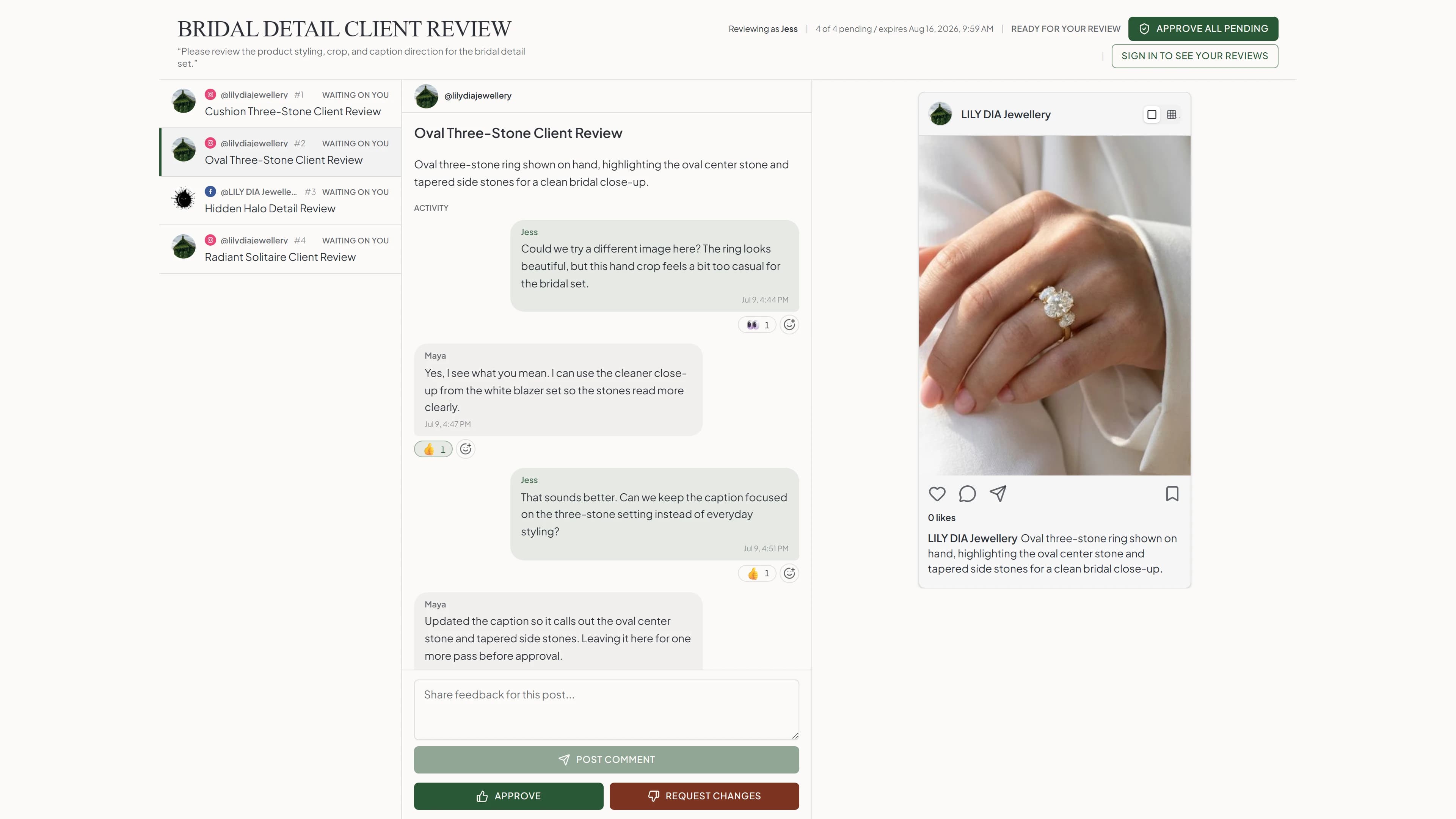
Run one real post through a review batch, a requested change and a resubmission. Keep the feedback beside the content and confirm the reviewer sees the revised version before approval. This is a more useful agency test than filling an empty calendar.
What does each tool cost for two client brands?
One internal user, two client brands with one external reviewer each, one Instagram professional account and one Facebook Page per brand: four connected profiles in total. The goal is external client approval. Prices below are in USD, before location-dependent taxes, checked October 10, 2026. Month-to-month billing is used where verified.
Maeve Social Standard: $99/month
Billed monthly, with five team members, five workspaces and 50 social connections. External review links and branded/scheduled PDF reports are included. Clients do not need Maeve Social accounts or paid seats. No add-ons are required for this scenario.
If you only need planning and publishing, Basic is $25/month for one user, two workspaces and 20 connections. It does not include external client review.
Maeve Social monthly plansSocialPilot: $100 USD/month
Premium is $100 on monthly billing, with 25 accounts, six team users and unlimited approval-only client seats. External clients can use Approve On-the-Go links without signing in. No extra account or user is needed for this scenario. Full platform white-labeling requires Ultimate, not Premium.
Check SocialPilot's pricing sourceMaeve Social Standard is $99/month for five team members, five workspaces and 50 social connections. SocialPilot Premium is $100/month with a different capacity mix. Both support account-free client approvals; the one-dollar gap is less important than the workflow, account limits and branding you need.
Do clients need accounts or paid seats?
Both tools offer account-free client review. Maeve Social Standard and Premium use invited-email review batches; SocialPilot Premium uses Approve On-the-Go links. SocialPilot approval-only clients do not consume team seats, but giving them publishing permission changes that. Compare revisions, access and your required approval policy.
Can I put my agency’s brand on everything?
Not in Maeve Social today. PDF reports support a logo and brand color, but external review pages do not currently support a custom logo or brand colors. SocialPilot documents dashboard branding, custom domains and branded login pages on its eligible white-label plan, with stated exceptions. Treat those as different capabilities.
How many clients can I manage on one plan?
Maeve Social Standard includes five workspaces, five team members and 50 social connections. Premium removes those three caps. Use a workspace per client where that matches your access model, and count internal teammates separately from external reviewers when choosing your plan.
Which networks and formats does Maeve Social cover?
- Publishing: nine networks
- Instagram, Facebook, LinkedIn, TikTok, YouTube, X, Threads, Pinterest and Google Business Profile. Supported formats vary by account and network. Publishing coverage
- Analytics: eight networks
- The same list except X. Standard and Premium add multi-channel reporting, branded PDFs and scheduled delivery. Metrics and history depend on the network. Reporting coverage
- Inbox: six networks
- Instagram, Facebook, Threads, TikTok, YouTube and Google Business Profile. DMs are Instagram/Facebook only. LinkedIn, X and Pinterest do not feed the inbox. Inbox coverage
For Instagram, Maeve Social supports feed posts, carousels, Reels and Stories on eligible Business or Creator accounts; a personal account must be converted first. TikTok supports video and photo posts, but direct publishing depends on the connected account's available publishing options. Some posts need to be finished in TikTok drafts. Instagram requirements and TikTok requirements.
Can you import your SocialPilot queue and history?
Maeve Social's current guides do not document an automatic importer for SocialPilot drafts, scheduled queues, approval records or analytics history. A supported import format for that transfer has not been verified. Plan a manual cutover unless support confirms an importer for your export file.
Check the client’s access, required approval policy and any branded portal before cutting over. Both products support client review, but the configuration and branding are not interchangeable.
Export what you need to keep, reconnect your accounts and recreate a small test batch. Set a cutover date and pause duplicate scheduled posts in SocialPilot before publishing from Maeve Social. Your existing published posts stay on their social networks.
What should you test before switching?
- Set up one client workspace with the people who actually create and review the posts.
- Run a review batch through a requested change and a second approval.
- Check the combined requirements for client workspaces, teammates and reporting before comparing total cost.
Does every client need a Maeve Social account?
No. External client review uses a link and the invited reviewer's email address, without a Maeve Social account or paid client seat. Your internal team uses the workspace. Check the pricing page for the current plans that include external reviews.
Sources and scope
Competitor capabilities and pricing evidence were checked against the official pages below on October 10, 2026. Unverified rates and capabilities are labelled as such. This is a direct product comparison, not an independent ranking or a claim of feature-for-feature parity.
Maeve Social details come from its current pricing, product guides and feature documentation. The screenshots show Maeve Social. We have not represented this source review as hands-on testing of every competitor. Plans and network requirements can change before you subscribe.